AI Marketing Advisor
Scale Marketing Assets 10x Faster
Generate ads, product listings, and social posts with AI. Create and scale marketing assets across 20+ platforms in seconds.
Boost Sales with AI Marketing Asset Generation

10x Your Creative Output
Upload your product details once and generate complete marketing assets across 20+ platforms. The system automatically creates platform-ready visuals and copy, removing repetitive resizing and rewriting tasks while maintaining consistency across every output.

Cut Your Costs by Over 50%
Replace manual workflows, external shoots, and fragmented design processes with a single automated system. Generate high-quality product visuals and campaign-ready creatives without additional production overhead, lowering cost per asset while increasing output volume.

Drive High-Converting Campaigns
AI Marketing Advisor produces both visuals and structured text assets aligned to campaign goals. Each output is built to support engagement and performance, ensuring that your assets are not only consistent but also aligned with conversion-focused messaging.
Create Marketing Assets for Every Channel and Role
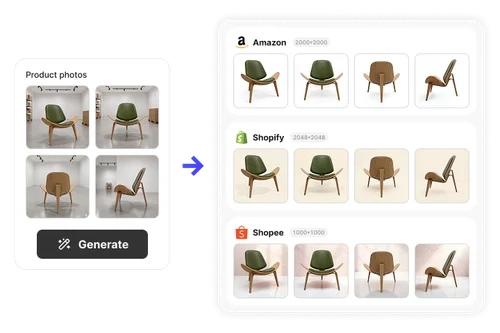
E-Commerce Sellers (Amazon, Shopify, and More)
Upload multiple product images and generate complete product listings tailored for platforms such as Amazon and Shopify. The system automatically adapts layouts, backgrounds, and formats to match platform standards, allowing sellers to create consistent, high-quality listings at scale without manually adjusting each variation.

Performance Marketers & Media Buyers
Instantly generate multi-format ad sets designed for platforms such as Google Ads and Meta Ads. The system produces correctly sized creatives alongside structured ad copy, enabling rapid A/B testing and reducing time spent on resizing and rewriting assets while maintaining consistency across campaigns
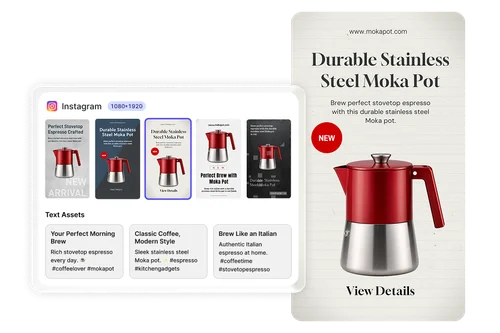
Social Media Managers
Generate platform-ready posts for Instagram, Facebook, TikTok, and other channels without manual design or formatting. The system creates visually consistent assets and supporting text, allowing teams to maintain daily posting schedules while reducing the operational burden of content production.

Agencies & In-House Marketing Teams
Store products and campaign inputs within a reusable project library. Teams can return to existing assets to generate new variations or campaigns without re-entering data, enabling scalable production workflows across multiple clients or product lines while maintaining brand consistency.
How to Use AI Marketing Advisor
Upload Product Assets
Input your product name, upload images, and add a short description. The system stores your assets in a reusable project library for future campaign generation.
Select Target Platforms
Choose from over 20 supported platforms, including e-commerce listings, ad networks, and social media channels. The system prepares outputs based on platform requirements.
Generate and Download Assets
Generate complete marketing assets instantly, including visuals and text. Review variations and download selected outputs in batch for immediate deployment.
Why Use AI Marketing Advisor
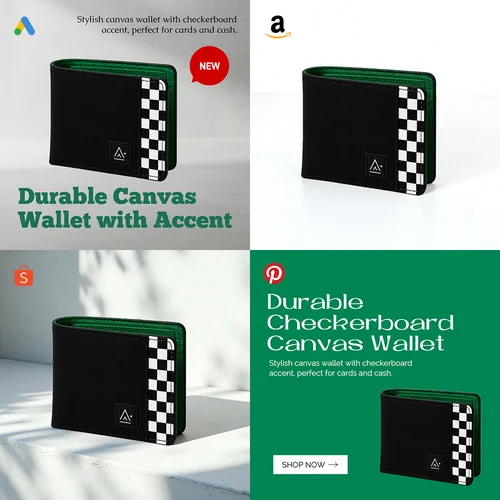
Create marketing assets for e-commerce platforms, advertising networks, and social media channels within a single workflow. Outputs are automatically structured to match platform requirements, eliminating the need for manual adaptation across channels.
Generate both visual assets and structured text outputs simultaneously. The system aligns imagery, layout, and messaging to ensure consistency across all generated materials without requiring separate tools or workflows.
Produce multiple asset variations in one session and export them together using batch download. This reduces repetitive manual work and allows teams to move from production to deployment without delays.
Store product information and generated assets in a centralized project list. Reuse existing data to create new campaigns or variations while maintaining consistent product representation and branding.
Each generated asset is automatically resized and formatted according to platform specifications. This removes the need for manual resizing and ensures compatibility across all selected distribution channels.
AI Marketing Advisor FAQ
What is AI Marketing Advisor?
AI Marketing Advisor is a tool designed to generate marketing assets such as product listings, advertisements, and social media posts using a single input. It combines image generation, layout adaptation, and text creation to produce platform-ready outputs at scale.
How do I use AI Marketing Advisor?
Users upload product images, input basic product information, and select target platforms. The system then generates marketing assets tailored to each platform, which can be reviewed, adjusted, and downloaded in batch for immediate use.
How does it help create social media content?
The tool generates visually consistent posts along with supporting text for platforms such as Instagram, Facebook, and TikTok. It removes the need for manual resizing and formatting while maintaining alignment with platform-specific requirements.
Is it safe to use AI Marketing Advisor?
The system stores uploaded assets securely within a project-based structure. Users retain control over their data and can manage, reuse, or remove assets as needed within their workflow.
Can I use the generated assets commercially?
Yes, the generated outputs are designed for commercial use, including advertising campaigns, e-commerce listings, and branded social media content, depending on the platform and licensing conditions.
Does it support multiple platforms at once?
Yes, users can select multiple platforms simultaneously. The system generates assets tailored to each platform’s specifications, allowing efficient multi-channel campaign production from a single input.
Can I edit the generated assets?
Generated outputs can be reviewed and refined before download. Users can regenerate variations, adjust selections, and choose the most suitable assets for their campaigns.
What types of assets can it generate?
The tool generates product listings, ad creatives, and social media posts. Each output includes both visual elements and structured text to support marketing performance.
Does it support batch downloads?
Yes, users can select multiple generated assets and download them together. This feature simplifies workflow management and reduces time spent exporting individual files.
Can I reuse previous projects?
All uploaded inputs and generated assets are stored in a project list. Users can return to previous projects to generate new variations or extend campaigns without re-entering data.