Background Editor
Effortlessly Edit or Remove Photo Backgrounds
Quickly remove or replace photo backgrounds, apply colors, templates, or custom images with a flexible, business-ready editor.
Edit Backgrounds Efficiently for Business
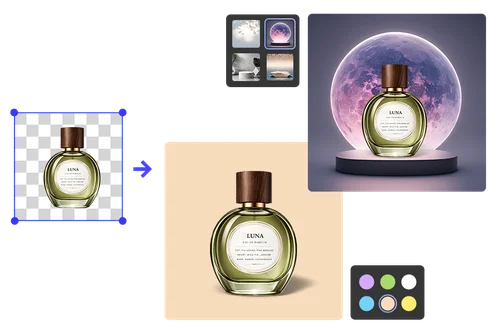
Product Background Editing for E-Commerce
Edit the background of product photos to meet the requirements of multiple platforms and campaigns. Remove distractions, apply consistent colors, or standardize catalog visuals to create polished, professional product visuals that increase buyer confidence and conversion.
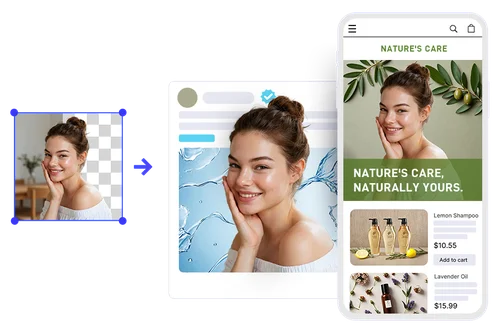
Professional Backgrounds for Ads
Adapt and edit image backgrounds quickly to match promotional messaging, seasonal offers, or audience segments. Swap environments, apply bold colors, or integrate lifestyle backdrops without reshooting, helping marketing teams refresh visuals rapidly and maximize creative output.

Strengthen Brand Identity Across Campaigns
Use MyEdit Business's background editor to enforce consistent brand presentation at scale. Apply approved color palettes, signature visual styles, or standardized layouts so every image reflects your brand positioning, ensuring cohesive storytelling across digital, retail, and print touchpoints.
How to Edit the Background of a Photo
Upload Your Image
Upload your product or marketing image. MyEdit's AI instantly detects and isolates the background for precise editing.
Customize Your Background
Apply solid colors, choose from preset or seasonal templates, blur the background, or upload custom images to match branding and campaign goals.
Export Brand-Ready Images
Download fully optimized visuals for marketing, e-commerce, or internal use. Images are ready for scaling across teams and platforms.
Why Choose MyEdit Business's AI Background Editor
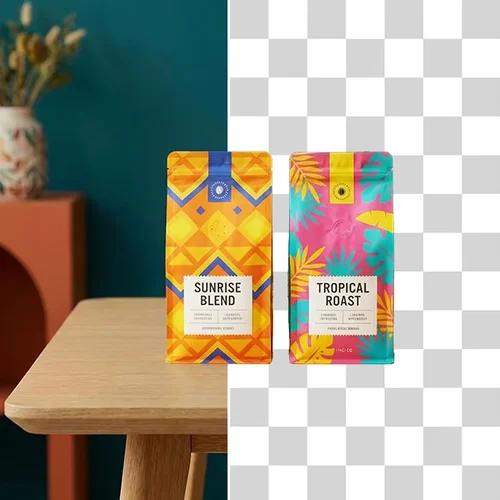
Edit the background of photos using removal, blur, solid colors, templates, or custom uploads in one AI background editor. Adapt visuals quickly for different platforms and business needs.
Access professionally designed background templates for ecommerce, promotions, and marketing needs. Apply polished environments instantly without relying on external design resources.
Use preset brand colors or select exact shades with a built-in picker to maintain visual consistency. Ensure every edited image aligns with brand standards across channels.
Add AI-generated shadows after you edit the background to create natural depth and realistic grounding. Avoid flat cutout effects and produce more polished, professional product visuals ready for ecommerce and marketing use.
Standardize backgrounds across product catalogs or marketing libraries without manual redesign. Maintain cohesive, on-brand visuals while streamlining your workflow.
From ecommerce listings to advertising creatives, this background editor supports high-volume production, helping teams maintain consistent, professional-quality visuals effortlessly.
Background Editor FAQ
What is a background editor?
A background editor is an AI-powered tool that allows you to remove, replace, or customize photo backgrounds instantly. It enables businesses to create professional, on-brand visuals for marketing, e-commerce, and campaigns without complex software.
Can I remove the background completely?
Yes. MyEdit Business's background editor can completely remove image backgrounds with precision, creating transparent assets suitable for product listings, advertising visuals, and branded marketing materials.
Does MyEdit Business's background editor support solid color backgrounds?
Absolutely! You can replace backgrounds with solid colors from preset options or a custom color picker, ensuring your images maintain consistent branding across multiple platforms and campaigns.
Can I upload my own background image?
Yes. You can upload custom background images and MyEdit Business's background editor will seamlessly integrate your product or subject, allowing you to match campaign themes, seasonal updates, or specific visual requirements.
Is background blur supported?
Yes. The tool can blur backgrounds to create depth and focus, making your subject stand out. This helps create professional, visually engaging photos without manual editing.
What is AI shadow and how does it help?
AI shadow adds realistic shadows to your images after background edits. It creates natural depth, anchors products, and makes visuals appear professional, enhancing credibility and conversion for e-commerce and marketing campaigns.
Can I edit backgrounds of photos for multiple platforms?
Yes. MyEdit Business's background editor allows customization for various formats and platforms, including e-commerce listings, social media posts, display ads, and print materials, ensuring consistent, high-quality visuals everywhere.
Do I need design skills to use the background editor?
No design experience required. The AI-powered interface makes background editing simple and intuitive, allowing marketing teams, e-commerce sellers, or business owners to produce professional-quality images in minutes.