AI Cinematic Shorts
Turn One Photo Into a Cinematic Story
Transform a single photo into a film-quality short with AI-generated cinematic camera movement, natural sound, and matching background music.
Create Cinematic Short Stories From a Single Photo
Turn Travel Photos Into Cinematic Adventures
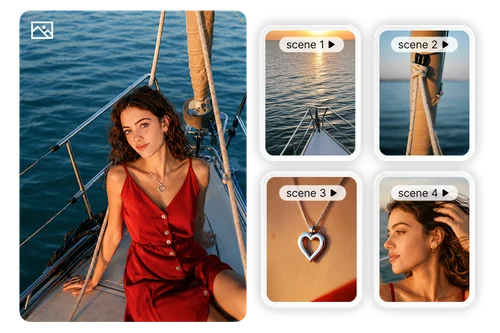
Transform a single travel photo into a cinematic travel story. The AI begins with a series of detailed static shots that emphasize subtle object movement and atmosphere, then smoothly transitions into a gentle handheld camera movement that returns to the original scene. Combined with natural ambient audio and carefully selected background music, the result feels like a professionally crafted indie travel film.
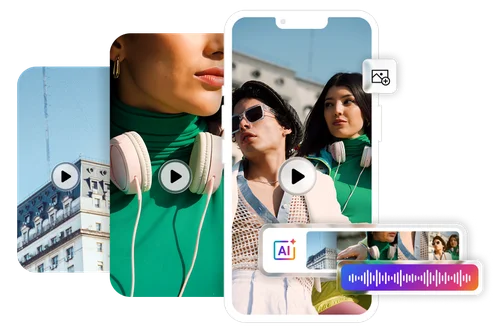
Transform Portraits Into Emotional Trailers
Transform a single portrait into a cinematic story inspired by lifestyle films. AI combines intimate close-up shots, aesthetic B-roll sequences, and calm static compositions to create a natural visual rhythm. Paired with an immersive audio build-up, the result is a polished portrait film with a warm, emotional feel.
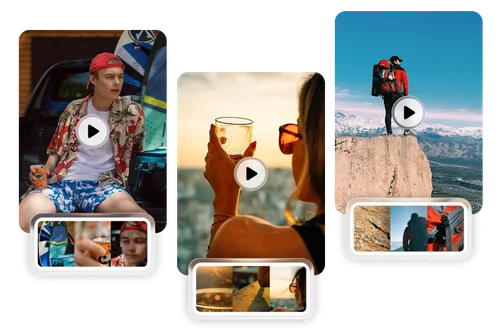
Create Scroll-Stopping Social Content
Stand out on TikTok, Instagram Reels, and YouTube Shorts with cinematic content created from a single image. Choose from a variety of cinematic templates, including atmospheric micro cinema, dynamic time-lapse, and fast-paced fashion spin effects. Each template features professional camera movements and perfectly matched music to create social-ready videos in just a few clicks.
How to Create AI Cinematic Shorts Online
 Step 1
Upload Your Photo
Import a single photo and choose your preferred aspect ratio. Whether you're creating content for TikTok, Instagram or YouTube, AI prepares your image for cinematic storytelling.
Step 2Choose a Cinematic Style
Browse professionally designed cinematic templates. Each style guides how AI creates multiple camera shots, transitions, pacing, and visual storytelling. Nothing manual needed.
Step 3Generate Your Cinematic Story
AI transforms your single photo into a complete cinematic sequence featuring multiple cuts, natural camera movement, automatically generated ambient sound, and matching background music.
Why Choose MyEdit's AI Short Video Generator?

Turn One Photo into a Short Film
Unlike traditional image animation, AI Cinematic Shorts transforms a single photo into a fully edited visual story. Instead of creating one continuous moving shot, AI intelligently plans multiple cinematic scenes, changing perspectives and camera angles to deliver a narrative that feels professionally directed.

True-to-Source Fidelity & Minimal Hallucinations
Unlike typical AI image generators that may alter your original photo or introduce unwanted elements, our deep-analysis engine first understands the scene and subject. It preserves your subject's identity and key details while applying smooth, natural-looking motion.

Natural Sound Effects and Background Music Included
Visual storytelling isn't complete without audio. AI automatically generates matching environmental sounds together with cinematic background music, creating an immersive viewing experience without requiring separate audio editing or music selection.

Cinematic Camera Tracking & 3D Depth
Go beyond basic pan-and-zoom. Our AI acts as your personal film director, intelligently separating your subject from the background to create a realistic 3D parallax effect. It applies professional camera movements such as one-take shot, time lapse, fast cut, and more.

Prompt-Free Cinematic Styles
Lower the barrier to creation. No need to endlessly tweak complex text prompts. Simply apply a template, and the AI will automatically calibrate complex techniques like dynamic speed ramps (slow-motion), handheld camera shakes, and focal shifts for you.

Ready for Every Social Platform
Generate cinematic shorts that are ready for TikTok, Instagram Reels, YouTube Shorts, Facebook, or any platform that rewards engaging video content. Multiple aspect ratios make publishing fast while the cinematic editing helps your content stand out in crowded feeds.
AI Cinematic Shorts FAQs
What is AI Cinematic Shorts (AI Short Video Generator)?


AI Cinematic Shorts transforms a single photo into a professionally edited cinematic video. Unlike traditional image animation, it doesn't simply make one picture move. Instead, AI analyzes your image to create multiple cinematic cuts, dynamic camera angles, smooth transitions, natural ambient sound effects, and matching background music. The result is a complete visual story that feels like a professionally directed short film, ready to share in just a few clicks.
How is AI Cinematic Shorts different from Image-to-Video?
Although both tools begin with a single image, they serve different creative purposes.
Image-to-Video focuses on animating one scene with realistic movement.
AI Cinematic Shorts creates an entire edited sequence from one photo using multiple shots, changing camera perspectives, cinematic pacing, automatic transitions, ambient sound, and background music.
Choose AI Cinematic Shorts when you want your photo to become a complete story rather than a single animated clip.
Do I need video editing experience?
No. AI Cinematic Shorts is designed for anyone to create professional-looking videos without editing experience. Simply upload one photo, select a cinematic style, and the AI automatically plans the shot sequence, creates camera movements, edits the transitions, and generates matching sound effects and background music. There's no timeline editing, keyframing, or prompt engineering required.
Will my original photo stay recognizable?
Yes. AI Cinematic Shorts is designed to preserve the subject, composition, and overall appearance of your original image while expanding it into a cinematic sequence. Rather than drastically changing your photo, the AI builds additional perspectives, cinematic framing, and natural camera movements that remain faithful to the original content, resulting in a believable and visually consistent short film.
Can I use AI Cinematic Shorts for social media?
Absolutely. AI Cinematic Shorts creates engaging videos ideal for TikTok, Instagram Reels, YouTube Shorts, Facebook, and other social platforms. You can choose the aspect ratio that best suits your destination, and the AI automatically generates cinematic pacing, multiple edits, and immersive audio that help your content stand out in fast-moving social feeds.
Does AI generate the sound and music automatically?
Yes. AI Cinematic Shorts doesn't stop at creating visuals. It also automatically generates natural ambient sound effects and background music that complement your video's mood and pacing. By combining cinematic editing with synchronized audio, the finished result feels far more immersive than a simple animated image, without requiring separate audio editing or music selection.
What kinds of photos work best?
AI Cinematic Shorts works best with clear, high-quality photos that feature a strong subject or an interesting scene. Portraits, travel photos, landscapes, architecture, lifestyle moments, pets, and memorable everyday moments all produce excellent results. Images with depth, lighting, and a clear focal point allow the AI to create richer shot sequences, more dynamic camera perspectives, and a stronger cinematic story from a single frame.
What image format are supported?
We support JPG, PNG, GIF, WebP, and BMP. The maximum file size is 50 MB, ensuring you can upload high-resolution photos for the best cinematic results.
Can I use AI Cinematic Videos for commercial purposes?
Yes. You can directly use your exported AI shorts for YouTube monetization, social media ads, and business projects. You maintain 100% copyright ownership of your originally uploaded photos. Please ensure that your source images are cleared for commercial use.
Can I add text, captions, or subtitles to generated cinematic shorts?
Text overlays, captions, and subtitles are not currently supported during the generation process. However, after creating your cinematic short, you can continue editing in the Video Editor to add text, subtitles, and other finishing touches.