Passport Size Photo Maker
Create Passport and ID Photos for Free
With free AI Passport Photo Maker, convert any photo into a professional, standard passport or ID photo in seconds. Start using your daily free credits now, No watermark.
 By continuing, you agree to our Terms of Use and Privacy Policy.
Best Online Passport Photo Maker for the Perfect ID Photo
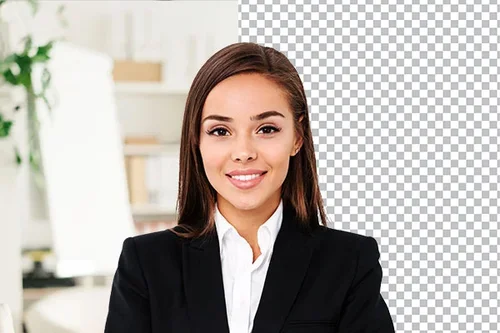
Instantly Remove Background for Passport Photo
Want to save time and money without compromising the quality of your passport photo? Simply upload your photo, switch to a white background, and download it in JPG format without any loss of quality or detail.
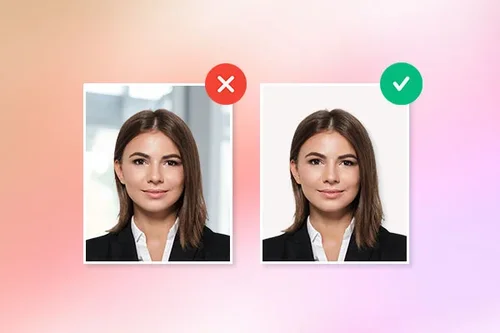
Passport Size Photo Maker Provides High-Quality Results
Want to save time and money without compromising the quality of your passport photo? Simply upload your photo, switch to a white background, and download it in JPG format without any loss of quality or detail.
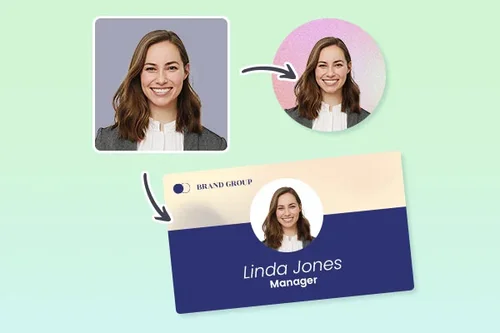
Make Passport, ID, and Visa Photos Online
With a wide selection of background colors, there’s no limit to the kinds of ID photos you can create. Make a high-quality passport photo, ID, or business card photo online for free in no time.
How to Create Passport Size Photos Online With Passport Photo Maker
 Step 1
Upload Image to Passport Size Photo Maker and Choose White Background
Select and import an image file from your device. Once the image is uploaded, select the white background option to ensure your passport photo has the correct background color.
Step 2Set the Correct Passport Photo Size
Click on the "General Tools" section and choose "Crop" to continue editing your image. Adjust the crop to the size and dimensions that you need for your passport photo.
Step 3Download High-Quality Passport Photo
Once you’re satisfied with the results, just download and save your ID photo from the passport photo maker to your device.
Professional Passport Photos Made Simple

Create Professional Passport Photos Instantly
With just a few clicks and taps, you can create professional-quality passport photos instantly without any hassle. No need to visit a studio or stand in long queues.

Make Free Passport Photos Online
Why spend money on taking an ID photo when you can do it for free with an existing photo? Simply upload a photo and get your perfect passport picture in seconds!

Easy Accessibility with a Passport Photo Maker
The online photo passport maker is easy and accessible to anyone. You don’t need any editing skills to be able to remove your photo background and change to a white background.

Professional Passport Photo Results
With just a few clicks, you can see powerful AI features work magic to remove image backgrounds and replace them with a white background without losing face details or resolution.

Background Switch for Passport Photos
Need profile pictures or resume headshots? The passport photo maker has various backgrounds according to your needs.

Wide Format Support
The passport photo maker supports JPG, PNG, GIF, WebP, and BMP formats so you don’t have to limit your photo choices.
FAQs about Online Passport Size Photo Maker
How can I make a passport-size photo online?


Upload your photo to a Passport Photo Maker and remove the photo background. Next, change the photo background to white. Finally, use Crop Image tool to get your desired professional passport-size photo!
What is the best free passport size photo maker?
The passport photo maker is the best free online passport photo maker. Easily remove any photo background and change to a white background for the perfect passport picture. No editing skills are required.
Is Passport Photo Maker free to use?
Yes, the passport photo maker has a free version. All our tools are free with limited use.
Can I digitally remove the background of the passport photo?
Yes, with the passport photo maker, you can remove the background of any photo with AI background removal in just a few seconds.
What is the ratio of a passport-size photo?
For U.S. passport photos, the size should be exactly 2 x 2 inches (5 x 5 cm). For other countries, please check relevant government websites for information.
If you’re opting for digital images, the photo also must be in jpeg, png, jpg, or gif formats with a plain white background. Try the free Passport Photo Maker to create the perfect passport photo.
How can I make my passport photo background white for free?
The Passport Photo Maker can create a white background passport photo for free. All you need to do is upload your photo and select the white background.
How can I take passport photos at home?
To take a passport photo at home, follow the steps below:
1. Adjust the lighting and make sure there aren’t any harsh shadows on your face.
2. Face the camera directly with a neutral expression and your face fully visible to the camera.
3. Follow your country’s guidelines for size and any additional restrictions.
4. Take the photo, then use the passport photo maker to change the background to white to meet the background requirement.