AI Shadow
Instantly Add Realistic Shadows to Images Online
Generate realistic shadows in your photos with AI. Customize shadow intensity and background to enhance product images, marketing visuals, or creative projects.
AI Shadows That Make Lifestyle or Product Photos Stand Out
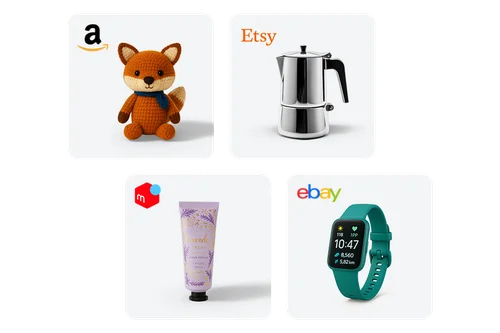
Enhance E-Commerce Listings
Effortlessly elevate your product photos with AI Shadow. Instantly add realistic, studio-quality shadows in one click to create a polished, professional look that captures attention and improves visual appeal.
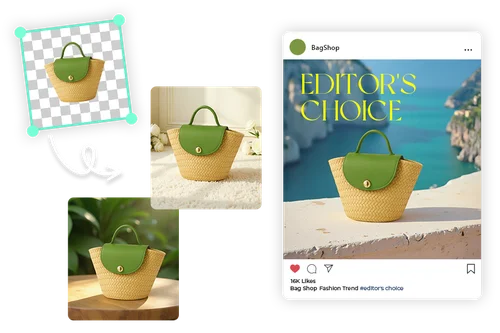
Make Every Product Shot Ad-Ready With AI Shadow Generator
Enhance your ads, banners, and social posts with polished, professional visuals. Instantly add realistic shadows with AI to bring depth to your photos. With built-in background removal and customizable background styles, creating standout marketing content has never been easier.
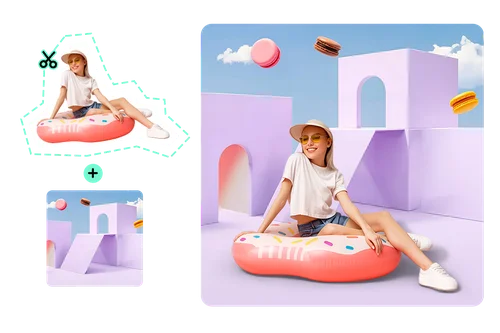
Add Natural-Looking AI Shadows in Seconds
Want to take great photos even further? Add natural-looking shadows to portraits, travel shots, and lifestyle images in seconds. Perfect for creators, influencers, marketers, and anyone looking to give their photos a polished, scroll-stopping look.
How to Use the AI Shadow Generator
 Step 1
Upload Your Photo
Select an image from your device. Supported file formats: JPG, PNG, GIF, WebP, and BMP.
Step 2Select AI Shadow and Your Preferred Background
AI Shadow automatically removes your photo’s background. Just toggle on the shadow effect, then choose from over 500+ background styles or upload your own for a custom look.
Step 3Export Your AI Shadow Photo
Download your enhanced image with a realistic shadow in seconds.
Why Use AI Shadow

Instantly Add Realistic Shadows
Easily add natural-looking shadows to your images with just one click. No manual editing or advanced skills required.

Achieve Studio-Quality Visuals
Produce high-quality, professional images that look like they were taken in a studio. Ideal for product photography, branding, and online catalogs.
Access 500+ Background Styles
Explore a rich library of customizable backgrounds or upload your own. Whether you're creating for e-commerce or personal projects, you’ll always find the perfect fit.

Improve Product Listings
Polished, eye-catching visuals grab attention across websites and social media. Better-looking images lead to more clicks and higher engagement, helping turn views into action.

No Design Experience Needed
With a simple, intuitive interface, anyone can create professional-quality edits in seconds. Perfect for beginners, marketers, and small business owners.

100% Online
Use the AI Shadow Generator right in your browser with no downloads required. Start editing instantly on desktop, tablet, or mobile.
AI Shadow FAQ
What is AI Shadow?


AI Shadow is a smart photo editing tool from MyEdit that automatically adds realistic shadows to your images. It creates depth and dimension, giving your photos a polished, professional look that’s ideal for social media, creative projects, or online content.
Do I need professional skills when using AI Shadow?
Not at all. MyEdit’s AI Shadow tool is simple to use. Just upload your photo, and the tool takes care of background removal and shadow creation. No editing experience is required to get high-quality results in seconds.
Can I change or customize the shadow after it’s generated?
Yes, you can adjust the size and position of your object to fine-tune the shadow effect. Once you've repositioned it, MyEdit will regenerate the shadow to match, giving you a more accurate and realistic result.
Which image formats are supported?
You can import popular formats like JPG, PNG, GIF, WebP, and BMP. Once you're done editing, you can export your image in high-quality JPG or PNG formats, ready for use across websites, social platforms, or printed materials.
Can I use AI Shadow on mobile?
Yes, the AI Shadow tool works directly in your mobile browser. There’s no need to download any software, so you can start editing instantly on your phone or tablet.
Can I use the results for commercial purposes?
Yes, commercial use is fully permitted. You can safely download and use your generated images for marketing campaigns, social media posts, digital advertising, and business projects. For more advanced enterprise needs, we encourage you to explore our MyEdit Business.