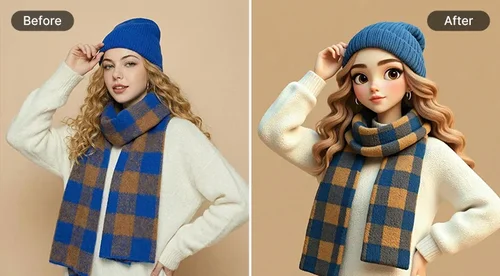
Photo to Cartoon Converter
Turn a Photo into a Cartoon in Seconds
Turn any photo into a cartoon with our AI Cartoonizer. Pick from 14 cartoon styles and cartoonify anything, from portraits and pets to food and scenery. Preview every cartoon style for free before you pick your favorite.
 By continuing, you agree to our Terms of Use and Privacy Policy.
Best AI Photo to Cartoon Generator
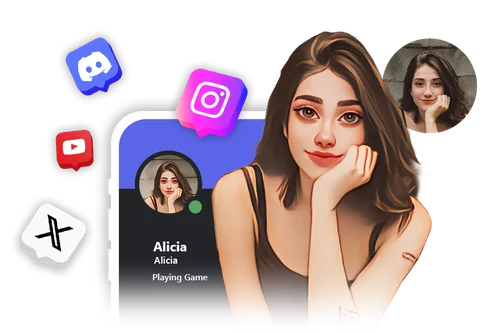
Convert a Photo to Cartoon in One Click with HD Quality
Turn ordinary pictures into cartoons with our AI Cartoonizer. It reworks colors and outlines automatically to give your image a clean, illustrated look.
• Transforms photos into cartoon art in one click
• 14 cartoon styles to match any look
• HD results ready to print or share
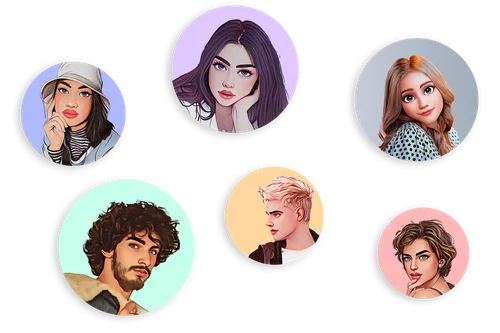
Cartoonify Yourself for Unique AI Profile Pictures
Turn your photo into a cartoon that still looks like you, ready for any profile.
• Profile pictures: pick a style that fits your vibe for gaming, Discord, or social profiles
• Social media portrait: keep your real expression with an artistic, illustrated look
• Friends and pets: apply the same styles to photos of friends or pets in a click
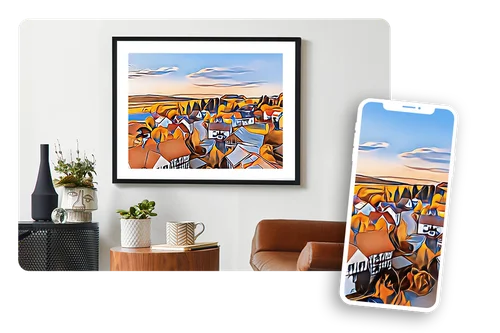
AI Photo to Cartoon: Transform Landscapes and Scenery
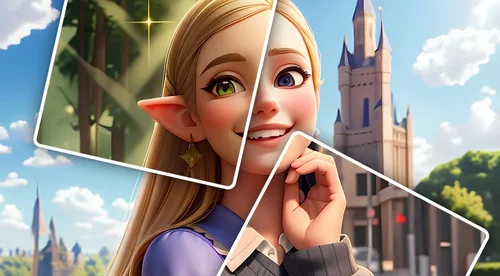
Reimagine landscapes, travel shots, and everyday scenes as illustrated artwork. The AI photo to cartoon converter adds depth and character to any frame.
• Turns scenery into creative digital art
• Add simple edits or text overlays
• Great for prints, blogs, and content design
How to Turn Photos Into Cartoons With AI Cartoonizer
 Step 1
Upload an Image to the Cartoonizer
Import the photo you want to turn into a cartoon from your device.
Step 2Select a Cartoon Filter
Choose from 14 cartoon filters and let the Cartoonizer restyle your image automatically.
Step 3Download the Cartoonized Image
Preview the result for free with a watermark. Go premium to download it as a JPG with no watermark.
Why Use Our Online Cartoonizer

Turn Any Photo into a Cartoon Online
Restyle your favorite photos into cartoon art in a few clicks. The AI keeps your features recognizable, so the result still looks like you. Want to describe your own style instead? Try AI Art and type a prompt.

Cartoonize Photos to Protect Your Identity
The Cartoonizer creates a drawn version of your image that looks like you without being an exact photo. It is a good fit for profile pictures on social platforms and message boards where you would rather not post a real photo.
Effortless Photo to Cartoon Transformation
The interface is built to be simple. Upload, pick a filter, and preview, with no editing skills needed. You get a clean, high-quality cartoon without any manual work.

Simple 3-Step Process
Upload your image, choose from 14 presets, and preview the result. Free previews include a watermark. Go premium for unlimited watermark-free downloads.
Quick Results
Upload a photo and turn it into a cartoon in seconds. It is a fast, fun way to make cartoon versions of yourself, your friends, or your pets.
Preview Cartoon Filters Before You Download
Try every filter and see how each one restyles your photo before you commit. Each style has its own look, so you can pick the one that fits your social post, project, or keepsake.
Photo to Cartoon FAQ
What is a photo to cartoon converter?


It is an AI tool that applies cartoon filters to your photo, restyling its colors, shading, and outlines into a cartoon look while keeping your face, pose, and composition recognizable. You can use the result for social media, profile pictures, message boards, and more.
How do I cartoonify an image online?
1. Upload the photo you want to turn into a cartoon.
2. Choose a cartoon filter.
3. Preview the result, then download it.
You can preview every filter for free before you decide. Premium removes the watermark from your download.
What cartoon styles can I choose from?
The Cartoonizer includes 14 cartoon styles, from bold comic looks to softer illustrated tones. Preview each one on your photo before you pick.
What file formats are supported?
You can upload JPG, PNG, GIF, WebP, and BMP files, and export your cartoonized photo as a JPG.
Is it free to cartoonize a photo?
Yes. You can preview any cartoon filter for free, with a watermark on the preview. To download your cartoon without a watermark, upgrade to premium.
How do I download my cartoon without a watermark?
Free previews include a watermark. Upgrade to premium to download your cartoon in full quality with no watermark.
Do I need photo editing skills?
No. Upload your photo, pick a filter, and the tool creates a cartoon version for you. There is nothing to set up or adjust.
Can I use my cartoonized image for social media?
Yes. Download your result and share it on Facebook, Instagram, or any other platform.
Is it safe to use the online Cartoonizer?
Your privacy is protected. Uploaded files are encrypted in transit and deleted after processing.
Can I cartoonize a landscape photo?
Yes. Upload a landscape and turn it into a cartoon scene. It works well with streets, mountains, vistas, and more.
Can I cartoonize a photo of my pet?
Yes. The Cartoonizer turns your pet's photo into a one-of-a-kind drawing.
What is the difference between the Cartoonizer and AI Cartoon?
The Cartoonizer applies ready-made cartoon filters to your photo in one click. AI Cartoon lets you type a prompt to create a custom cartoon style. Use the Cartoonizer for quick results, and AI Cartoon when you want more control.
What is the best way to turn a photo into a cartoon?
A good cartoonizer keeps your features recognizable, gives you a choice of styles, and runs in the browser with no install. MyEdit's Cartoonizer does all three: upload your photo, pick from 14 cartoon styles, and export in one click.