AI Image Enhancer
Enhance Photo Quality and Sharpness Online
Deblur, upscale to 4K, and restore faces in one pass. Now with Generative AI Enhance, rebuilding the detail one-click enhancers miss.
 By continuing, you agree to our Terms of Use and Privacy Policy.
Enhance Photo Quality Online with AI
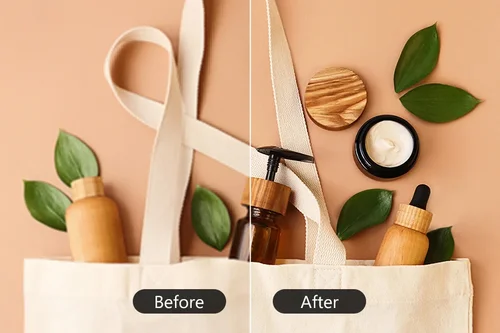
Increase Resolution to 4K With AI Photo Quality Enhancer
Enhance portraits, screenshots, and everyday photos with our AI Photo Enhancer, which lifts resolution and refines detail up to 4K. With Generative AI Enhance on, it targets 2K or 4K from your photo's longest edge.
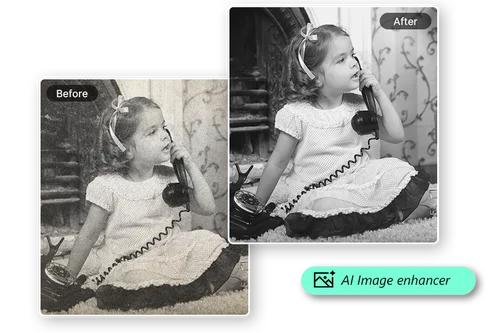
HD Photo Maker Helps Restore Your Old Photos
Bring faded, pixelated, or blurry memories back to life. The AI Photo Enhancer fixes pixelation, restores color, and sharpens for print-ready results. On scans, Generative AI Enhance rebuilds detail in faces and fabric.
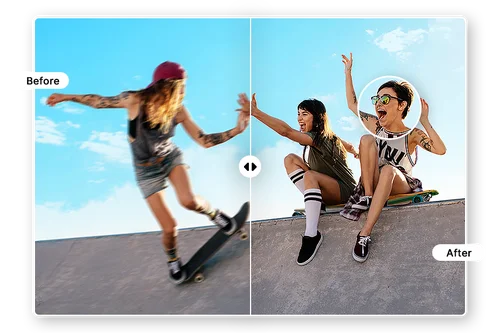
Fix Blurry Action Shots With Photo Enhancer
Turn motion-blurred photos into sharp, clear images in seconds. The AI unblurs, sharpens definition, and cuts grain, even in low light. Not sharp enough? Click Enhance again to work from your latest result.
How to Enhance Photo Quality Online
 Step 1
Upload Your Image File
Select and import an image from your device. JPG, PNG, GIF, WebP, and BMP files are supported, up to 50 MB and 4096 x 4096 pixels.
Step 2Turn On Generative AI Enhance
Switch on Generative AI Enhance for a stronger pass on blurry photos, then click Enhance. Leave the toggle off to run the standard one-click enhancement instead.
Step 3Download Your Enhanced Photo
Preview the result and download your enhanced photo for sharing or printing. Want it sharper? Click Enhance again and the AI refines the result you just made.
The Best Photo Quality Enhancer

Improve Quality, Color, and Resolution
Enhance photo quality online without touching a slider. The AI handles sharpness, color, and resolution in the same pass, which is usually all a social post or profile picture needs before it goes up.

Generative AI Enhance, Powered by Gemini
For photos that need more than a sharpen, Generative AI Enhance reconstructs fine detail in blurry faces, hair, fur, and fabric instead of boosting the pixels already there. Available with a Creator Pro plan.

Unpixelate an Image
Screenshots, forwarded images, and photos saved from chat apps arrive compressed and blocky. The enhancer rebuilds edges and smooths artifacts, so text stays legible and faces stop looking like mosaics.

Enhance Your AI Generated Image
AI-generated images often land at a lower resolution than you want to print or post. Run them through the enhancer to lift the resolution, and use Generative AI Enhance when the render is soft to start with.

Upscale Photos for High-Quality Prints
Photos that look fine on a phone often fall apart at print size. Enhancing first gives you the pixels to work with, and each repeat pass builds on the last result, up to a size worth framing.

Preview Before You Download
MyEdit's Photo Enhancer allows you to preview your edits in real time before exporting, ensuring your images look exactly as you want them to.
Photo Quality Enhancer Online FAQ
What does the AI Photo Enhancer tool do?


It improves the overall quality of a photo in three areas: it deblurs the image, raises the resolution so it reads crisp and sharp, and retouches blurry faces and fine details with face restoration. It runs in two modes, a standard one-click pass and Generative AI Enhance, which you choose with a toggle before you enhance.
How does Image Enhancer work?
Upload a photo, choose whether to switch on Generative AI Enhance, then click Enhance. The tool upscales the image, restores facial detail, and deblurs it in a single pass. Each further click of Enhance works from the result you just produced, so you can build up quality in stages instead of starting over.
What image formats does AI Image Enhancer support?
JPG, PNG, GIF, WebP, and BMP images are supported. Files can be up to 50 MB, and the enhanced image is saved as a JPG.
What is Generative AI Enhance?
Generative AI Enhance is an optional mode inside the MyEdit Image Enhancer. Turn it on before clicking Enhance and instead of sharpening the pixels already in your photo, the AI reconstructs detail that the original file lost, keeping skin, hair, and fine textures looking natural rather than smoothed over. It is the mode to pick for photos that are genuinely blurry or low resolution, rather than photos that just need a little polish.
Do I need technical skills to enhance the quality of my photos?
No. There are no sliders, layers, or settings to learn. Upload a photo, decide whether you want the generative pass, and click Enhance. The AI handles sharpness, resolution, and facial detail on its own, and you can always discard a result and try the other mode.
Is Generative AI Enhance free to use?
The standard enhancement is free to preview, while a subscription plan lets you download the result without a watermark. Generative AI Enhance is a premium feature: on a free account, the toggle appears with a lock, and turning it on prompts you to upgrade. Once you have a subscription, the toggle is enabled by default whenever you open the Enhance panel.
Can I use the results for social media or commercial purposes?
Yes, our results are ready for commercial use! You are free to use them for social media and marketing campaigns, provided that your uploaded source materials are legally obtained and safe to use. For more advanced enterprise needs, we encourage you to explore our MyEdit Business.
Is it safe to use AI Image Enhancer?
Yes. Your photos are encrypted in transit over HTTPS and are used only to run the enhancement you asked for. They are deleted from the servers automatically after processing, including images sent through Generative AI Enhance, and MyEdit operates under GDPR and CCPA. Your photos are never published or reused without your permission.
What are the image size limits for the photo enhancer?
Photos need to be at least 16 x 16 pixels and no larger than 4096 x 4096 pixels, with a file size under 50 MB. Once an enhanced result passes 4096 pixels on its longest side, you can only keep enhancing it with Generative AI Enhance switched on. With the toggle off, the Enhance button stops at that ceiling.
What is the best photo quality enhancer?
A good photo enhancer should handle blur, resolution, and facial detail in one pass, run in the browser with nothing to install, and let you judge the result before you download. The MyEdit Image Enhancer does all three, and Generative AI Enhance adds a generative pass for photos too soft for a standard upscale to fix.
How to convert blurred images to high quality?
Upload the blurry photo and click Enhance. For mild blur the standard pass is usually enough. For a photo that is badly out of focus or very low resolution, switch on Generative AI Enhance first, since it rebuilds detail rather than sharpening what little is left.