AI Image Extender
Expand Any Photo Beyond Its Edges with AI
Upload a photo and let AI fill the new space with a background that matches the original. Fix tight framing, go from vertical to wide, or resize for any feed without stretching. Download your result with no watermark.
 By continuing, you agree to our Terms of Use and Privacy Policy.
Expand, Uncrop, and Resize Your Photos in One Tool
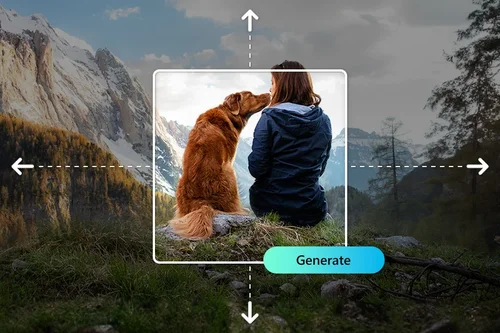
Fix Framing and Extend Photos Without Stretching
Bad framing is hard to fix after the shot. AI Image Extender rebuilds the space around your subject instead of stretching pixels, so a cramped photo gets room to breathe and a zoomed-in shot keeps its detail. Turn a vertical portrait into a horizontal banner, or add sky, ground, and scenery that blend into the original edge. One click, no manual cloning or masking.
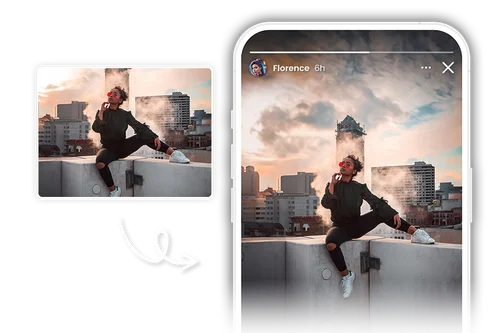
Resize to Any Aspect Ratio for Social and Marketing
One photo rarely fits every channel. Extend the same image to a 9:16 story, a 1:1 post, a 16:9 thumbnail, or a wide Pinterest pin, and the tool generates new background to fill the gaps instead of adding bars or cropping your subject. Presets cover Instagram, YouTube, Facebook, and more, and you can set custom dimensions when you need an exact size.
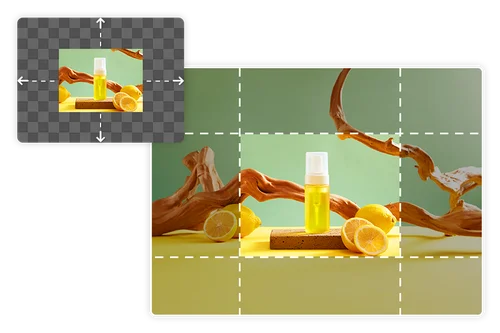
Uncrop Product Shots for Ads and Storefronts
Give product photos the room a layout needs. Extend a tight shot into a full banner, poster, or infographic, and keep the background consistent so the product stays the hero. Show more of the scene, fit the frame your campaign calls for, and reuse one source image across ads, listings, and promos without a reshoot.
How to Expand an Image with AI Image Extender
 Step 1
Upload Your Photo
Drop in any photo, portrait or landscape. A clear, high-quality source gives the cleanest extended result.
Step 2Select Aspect Ratio and Edit Your Image
Select a preset aspect ratio perfectly sized for social media and online stores, or easily customize your own dimensions. Once chosen, simply position your image on the canvas.
Step 3Generate and Download
Click Generate, compare the result with your original, and download it with no watermark.
Why Use MyEdit's AI Image Extender

Fills New Space That Actually Matches
The AI reads your photo's lighting, color, and texture, then fills the new area with content that blends into your original, so you avoid the hard seams and repeated patterns of a manual patch.

Keeps Your Original Detail Sharp
Instead of stretching the image to fill a bigger frame, it generates fresh pixels around it. Your subject stays crisp while the canvas grows.

Any Ratio, Any Direction
Extend up, down, left, right, or all at once. Preset ratios cover the major social and store formats, and custom dimensions handle everything else.

Runs Fully in Your Browser
No install, no plugin. It works the same on desktop or phone, so you can extend a photo wherever you are.

Fast Results, No Design Skills
Upload, position, generate. What used to take manual cloning in a photo editor now takes a few seconds, with no editing experience needed.

Clean Downloads, No Watermark
Your finished image comes out with no watermark stamped across it. Generating uses a small number of credits depending on how many results you create.
AI Image Extender FAQ
What does AI Image Extender do?


It expands a photo beyond its original edges. You choose how much bigger you want the frame and in which direction, and AI generates new content to fill the added space so the image looks like it was always that size.
What is AI outpainting?
Outpainting uses AI to generate new pixels beyond a photo's original borders. Rather than stretching or cropping, it invents background, scenery, or surroundings that match the existing image, so the result looks natural at the larger size.
What makes a good AI image extender?
A good one fills the new space with content that matches the original lighting, texture, and perspective, instead of leaving a visible seam. MyEdit runs fully in your browser, supports preset and custom aspect ratios, extends in any direction, and works the same on desktop or phone with no install.
How do I use AI to expand an image?
Upload a photo, pick a preset or custom aspect ratio, and position the image on the canvas so you can see where the new space will be added. Click Generate and the tool fills the extended area, then download your result.
Do I need any editing skills?
No. The AI handles the new content for you. Once you upload and set the ratio, expanding the image is a single click.
Is AI Image Extender free?
Yes, you can start for free. Sign in to claim free daily credits, and each time you extend an image it uses a few of them. Anything you download has no watermark.
Can I use extended images commercially?
Yes, commercial use is permitted for all generated images, so you can use them across marketing, ads, and business projects. For online stores and marketing teams that need to scale their visuals, see how MyEdit Business can help.
How do I expand an image without distortion?
Start with the best-quality source you have. Because the tool generates new pixels instead of stretching existing ones, your subject stays sharp, and a clean, high-resolution input produces the most natural extended result.
What types of images work best?
Both portraits and landscapes work well, at almost any aspect ratio, and it handles everyday photos as well as product shots. Extending toward areas with a consistent background, like open sky or a plain wall, gives the AI the most to work with and the cleanest fill.
Can I compare the result with my original?
Yes. After generating, you can compare the result against your original and undo any change, so you keep only the version you want.