Reflection Removal
Remove Reflections from Photos in One Click
Automatically remove glare and reflections from photos taken through glass, windows, or eyeglasses. Preview your result online in seconds with MyEdit.
 Notice: Please upload a photo with little or no text
What Can Reflection Removal Do for You?
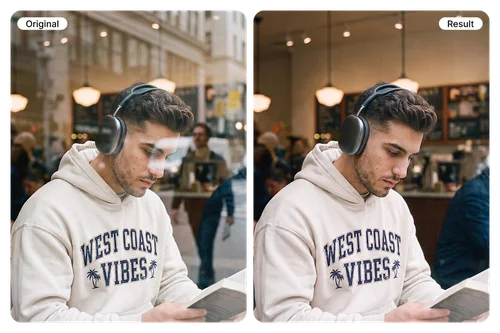
Remove Window Reflections from Portraits
Photos taken through glass often catch ghostly reflections that cover faces and wash out details. Whether it’s a portrait shot through a café window or a quick photo behind glass, the AI separates the reflection from your subject and restores a clear, natural-looking portrait in seconds.
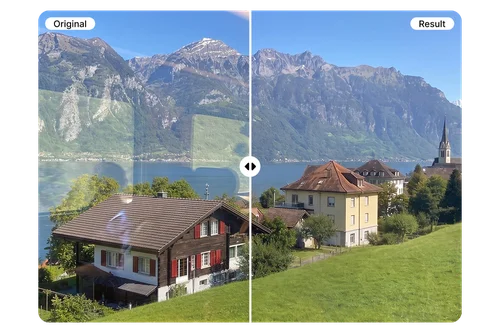
Clear Up Window Reflections from Scenery Shots
Airplane windows, hotel rooms, and observation decks all come with the same problem: indoor lights and silhouettes reflected on the glass. The AI automatically detects and removes window reflections in seconds, so your travel photos show the skyline you actually saw, not the room behind you.
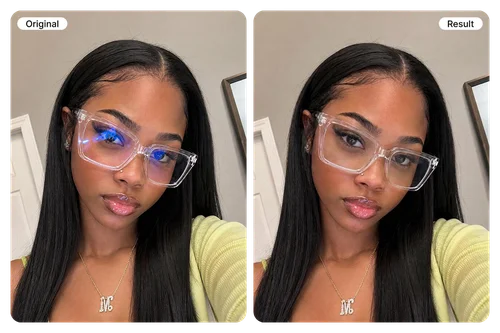
Erase Glare from Eyeglass Lenses
Eyeglass glare can hide the most expressive part of a portrait: the eyes. The AI automatically detects reflections on lenses and removes them in seconds, keeping natural skin tones and facial details intact. Perfect for professional headshots, selfies, and family photos.
How to Remove Reflections from a Photo?
 Step 1
Upload Your Photo
Upload a JPG, PNG, GIF, WebP, or BMP photo with window reflections or eyeglass glare.
Step 2Let AI Remove Reflections Automatically
No manual masking or brushing needed. The AI detects the reflection layer and removes it automatically as soon as your photo is uploaded.
Step 3Preview & Download Your Clear Photo
Preview the before-and-after result, then download the photo, ready to post, print, or keep editing.
Why Use MyEdit to Remove Glare?

One-Click Automatic Removal
Powered by Qwen Image Edit and an AI model trained by MyEdit specifically for reflection removal, the AI automatically detects and removes glass and lens reflections in seconds. There's no need for manual masking, brushing, or selecting source areas.

Natural, Detail-Preserving Results
The AI model separates the reflection layer from your subject and rebuilds what's behind it. Textures, colors, and lighting stay intact, so the result looks like the reflection was never there.

Works on Portraits, Scenery & Glasses
From portraits and scenery shot through glass windows to eyeglass lens reflections in headshots, MyEdit handles it all in the same browser tool.

Results Auto-Saved to My Library
Every processed photo is automatically organized into a Reflection Removal folder in My Library, so you can find and re-download past edits anytime without saving files manually to your device.

Keep Editing in One Place
Reflection Removal is just one of many AI Tools in MyEdit. After removing reflections, you can instantly enhance image quality, turn photos into videos, and explore even more creative possibilities.

No Software or Skills Required
Manual reflection removal in Photoshop takes advanced masking skills and hours of work. MyEdit runs the same fix in one click, right in your browser, with nothing to install and no editor to learn.
More Ways to Create with MyEdit
Photo Reflection FAQ
How do I remove glare from a photo?


Upload your photo to MyEdit’s Reflection Removal tool. The AI automatically detects and removes window reflections, glass glare, and eyeglass reflections—no masking or brushing required. Preview the before-and-after result, then download your clear photo or continue editing it in MyEdit.
Can AI remove window and glass reflections without ruining the photo?
Yes. MyEdit separates the reflection layer from the subject and reconstructs the details behind it while preserving natural textures, colors, and lighting. It works on portraits, scenery photographed through glass, and glare on eyeglass lenses. Results may vary when a strong reflection completely covers important details.
Is it safe to upload my photos?
Yes. MyEdit processes your uploaded photos securely and keeps your data private. Your images are used only to generate your requested edits.
Will removing reflections reduce my photo quality?
MyEdit is designed to preserve your photo’s clarity and important details. Instead of simply blurring or covering the reflection, the AI rebuilds the area behind it to produce a clear, natural-looking result. For the best outcome, upload the highest-quality original available.
Which image formats and sizes are supported?
MyEdit supports JPG, PNG, GIF, WebP, and BMP images. Each uploaded file can be up to 50 MB.
Can I remove glare from a photo for free?
You can preview the reflection-removed result for free to see how it looks. Downloading the final image without a watermark requires a premium plan, which gives you unlimited access to the tool.