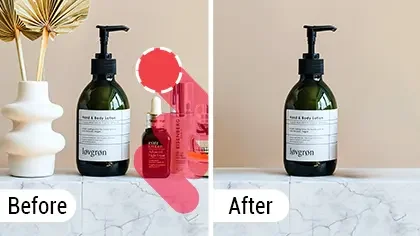
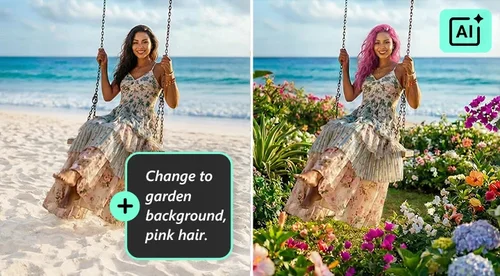
AI Replace
Swap or Add Objects in Any Photo with AI
AI Replace is MyEdit's generative tool for swapping and adding objects in a photo. Brush over an area, type what you want, and the AI fills it in to match the surrounding lighting and texture. Claim free daily credits and download with no watermark.
 By continuing, you agree to our Terms of Use and Privacy Policy.
What You Can Do with AI Replace
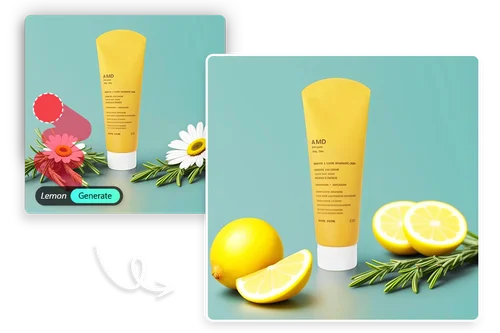
Swap Objects in Product Photos
Update product shots without booking a reshoot. Brush over an item, describe what should replace it, and AI Replace swaps it in with matching lighting and shadows. Change a product's color for a new variant, drop in a different prop, or clean up a busy tabletop. It is a fast, low-cost way to keep listings and ads fresh across a whole catalog.
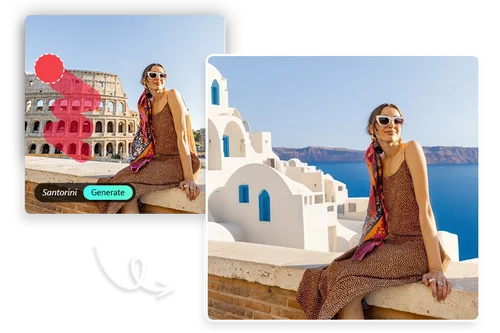
Redesign Skies, Backgrounds, and Scenery
Fix the parts of a scene that did not cooperate on the day. Brush over what you want gone and describe the replacement, and AI Replace blends it into the existing light and perspective. Turn a grey sky blue, swap a cluttered background for open scenery, or change seasonal details like bare trees into cherry blossoms. Useful for travel shots, real estate photos, and landscapes.
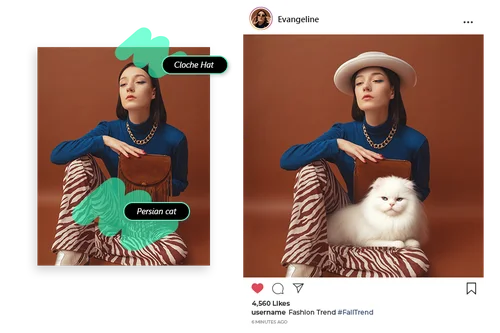
Add or Change Details Using a Reference Image
Refresh portraits and fashion shots without reshooting. Simply upload a reference image, and AI Replace will automatically update specific details while keeping the rest of your photo intact. Swap clothing styles, add accessories like glasses or a hat, or change the background. Effortlessly create diverse profile pictures and social posts that perfectly reflect your unique personality.
How to Use AI Replace?
 Step 1
Upload Your Photo
Select the image you want to edit from your device. JPG, PNG, and WebP all work.
Step 2Brush the Area and Add a Prompt
Brush over the object or area you want to change, then describe what should go there in the text box. You can also upload a reference image (optional) to guide the AI for more accurate results.
Step 3Generate and Download
Hit Generate to create the result, which uses credits. Download it with no watermark, or click Generate More to see other options.
Benefits of AI Replace

Swap or Add Objects
Replace an unwanted item or add a new one by brushing the area and typing a prompt, or simply uploading a reference image. The AI blends it in to match the lighting, texture, and perspective, so the edit looks like it belongs in the original photo.

Precise, Brush-Based Edits
Brush only the area you want to change, so the rest of the photo stays exactly as it was. It is ideal for swapping a single object or detail without touching the background or the people around it.

Guided by Your Prompt
Describe what you want in plain words, like "a red car" or "a clear blue sky", and the AI generates it in place. If it is not quite right, adjust the prompt or generate again until the result fits.

Results in Seconds
Each edit comes back in seconds, with no manual masking, layering, or cloning. You can try several versions of the same change quickly and keep the one you like best.

Works on Any Device
AI Replace runs fully online in your browser, with nothing to download or install. The processing happens in the cloud, so it works the same on a laptop or a phone.

No Watermark
Your finished image downloads clean, with no watermark across it. That makes it ready to use right away for social media, product listings, and marketing.
AI Replace FAQ
What is AI Replace?


AI Replace is MyEdit's generative tool for swapping or adding objects in a photo. Brush over the area you want to change, type what should go there, and the AI fills it in to match the surrounding lighting, texture, and perspective. It works well for product photos, backgrounds, and cleaning up portraits.
What is the best AI replace tool?
The best one lets you control exactly what changes and blends the result naturally. AI Replace uses a brush plus a text prompt, so you edit only the area you select, runs fully online with no install, and exports with no watermark. Try a couple of prompts on the same spot to get the result you want.
How do I replace an object in a photo?
You can easily replace objects in your photos by following these steps:
1. Upload the photo.
2. Use the brush to select the objects you want to replace.
3. Enter a prompt to describe the objects you want to generate.
4. Click "Generate" and you'll get the result!
How do I add an object to a photo?
Just follow the steps below to add elements to your photo right away:
1. Upload the photo.
2. Use the brush to select the area where you wish to add elements.
3. Enter a prompt to describe the elements you want to generate.
4. Click "Generate" and you'll get the result!
Is AI Replace free?
Yes. Sign in each day to claim free Credits, and each generation uses credits depending on the result. Your download has no watermark. Premium plans add monthly Credits for more edits.
Do I need any design skills?
No. Brush the area and type what you want in plain words. The AI handles the blending, lighting, and texture for you.
Can I use the results commercially?
Yes. You can use your results for marketing, social media, product pages, and other commercial projects, as long as your source images are legally yours to use. For enterprise needs, see MyEdit Business.
How do I get the best quality?
Start with a clear, high-quality photo. Sharp, well-lit source images give the AI more detail to work with and produce a cleaner result.