AI Video Storytelling
Turn Your Photos and Clips into a Narrated Video, Written by AI
AI Video Storytelling is MyEdit's AI video maker for photos and clips: it reads your media, writes the narration, and adds a natural voiceover with subtitles and music. No script to write and no timeline to edit. Try your first video free, then subscribe for more when you need it.
*Only Available on Chrome and Edge.
How to Create Videos with AI
 Step 1
Upload Your Media
Upload your photos and clips (up to 120 images and 10 videos). Then choose a storytelling theme that fits your content.
Step 2Choose a Direction and Customize
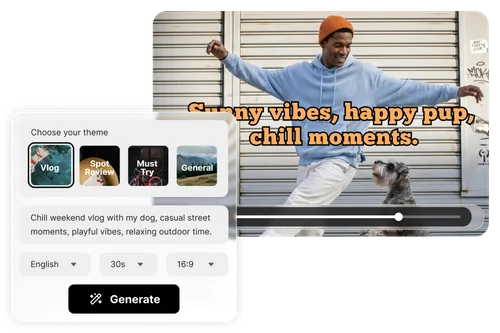
Pick a theme to steer the story, or choose General to set your own direction with a short prompt. Then set the language, duration, and aspect ratio, and choose an AI voiceover to narrate.
Step 3Generate and Export
Generate your storyboard, then preview the result. Edit the subtitles, reorder scenes, or regenerate any part, and export the finished video ready to share.
One AI Video Maker for Every Kind of Story
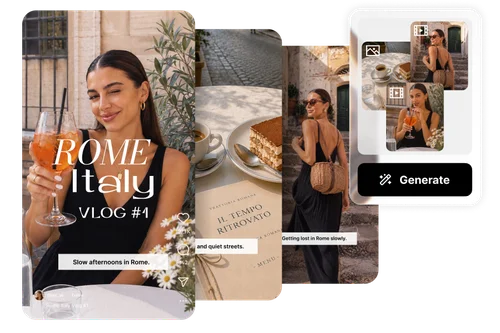
YouTube Vlogs and Travel Videos
Upload your trip photos and clips, and let the AI turn them into a vlog that actually tells the story. It reads each scene, writes captions and a narration to match, and syncs everything to music. Export in 9:16 for Reels and Shorts, or 16:9 for YouTube. Made for travel diaries, daily life, and everyday moments.
How-To and Explainer Videos
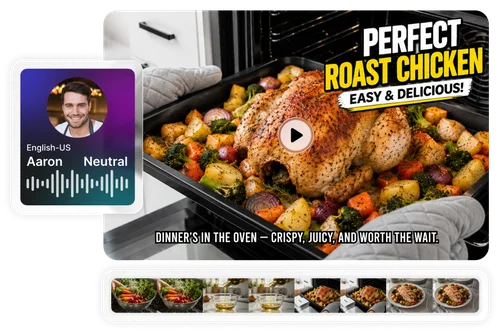
Turn any topic into a clear how-to without going on camera. Add your photos or clips, describe the steps, and the AI writes the narration and voices it, like the recipe video here. Tweak the script and subtitles, then export and share. Great for recipes, tutorials, and training videos.
Milestones and Memories, Told Your Way
Turn a move, a graduation, or a big trip into a video that actually tells the story, not just a slideshow of pics. Pick a theme or describe it in your own words, and the AI reads your photos and clips, writes the narration, and builds it in the direction you choose. Adjust the vibe, swap scenes, and regenerate until it feels right.
Why Use MyEdit to Create Videos with AI

AI Script and Narration
Never start from a blank page. MyEdit analyzes your photos and clips, then writes a full narration script in the direction you choose, so the story is built for you before you record a word.

Realistic AI Voiceovers
Add a natural AI voiceover in the language and tone you choose. It is ideal for faceless channels and anyone who wants a narrated video without recording their own voice.

No Timeline, No Editing Skills
Skip the complex timeline. The AI selects your best moments, structures the video, and syncs everything with music, so anyone can finish a video in minutes.

Subtitles and Scenes You Control
The AI does the heavy lifting, but you stay in charge. Edit the subtitle text, drag to reorder scenes, and regenerate until the video matches what you had in mind.

For Work or for Keepsakes
Use it for explainers, how-tos, and training, or for personal videos like a graduation tribute or a family memory. The same narration engine fits both.

Ready for Every Platform
Export in 9:16 or 16:9 formats. MyEdit ensures every AI video is ready for YouTube, Instagram, or TikTok without extra editing.
More Ways to Create with MyEdit
AI Video Storytelling FAQ
What is AI Video Storytelling?


AI Video Storytelling is a MyEdit tool that turns your photos and clips into a narrated video. The AI analyzes your media, writes a script that fits it in the direction you choose, and adds an AI voiceover with subtitles and music.
How is this different from an AI video generator?
An AI video generator creates footage from a text prompt. AI Video Storytelling works from the media you already have. It analyzes your photos and clips, writes narration that matches what is in them, and builds a finished video with that voiceover.
How is this different from an auto-cut or script-to-video tool?
Auto-cut and slideshow tools trim your clips and sync them to music, but they do not write a script. Script-to-video tools write a script but fill the video with stock footage. AI Video Storytelling does both: it reads your own photos and clips and writes a narration made for them.
Can I turn my photos into a video?
Yes. Upload up to 120 photos and 10 clips, and the AI arranges them into a narrated video. You need at least 30 seconds of media in total to start.
Is MyEdit AI Video Storytelling free?
Generating a video uses credits, with 20 credits per storyboard, and new users get a one-time free trial. You can sign in to claim credits and subscribe for more when you need them.
Can I use it without video editing experience?
Yes. The AI handles the script, voiceover, and editing. You only upload your media and describe your idea, so no editing experience is needed.
Which languages are supported for voiceovers?
Multiple languages are supported with natural AI voices, including English, Chinese, Japanese, French, German, Spanish, and more.
Can I edit the AI-generated video?
Yes. You can edit the subtitles, reorder or adjust scenes, change the voiceover, and regenerate the result anytime before you export.
What formats are supported?
MyEdit supports MP4 and MOV for video, and JPG, PNG, and WebP for images.
Is it safe to upload my media?
Yes. Your uploaded media is processed securely and used only to generate your video.