AI Clothes Changer
Try On Hundreds of Outfits with Your Own Photo
Upload a photo, pick an outfit from the fitting room, upload a garment you want to try, or describe the look. The AI swaps the clothing and keeps your face and pose. Free daily credits, no watermark.
 By continuing, you agree to our Terms of Use and Privacy Policy.
Change Clothes in Photos for Shopping, Posting, and Profile Pictures
Virtual Try-On Before You Commit to Anything
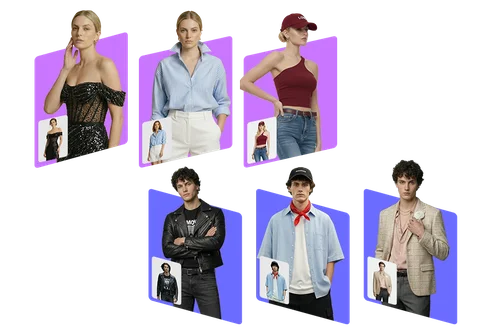
Stop guessing from a size chart. Run one photo through a whole rack of looks, women's and men's, and see each one on your own frame before you spend anything. The AI reads your posture and build from the photo rather than pasting a flat cutout on top.
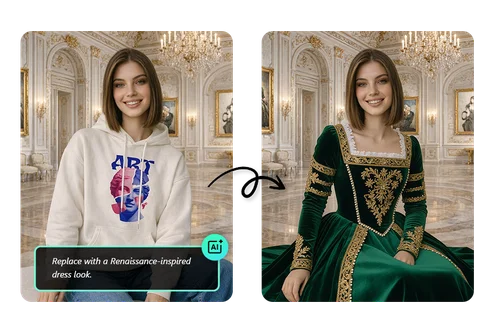
Style on Demand for Content Creators
Describe the outfit the way you would say it out loud and the AI applies it to a shot you already have. Your face, your pose, and the room behind you stay exactly as they were, so one session covers a week of posts. Send the result to Image to Video when you want the look to move.
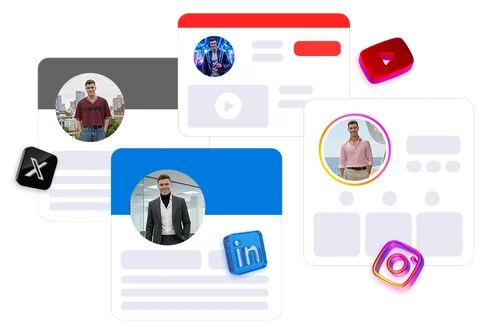
One Photo, Every Platform Profile
Every platform wants a slightly different version of you, and reshooting for each one isn't happening. Change the outfit on one good photo and you get a consistent set of profile pictures across all of them, same face, same framing, so people recognize you everywhere.
How to Change Clothes in Your Photos
 Step 1
Upload Your Photo
Upload the photo you want to change. A front-facing shot of one person with the current outfit fully visible gives the AI the most to work with. JPG, PNG, GIF, WebP, and BMP all work, up to 10 MB.
Step 2Pick an Outfit, Upload a Garment, or Describe It
Browse the fitting room by category, upload a photo of the specific piece you want to try, or type the look in your own words. Uploading the actual garment gives you the closest match.
Step 3Generate and Download
Click "Generate" and the AI redraws the clothing while Identity Lock holds the face and pose from your photo. Most runs cost 6 credits from your daily free allowance, and the download carries no watermark.
The Benefits of AI Clothes Changer

Hundreds of Outfits, From Business to Bridal
The fitting room is sorted into modern, gala, Japanese, themed, bridal, and business looks, with separate libraries for women's and men's wear. Pick one and you have a result without writing a prompt or hunting for a reference photo.

Identity Lock Keeps the Person Consistent
The AI works from your original photo instead of generating a new shot, so it redraws only the clothing and carries through your face, body proportions, and pose. Fabric folds and drapes where it should. Run it again with a different outfit and the person doesn't drift.

Try Before You Buy
Test a trend, a color, or a price point you would not commit to yet. Seeing a piece on your own photo tells you more than a size chart does.

Refine Until It's Right
Describe the outfit in up to 800 characters, then adjust the fabric, color, and cut and run it again. Each pass starts from your original photo.

No Watermark, Commercial Use Included
Downloads come clean, on the free tier too. You can use what you generate in listings, ads, and social posts.

Runs in the Browser
Nothing to install, and no design skills needed. It works on desktop, tablet, and phone, and the result opens straight into MyEdit's editor if you want to keep going.
Online AI Clothes Changer FAQ
What is AI Try On?


AI Try On is MyEdit's online tool that replaces the clothing in a photo you upload. Pick an outfit from the fitting room, upload a photo of a garment you want to try, or describe the look, and the AI redraws the clothing while carrying through the face, body shape, and pose in your original photo. It runs in a browser, and downloads have no watermark.
Will it still look like me after the outfit changes?
Yes, and Identity Lock is how MyEdit handles that. Instead of generating a fresh image of someone in new clothes, the AI anchors on the photo you uploaded and rewrites only the clothing region. That's what keeps your face, proportions, and pose from shifting, and it's why running one photo through several outfits gives you a consistent set rather than several different-looking people.
How many outfits can I choose from?
473 right now, split across 369 women's looks and 104 men's. They are grouped into Modern (161), Gala (77), Japan Style (54), Theme (37), Bridal (24), and Business (16), with a Hot row that surfaces recent additions. You can also skip the library entirely and upload your own garment photo or describe the look.
What kind of photo works best?
One person, facing the camera, with the current outfit fully visible. Avoid heavy coats over the piece you want replaced, faces that sit very small in frame, and photos with several people in them. For a garment reference, a flat shot on a plain background reads most accurately.
Is it free, and how do the credits work?
It's free to use, but you do need an account. Sign in and you get free credits every day. Most outfit changes cost 6 credits and the lightest option runs at 3, and the editor shows the cost before you click "Generate". Free downloads have no watermark. If you need more than the daily allowance, the pricing page covers the paid plans.
What resolution do I get, and what can I upload?
Downloads come out at 1K, which covers social posts, profile pictures, and design comps. If you need a larger file for a product listing or for print, run the result through Image Upscaler. On the way in: JPG, PNG, GIF, WebP, and BMP, up to 10 MB, and text descriptions up to 800 characters.
The result doesn't look right. What should I do?
Most misses trace back to the input. Try a photo where the piece you want replaced is unobstructed, re-run with a clearer reference shot of the garment, or describe the fabric and cut in the prompt instead of naming a brand. If the pose is unusual, a straighter front-facing shot usually resolves it.
Can I use AI Clothes Changer for commercial projects?
Yes, commercial use is permitted. You can download and use your generated images in listings, marketing campaigns, social posts, and digital advertising. You do need the rights to what you put in: your own photo or one you are licensed to use, and a garment image you own or have permission for.
Can I use AI Clothes Changer on mobile?
Yes, it’s a browser-based tool that works seamlessly on all devices, including mobile, tablet, and desktop, no downloads or installs required.