AI Frame Interpolation
Smooth Out Slow-Mo Videos Online
Turn choppy or low-frame-rate footage into smooth, natural motion. Sign in for free daily credits, upload your clip, and download a smoother version in seconds, no watermark, no editing experience needed.
How AI Frame Interpolation Smooths Out Every Type of Footage
Smooth Out Travel Vlogs and Cinematic B-Roll
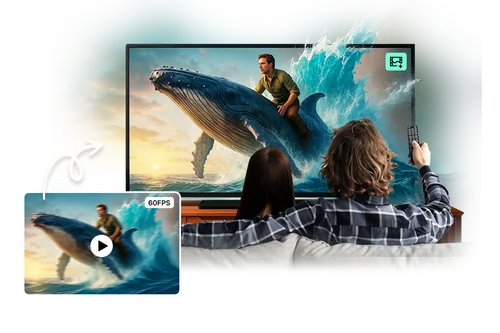
Footage filmed at a standard frame rate can look slightly choppy, especially during pans or fast camera movement. AI Frame Interpolation generates extra frames between existing ones, doubling the frame rate so motion plays back smoothly instead of stuttering.
Fix Choppy Slow-Motion in Sports and Action Clips
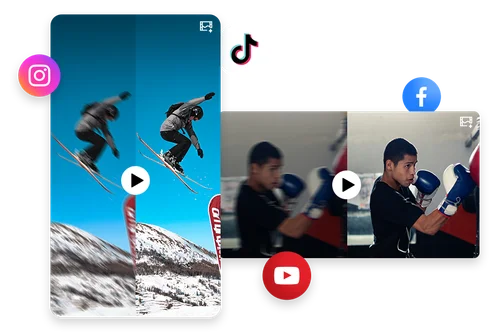
Fast movement recorded at a normal frame rate can look blurry or stuttery once it's slowed down. AI Frame Interpolation adds in-between frames so slow-motion replays of sports and action footage stay sharp and fluid instead of choppy.

Smooth Out Motion in Product Videos for E-Commerce and Ads
Product videos with quick pans or rotations can look jerky if the original footage was shot at a low frame rate. AI Frame Interpolation smooths the motion between frames so the final video plays back cleanly, without reshooting.
How to Use AI Frame Interpolation
 Step 1
Upload Your Video
Drag and drop or select your clip. Supports MP4 and MOV files.
Step 2Turn On Frame Interpolation
Select the Frame Interpolation option. Want more? You can also check Video Denoise, Lighting Adjustment, or Video Upscaler in the same step, no separate upload needed.
Step 3Export Your Enhanced Video
Preview the result, then download your AI-enhanced video with 2X smoother, more natural-looking motion.
Why Use the Online AI Frame Interpolation Tool

Double Your Frame Rate in One Click
No manual keyframing or software needed. AI generates real in-between frames automatically, such as enhancing a 30 FPS clip to 60 FPS.

Built for Both Cinematic and Slow-Motion Footage
Whether it's smooth B-roll or slowed-down action shots, the AI adds frames based on actual motion in your clip, not a fixed blur effect.

Improve Viewer Engagement
High frame rate videos deliver a seamless viewing experience, helping you retain attention longer on social media, ads, gaming content, and more.

Free to Start, No Watermark
Sign in for free daily credits. Cost scales with clip length and how many enhancements you turn on, so a short clip with just Frame Interpolation costs very little.

Steadier Motion in Handheld or Dim Footage
Reduces jitter caused by low shutter speeds in handheld or low-light shots. This only smooths motion. It doesn't change brightness or remove noise, so pair it with Video Brightener or Video Denoiser if those need fixing too.

No Software, No Installs
Works entirely in your browser on desktop or mobile. Nothing to download, nothing to update.
Online AI Frame Interpolation FAQ
What is AI Frame Interpolation?


AI Frame Interpolation is a video enhancement technique that uses AI to generate new frames between existing ones, increasing the frame rate and smoothing out motion.
Is AI Frame Interpolation free to use?
Yes. Sign in and use your free daily credits to smooth out video motion. Cost scales with clip length and how many enhancements you turn on, so a quick pass on a short clip costs very little. See the pricing page for current credit details.
Do I need professional skills when using AI Frame Interpolation?
No. MyEdit's AI Frame Interpolation tool is simple and beginner-friendly. Just upload your video and the tool handles the rest with no editing experience required.
What video formats does AI Frame Interpolation support?
MP4 and MOV for import; exports are in MP4.
What is the maximum FPS that AI Frame Interpolation can achieve?
MyEdit can double the frame rate of your original video. For example, a 30 FPS video can be enhanced to 60 FPS.
What causes choppy or stuttering motion in a video?
Low frame rates, fast camera movement, and slowing down footage in post all commonly cause choppy motion, since there isn't enough visual information between frames to make movement look smooth.
Will frame interpolation make my video blurry or introduce artifacts?
No. AI Frame Interpolation generates real in-between frames based on detected motion, rather than blurring frames together, so results stay sharp rather than smeared.
Can I use AI Frame Interpolation on mobile?
Yes. It runs in your browser, so you can smooth out footage from a phone or tablet without installing anything.