Text to Speech
Online TTS Tool With Human-Like AI Voices
Turn text into natural-sounding speech for free. Choose from realistic AI voices in 10 languages for videos, marketing, audiobooks, and more.
AI Voice Generator for Realistic AI Voiceovers
Create Realistic AI Voiceovers for Free
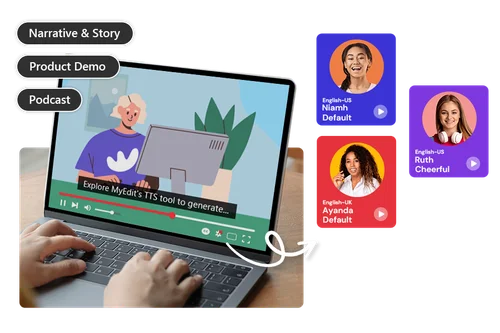
Generate lifelike speech with our AI Text-to-Speech (TTS) tool. Choose from English (US & UK), Chinese, German, French, and more. Use the preset voice filters tailored for various use cases, like marketing or storytelling, to perfectly match your needs. With AI Text-to-Speech, you can quickly make audiobooks and bring stories to life.
Create Content with Your Own Voice
Use your own AI voice to narrate videos, social content, and presentations. Once your voice is cloned, you can reuse it across Text to Speech and AI Video Storytelling for a consistent listening experience.
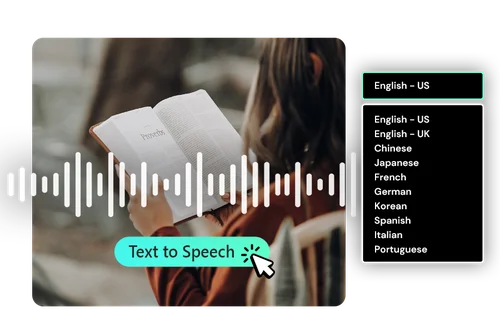
AI Voice Reading: Text-to-Speech for Everyone
MyEdit's TTS tool is perfect for anyone who struggles with reading or simply prefers listening. Hear text read aloud to improve comprehension and retention.
How to Generate AI Voices Online with Text to Audio
 Step 1
Upload Your Text File or Input Text Directly
Import your text file to the TTS tool or directly fill in the text script.
Step 2Choose a Voice or Clone Your Own
Select a preset voice by language, gender, and style, or record your own voice in the Custom tab to create a personalized voice profile.
Step 3Preview and Download Generated Speech Results
Preview your audio to make sure the sound is perfect.
Text to Speech Features

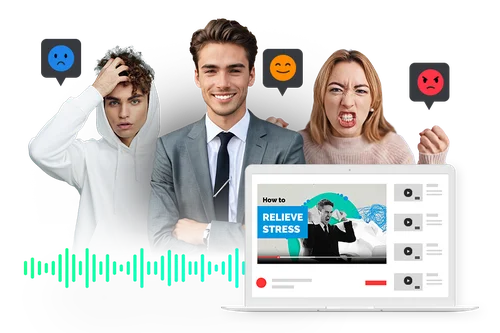
Diverse Emotions and Genders
Choose from preset emotions like cheerful, sad, or angry, plus male and female voice options, so your narration always matches the mood and tone of your content, no extra recording needed.

Multiple Languages
MyEdit's text-to-audio tool supports English, Chinese (traditional), Chinese (simplified), Japanese, French, German, Korean, Spanish, Italian, and Portuguese. It is ideal for creating voiceovers for your content.

Voice Filters for Use Cases
Our TTS tool offers specialized voice styles for various use cases, including narration, product demo, news reporting, and advertising. Easily find the perfect voice for your project.

Your Voice, No Voice Actor Needed
Clone your own voice to create narration that sounds authentically like you. Simply read a short script for 15–60 seconds, and the system automatically checks the recording quality before generating your personal voice profile.

Get TTS Results Effortlessly
Save time with our simple three-step process: upload your script or input text, select a voice profile, and download your audio in seconds.

Browser-Based Online TTS
Our Text to Speech tool lets you create AI-generated voices directly in your web browser. Enjoy real-time voice generation to make your workflow faster and easier.
Online Text to Speech FAQs
What does Text to Speech do?


The Text to Speech (TTS) system uses artificial intelligence and machine learning to turn written text into spoken words. With TTS, you can easily convert text into realistic voices of your choice, all through a simple, browser-based interface.
What is the best Text to Speech tool?
MyEdit's Text to Speech tool stands out for its 10 supported languages, wide range of preset voices, and the ability to clone your own voice for a more personal touch.
How do I use Text to Speech for voice-over?
1. Input your text
2. Choose a preset voice, or record your own voice in the Custom tab to create a personal profile
3. Click ""Generate"" to convert text to audio
Do I need technical skills to use Text to Speech?
No. MyEdit's TTS interface is intuitive and user-friendly, allowing you to generate results with just a few clicks. No technical skills are required to use our online TTS tool.
Can I use Text to Speech for podcasts?
Yes, you can create podcasts by uploading your text for our TTS tool to convert it into speech.
Can the results from TTS be used in business?
Yes, the results of our Text to Speech tool can be used for commercial purposes.
What languages does TTS support?
MyEdit's Text to Speech tool supports English, Chinese (traditional), Chinese (simplified), Japanese, French, German, Korean, Spanish, Italian, and Portuguese.
Is it safe to use Text to Speech online?
Yes. If you clone your own voice, that recording is only used to create your voice profile, and you can permanently delete any custom voice profile at any time from the voice picker.
Is Text to Speech free?
You can use your daily bonus Credits or monthly bonus Credits (for premium users) to generate Text to Speech. Voice cloning is a separate premium feature. See the Voice Clone question for more details. Find out all about Credits >
Can I clone my own voice with Text to Speech?
Yes. Read the 15–60 second script in the Custom tab to create your voice profile. You can reuse it in AI Video Storytelling. Voice cloning is available with a premium plan.
Is Voice Clone free?
Voice cloning is included with premium plans. If you're using the free version, you can still generate speech with our standard AI voices using your daily Credits.