Video Denoiser
Denoise Videos Online With AI
Remove grain and noise from video online with free AI. Clean up low-light footage, old clips, and compressed video in one pass. Free daily credits, no watermark.
How Video Denoiser Cleans Up Every Type of Noise

Clean Up Compressed or Re-Uploaded Clips
Videos that have been downloaded, re-compressed, or pulled from a screen recording often pick up blocky artifacts and speckled noise on top of the original footage. Video Denoiser separates that noise from the real image detail and removes it, so re-shared or re-encoded clips look closer to the original quality. Useful before reposting footage to a new platform.

Fix Grainy Footage From Low-Light Shoots
Low light forces a camera sensor to work harder, and that shows up as visible grain and static. Video Denoiser detects this pattern and smooths it out frame by frame, without softening the footage into a blurry mess. It keeps edges and texture intact, so the result still looks like your footage, just without the noise. Works well for indoor filming, night shoots, and dimly lit venues.
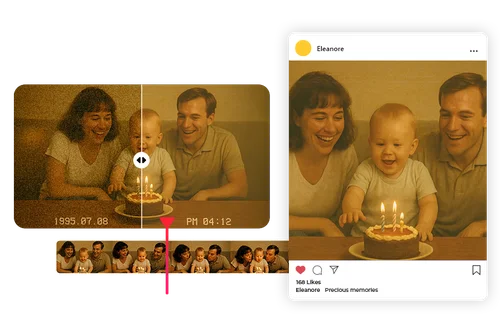
Restore Old Home Videos and Archival Footage
Older camcorders and early phone cameras often baked heavy grain into the footage itself. AI Video Denoiser reduces that noise while preserving the original motion and detail, so family videos and archived clips come out clearer without looking artificially smoothed. A practical way to make old footage watchable again before sharing it.
How to Use the AI Video Denoiser
 Step 1
Upload Your Video
The video denoiser tool supports MP4 and MOV formats.
Step 2Turn On Denoise
Select the Video Denoise option. Want more? You can also check Video Upscaler, Lighting Adjustment, or Frame Interpolation in the same step, no separate upload needed.
Step 3Export Your Denoised Video
Now just click “Download.” Your enhanced video is ready to share or save for future viewing.
The Benefits of Using the AI Video Denoiser

Remove Grain in One Click
No sliders or manual settings to learn. Upload, turn on Denoise, and the AI handles pixel-level noise reduction automatically.

Built for Every Noise Source
Whether the grain comes from low light, compression, or an old camera sensor, the AI adapts its approach instead of applying one blanket filter.

Keeps Detail, Not Just Smoothing
The AI targets noise specifically instead of blurring the whole frame, so fine detail and texture stay intact.

No Software, No Installs
Works entirely in your browser on desktop or mobile. Nothing to download, nothing to update.

Free to Start, No Watermark
Sign in for free daily credits. Cost scales with clip length and how many fixes you turn on, so a short clip with just Denoise costs very little.

Do More than Denoising
Beyond just noise removal, our all-in-one video enhancement tool improves lighting and resolution with optional upscaling. It’s like having a full editing suite tailored to enhance every pixel.
Video Denoiser FAQ
What is a video denoiser?


A video denoiser is an AI tool that detects and removes visual noise, grain, or static from footage while preserving the real image detail underneath.
Is Video Denoiser free to use?
Yes. Sign in and use your free daily credits to denoise videos. Cost scales with clip length and how many enhancements you turn on, so a quick denoise on a short clip costs very little. See the pricing page for current credit details.
Will denoising make my video blurry
No. Video Denoiser is built to separate noise from real detail, so it removes grain without softening edges or textures the way a basic blur filter would.
What is file format limitation?
MyEdit supports MP4 and MOV formats, so most users can work with their existing footage without converting files.
What causes grain or noise in a video?
Low light, high ISO settings, video compression, and older camera sensors are the most common causes. Each produces a slightly different noise pattern, which is why a one-size-fits-all filter often over-smooths footage.
Can I use Video Denoiser on mobile?
Yes. It runs in your browser, so you can denoise footage from a phone or tablet without installing anything.