Online Image Editor
AI-Driven Image Editing Made Simple
Upload a photo and start editing. Layers, text, stickers, and one-click AI tools in one browser tab, with free credits every day.
 By continuing, you agree to our Terms of Use and Privacy Policy.
AI-Powered Free Online Image Editor

Design with Layers, Text, and Stickers
No more switching apps to finish one graphic. Every element sits on its own layer, so you can drag text, stickers, and photos into the order you want and swap one out without touching the rest. Flat images can join that stack too: AI Text Lift pulls the text baked into a photo onto its own layers, ready to retype or delete.

One-Click AI Tools for Every Fix
From social posts to polished product shots, MyEdit's online image editor gives you everything you need in one place. Use AI Replace to replace unwanted objects in seconds, Reflection Removal to eliminate reflections from glass and eyeglass lenses automatically, AI Extender to resize images for any platform, and Image Enhancer to instantly improve low-quality photos.

Edit Photos Just by Typing
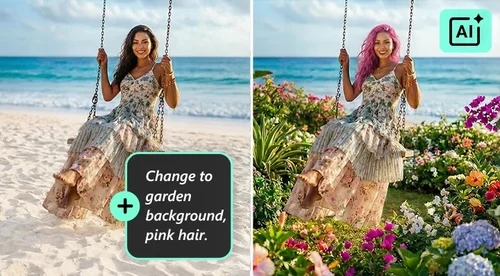
Not sure which tool you need? Type it instead. Describe the change in plain words and the editor handles the rest, whether that is brightening a dull sky, taking a stray cup off the table, or reworking the whole scene. It is the fastest way in when you know what you want the photo to look like but not what the tool is called.
How to Use MyEdit's Online Image Editor
 Step 1
Upload an Image or Select From Stock Photo Collections
Our online image editor makes it easy to upload your own images, or start from scratch with a collection of stock photos.
Step 2Use AI Tools, Drag & Drop Elements to Make Designs
Click an AI tool to fix the photo, or drag text, stickers, and photos onto the canvas to build the design by hand.
Step 3Download Your Designs
Export the finished design as a JPG or PNG straight to your device, at the size you set on the canvas.
Explore the Power of MyEdit's Online Image Editor

Layers of Customization
Rewrite a headline, change its color, or move a sticker behind your subject, and the rest of the design stays exactly where you left it. Because each piece keeps its own layer, you can keep adjusting one detail at a time instead of starting over.

AI Tools for Every Kind of Fix
Point at what you want changed, or just describe it. Brush over an object to swap or erase it, let the AI clear glare and widen a cropped frame on its own, or type the change you want in plain words. The AI works out the edges either way.

Multiple AI Models to Power Your Creativity
Different models excel at different tasks. GPT Image 2.5 offers precise results and consistent details, while Nano Banana Pro handles text in images, including other languages. The picker shows all currently available models.

Easy Image Editing with Text
Edit images simply by typing what you want to change, whether adding a mask or replacing an object. No manual tools or professional design skills are required. Create polished visuals quickly with intuitive, text-based controls.

Library of Text, Stickers, and Photos
We provide an extensive collection of text, stickers, and photos to help you easily create promotional materials, such as Black Friday or Christmas-themed stickers. Start creating your custom designs with our online image editor today.

Lift Text Off Any Image
AI Text Lift finds the text baked into an image and extracts each piece into its own editable layer. Retype the wording, change the font or color, move it, or delete it. It also works on images you just generated in MyEdit, so you can fix the copy on an AI ad or photoshoot without starting over.
More Ways to Create with MyEdit
Online Image Editor FAQ
Is it free to use MyEdit online image editor?


Yes. You can use your daily free Credits, or monthly bonus Credits if you’re a premium user, to use MyEdit’s online image editor. Most AI tools use Credits from your balance, so you can create social posts, product photos, and ad graphics without additional payment as long as you have available Credits. However, some tools, such as AI Text Lift, are available only with a paid plan.
Is it safe to use MyEdit online image editor?
Yes. MyEdit encrypts your uploaded images and text prompts in transit and does not share your files with third parties. Your data is only used to generate the edits you request, never for anything else.
Why is MyEdit a good online image editor?
The online image editor runs entirely in your browser, so there's nothing to download or install. It combines AI editing tools with daily free credits and a built-in library of stickers and images, so you can finish a design in one tab instead of switching between apps.
Is MyEdit's online image editor good for beginners?
Yes. The online image editor uses a simple drag-and-drop interface, and its AI tools handle most of the technical work for you. Just log in from any browser and start editing. Most first-time users finish their first design in a few minutes.
Can I create professional images using MyEdit's online image editor?
Yes. The online image editor includes AI and design tools used for marketing materials and product photos, helping freelancers and small teams speed up routine edits without switching to desktop software.
What formats can I export my image as?
MyEdit's Online Image Editor supports JPG and PNG formats.
Can I edit text that is already in an image?
Yes. Select the image, choose AI Text Lift from the toolbar, and the AI extracts each piece of text it finds into its own editable layer. From there you can retype the wording, change the font, size, and color, reposition it, or delete text you don't want.
Which AI models can I use?
The editor includes several image models you can switch between at any time: GPT Image 2.5 Sunburst and GPT-Image-2.5 Flare, Nano Banana Pro and Nano Banana 2, Seedream 5.0 Pro, Kling O3, and Qwen Image Edit.