Video to Video AI Editor
Describe the Edit. Generate a New Video.
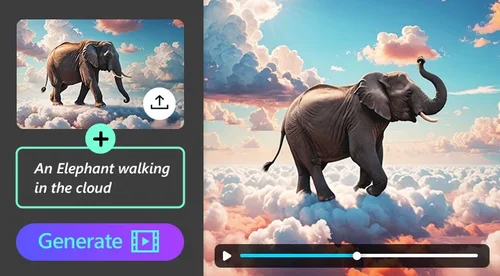
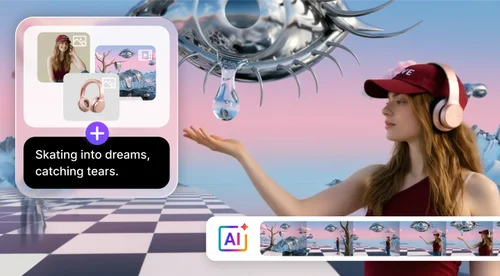
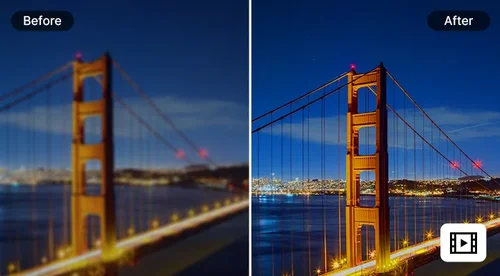
Upload a clip, type what you want changed, and the AI rebuilds the footage: outfits, backgrounds, objects, whole visual styles. No timeline, no reshoot.
How to Edit Videos with Video to Video AI
 Step 1
Upload Your Video
Upload your MP4 or MOV clip into the editor. A prompt alone is enough for most edits. Reference images are optional, and worth adding when you need the AI to match a specific outfit, product, background, or style.
Step 2Describe What You Want to Change
Use plain language to explain your edits: outfit swaps, scene changes, object removal, a new visual style. If you added reference images, point to them by number, like "replace the background with @image1." Pick your AI model and output resolution before you generate.
Step 3Review Your Result and Download
Check the generated result, keep refining inside the same chat, or rerun the clip on another model. Download the final video with no watermark.
What You Can Do with Video to Video AI
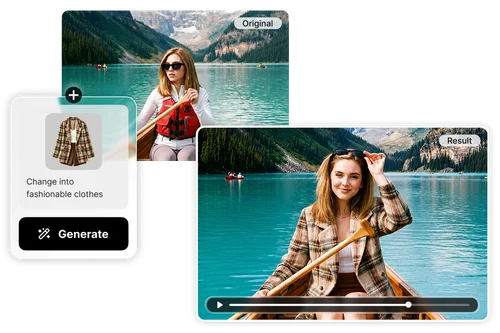
Restyle Characters Without Reshooting
Need a different look without booking another shoot? Upload your footage and describe the change, or add a reference image when the outfit has to match something exact. The AI works from your original movement, lighting, and framing instead of generating a shot from scratch, so the result still reads as the same take. Useful for fashion creators, branded campaigns, character redesigns, and social content variations.
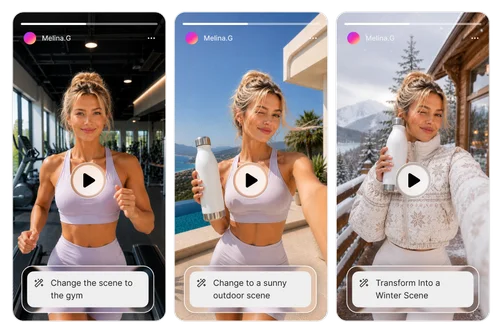
Change Backgrounds, Seasons, and Mood
Put the same footage somewhere else, just by describing the place. Turn summer into late autumn, take an indoor scene outside, or drop the same clip into a different time of day. The same shoot covers several versions, and you do not pay for a second location or another shoot day.

Remove Objects, Distractions, and Unwanted Elements
Say what you want gone and it goes. Background distractions, a competitor's logo, someone who walked through the shot, clutter on the table. The AI rebuilds the background where it used to be and keeps working from your original motion and composition, which is why it holds up in product videos, interviews, and clips you are recutting for another platform.
Why Use Video to Video AI

Skip the Reshoot
Work from the footage you already shot instead of rebuilding a set or rebooking a crew.

If You Can Describe It, You Can Edit It
Type the change in plain English. You never open a timeline or mask anything by hand.
Pick the Model That Fits the Edit
Several AI models sit behind the same chat box, each strong at something different. Try another one on the same clip without re-uploading or starting over.

Reference Images When You Need Them
A prompt alone covers most edits. When the look has to be exact, upload the outfit, product, or background so the AI has something to match instead of guessing.

Every Version Stays in the Same Chat
Build on the last result, compare two takes side by side, or branch in a new direction, all from the same upload.

No Watermarks, Ever
Export in HD and nothing gets stamped on your video, including on your free run.
Video to Video AI FAQ
What is AI video editing by chat?


AI video editing by chat means changing a video by describing what you want in text, instead of editing a timeline. You upload a clip, type what you want changed, and the AI generates a new version while keeping the original motion and framing. Video Edit by Chat is MyEdit's video to video AI tool, and it runs fully in your browser.
What types of edits can I make?
Anything you can describe as a change to what is already on screen, including:
- Outfit replacement and character restyling
- Background and environment changes
- Object or person removal
- Seasonal, weather, and lighting changes
- Scene redesign and visual style updates
- Product repositioning or replacement
- Text rewrites inside the frame
Specific prompts beat short ones, and a reference image helps whenever the look has to match something exact.
Which AI model should I choose?
Start with whichever model is selected by default and switch when you want something specific. Right now the editor offers Happy Horse 1.0, which holds skin, fabric, and facial detail best and is the safe pick when there is a person on screen. Kling O3 gives you the most control over what changes and handles shot composition and camera angles. Wan 2.7 is the style-transfer option: it keeps a character consistent through a restyle and can copy an action or camera move from a reference. PixVerse V6 works element by element, so use it to swap a subject, add a prop, remove something and let it rebuild the background, or rewrite text inside the frame. The lineup changes as new models are added, and the editor always shows what is currently available. You can rerun the same clip on a different model without re-uploading.
How long can my video be?
Short clips are what this is built for, and how long the result runs depends on the model. Happy Horse 1.0 takes up to 60 seconds but only uses the first 15, so it returns 3 to 15 seconds. Kling O3 takes clips of 3 seconds or more and returns 3 to 10 seconds. Wan 2.7 takes 2 to 10 seconds and returns the same length. PixVerse V6 takes up to 30 seconds and returns the full clip. Upload MP4 or MOV, up to 100MB, or up to 200MB on Kling O3. If your clip is longer than the model's limit, trim to the part you actually want to change before uploading, or you will pay to regenerate footage you are not using.
Do I need a reference image?
No. A prompt on its own handles most edits, including background changes, object removal, lighting, and style. Reference images are for when the look has to be exact, like a particular jacket or a product shot the AI needs to match. When you do add them, point to them in the prompt by number: "replace the background with @image1 and put the jacket from @image2 on her" tells the AI exactly which reference goes where instead of leaving it to guess. How many you can add depends on the model: five on Happy Horse 1.0, four on Kling O3 and Wan 2.7, three on PixVerse V6.
Is Video Edit by Chat free?
You get one free trial for the whole tool. It has a short length limit and applies across all AI models, so once you generate a result on any model, the free trial is used. After that, generating uses credits billed per second. The rate varies by the AI model you choose, and finished videos export without a watermark.
What resolutions, aspect ratios, and audio options are supported?
Up to 1080p, and PixVerse V6 tops out at 720p. Most models keep your source aspect ratio, and Wan 2.7 also lets you output 16:9, 9:16, 1:1, 4:3, or 3:4. On Happy Horse 1.0 and Wan 2.7 you can keep the original audio or let the AI generate new audio from your prompt.
What should I do if the generated result is not accurate?
Add detail to the prompt and try again. You can also attach a reference image, switch to a different AI model, ask for another variation, simplify the change into one step, or keep editing the result inside the same chat. Small prompt adjustments usually do more than a bigger request.
How is this different from a regular video editor?
A regular video editor gives you a timeline where you cut, layer, and adjust clips by hand. Video to video AI is generative: you describe the change and the AI rebuilds the footage for you. The two are not interchangeable. Use a timeline editor for precise cuts, transitions, and effects. Use chat-based editing when you want what is already in the frame to look different, or want something taken out of it.
Can I use the generated videos commercially?
Yes. Generated videos can be used for commercial work such as marketing campaigns, product promotions, social media content, client projects, online advertisements, and brand content. Always make sure your uploaded source footage and reference assets are licensed for the use you have in mind.
Is it safe to upload my videos and images?
Your uploads are encrypted in transit and used only to generate your result. CyberLink does not sell or share your personal information, and keeps data only as long as necessary.
Can I upload my own images to replace objects or clothing?
Yes. You can upload reference images to guide visual replacements and transformations. Reference assets help the AI match:
Clothing styles
Product appearances
Background environments
Character aesthetics
Color palettes
Scene composition
This improves visual consistency in generated results.
Do I need professional editing experience to use this tool?
No. Video Edit by Chat is built for creators, marketers, and casual users who want a faster workflow without complex software. Instead of timelines or keyframes, you describe the edits you want in natural language.