AI Voice Designer
Design Custom AI Voices from Text
Describe any voice by age, accent, tone, and style to create it instantly with AI. Save and reuse your custom voice profiles in audio tools.
How to Create Custom Voices with AI Voice Designer?
 Step 1
Pick an AI Voice Model
Choose ElevenLabs for lifelike voices with real emotional expression, or Gemini 3.1 Flash for dynamic rhythm and lively, expressive intonation.
Step 2Describe Your Voice and Generate
Write a prompt about the age, tone, accent, and pace you want, like "an older British man with a deep, calm voice," then click Generate.
Step 3Reuse Your Voice Across MyEdit
Your new voice is saved as a voice profile. Pick it anytime in Text to Speech or AI Video Storytelling to keep the same voice in every project.
Popular Ways to Use Our AI Voice Designer
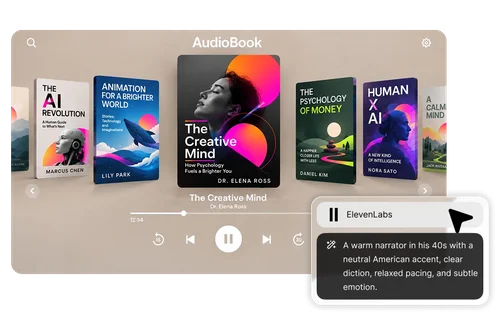
Create Professional Audiobook & Narration Voices
Generate a consistent narrator voice for full-length audiobooks or long-form content. Simply describe the tone, age, accent, and pacing you need, and the AI creates a reusable voice profile that stays the same across every chapter. This is perfect for authors who want dedicated narration.
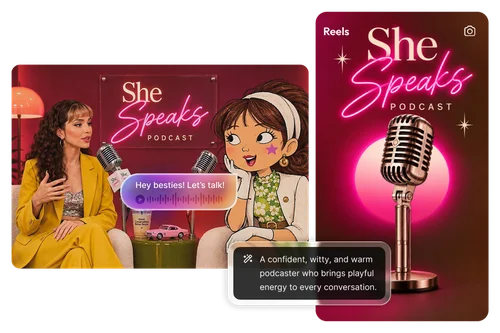
Signature Host & Voiceover Voices for Podcasts and Videos
Design a unique host voice or voiceover for your podcast episodes, YouTube videos, TikTok content, and ads. Create your signature sound once, then generate intros, full episodes, or video narrations whenever you need them. This is ideal for creators who want consistent brand audio without recording every time.
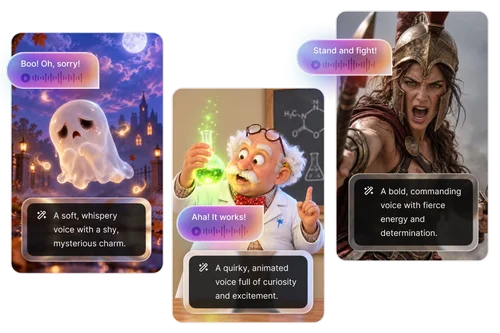
Build Distinct Character Voices for Drama & Animation
Build multiple unique character voices with an AI voice creator that works from text descriptions alone: a deep, gravelly villain, a bright, energetic sidekick, or any personality you imagine. Save and switch between voice profiles instantly for AI mini-dramas, animations, or multi-character projects.
Why Use AI Voice Designer as Your AI Voice Creator?

Design a Voice from a Text Description
Skip scrolling through hundreds of stock voices. Describe the age, tone, accent, speaking style, and pacing you want, and AI Voice Designer builds a matching voice, whether it's an upbeat YouTube host or a gravelly horror narrator.

Top AI Voice Models in One Place
Pick ElevenLabs for lifelike voices with real emotional expression, or Gemini 3.1 Flash for dynamic rhythm and lively intonation. Switch models anytime and your description stays filled in, so trying the other model takes one click.

Claim Free Credits Every Day
You don't need a premium plan to use AI Voice Designer. Every account can claim free credits every day to keep creating new voice profiles for your videos, podcasts, and stories.

One Consistent Voice Across Projects
Every voice you design is saved as a voice profile you can rename and reuse. Pick the same voice in Text to Speech or AI Video Storytelling, so your channel intro, weekly podcast, and story videos all sound like the same narrator.

A Distinct Voice for Every Character
Give each speaker their own sound. Design a warm host and a sarcastic co-host for your podcast, or match every character in a story or mini drama to their age, personality, and role, so listeners always know who's talking.

No Recording or Voice Actor Needed
Unlike voice cloning, AI Voice Designer doesn't need an audio sample. Your voice comes from your words alone, and you can use it in YouTube videos, ads, and client projects.
AI Voice Designer FAQs
What Is an AI Voice Designer and How Does It Work?


An AI voice designer creates a brand-new voice from a written description instead of a recording. You describe traits like age, accent, tone, and pace, and the AI model builds a matching voice that reads any script with natural pacing and intonation.
Is There a Free AI Voice Creator?
Yes. AI Voice Designer runs on credits, and no premium plan is required. MyEdit gives every signed-in user free credits each day, which you can spend on designing new voice profiles or turning your scripts into speech in Text to Speech.
Can I Create a Custom AI Voice from a Text Description?
Yes. Write 20 to 1,000 characters describing the voice, including details like age and gender, accent, tone and mood, speaking style, and pace. For example: "An older British man with a deep, calm voice and a slow, relaxing speaking style."
What's the Difference Between ElevenLabs and Gemini 3.1 Flash?
Both create natural-sounding voices, but they work a little differently. ElevenLabs creates lifelike voices with authentic emotional expression and also writes a short preview script for you in the language of your description. Gemini 3.1 Flash offers dynamic rhythm and lively intonation, and you can set the voice gender and choose a voice style, such as Warm, in addition to your description.
How Is AI Voice Designer Different from Voice Cloning?
Voice Designer creates a brand-new voice from your written description with no recording needed, and Voice Clone creates a copy of your own voice from a short recording. Pick Voice Designer when no preset fits and you'd rather not use your own voice.
Can I Save a Designed Voice and Reuse It Later?
Yes. Every voice you design is saved as a voice profile in the Voice Designer tab of your MyEdit account. You can rename or delete it anytime, and pick it again in Text to Speech or AI Video Storytelling for a new episode, a follow-up ad, or the next part of a series, without describing it again.
What Languages Can AI Voices Speak?
AI Voice Designer supports 10 languages: English, Chinese (Traditional), Chinese (Simplified), Japanese, Korean, French, German, Spanish, Italian, and Portuguese. For the most natural result, write your voice description in the language you plan to use, and generate speech in that same language.
Can I Use AI-Generated Voices for YouTube Videos?
"Yes. You can use your voiceovers in YouTube videos, TikToks, Instagram Reels, ads, and podcasts. Two things to keep in mind: don't prompt for a celebrity's or another real person's voice, and follow YouTube's disclosure rules for realistic AI-generated content. "