
MyEdit Agent
One AI Agent. Photos, Videos, and Audio, Done.
Chat with MyEdit Agent to edit or create photos, videos, and audio. It picks the right tool automatically and works across up to 20 files at once.
The Smartest Starting Point for Your Content

Your AI Photo Agent, Ready for Any Fix
Need to deblur an image, remove an object, or generate new art from scratch? Just describe the result in the chat. MyEdit's photo AI agent reads what you're asking for and applies the right enhancement or generation tool automatically, no separate tool for each fix.

One AI Video Agent for Any Footage
Skip switching between video tools. Tell MyEdit's video AI agent what footage you want to create, or how to change a clip you already have, and it handles the generation or editing for you in the same chat.

Meet the AI Audio Agent
Stay in the same window for the whole project. MyEdit's audio AI agent turns a text prompt into a voiceover, builds a sound effect, or cleans up a noisy track or guides you to the room for further detailed edits.
What Can MyEdit's AI Agent Do For You?
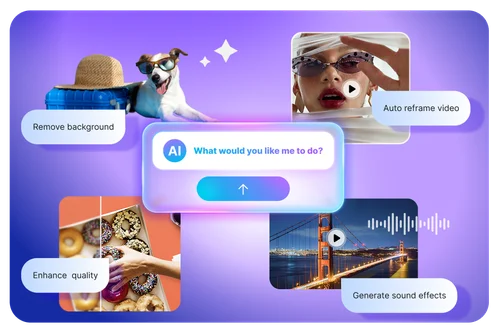
Skip the Guesswork of Which Tool to Use
Is your photo blurry, noisy, or just outdated? Deblur, Denoise, and Image Enhancer each fix a different problem, and it's easy to pick the wrong one. MyEdit's AI Agent reads what's actually wrong and sends your request to the right tool, whether the fix is on the photo or video side, instead of making you guess.
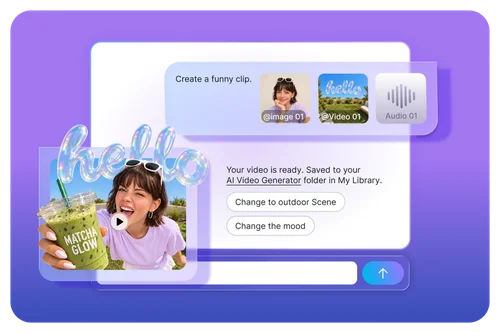
Mix Photos, Video, and Audio in One Project
Got product photos, a few clips, and a voiceover you want combined? Upload them together in one chat, and tell the AI Agent how to put them into one project. No other MyEdit tool reads across that many file types at once.
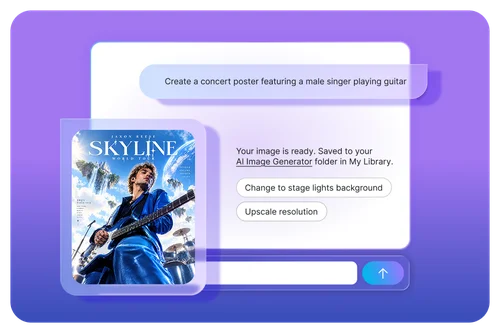
Start from Nothing, Not Just an Upload
Don't have footage or a photo yet? Describe what you want, and AI Agent generates it from scratch, whether that's a new image, a video, or a voiceover, instead of only reshaping something you already have.
How to Use MyEdit's AI Agent ?
 Step 1
Upload Files or Start with Just a Prompt
Add your photos, videos, or audio files, as many as the project needs, or skip uploads entirely and describe what to generate from scratch.
Step 2Tell MyEdit's AI Agent What You Want
Type your request in plain text. The AI Agent figures out whether to handle it directly or route you to the right MyEdit tool.
Step 3Review Your Result and Keep Going
See the result right in the chat. The AI Agent suggests three next actions so you can keep refining before you download.
Why Use MyEdit's AI Agent?
One Chat, Every MyEdit Tool Behind It
MyEdit Agent knows the whole toolkit and brings in the right one for your request, instead of making you find it yourself.
Upload Multiple Files at Once
Upload several photos, video clips, and audio files in one session, then tell MyEdit Agent how to combine them into one result.
Edits What You Have, or Creates What You Don't
Bring an existing photo or clip to change, or start with nothing but a description. MyEdit's AI Agent handles both editing and generation in the same conversation.
Built-In Next Steps
After every completed edit, the AI Agent suggests three relevant next actions right in the chat, so you're never stuck staring at a blank prompt box wondering what to try next.
Guided to the Right Tool When Needed
For edits that need finer control, like brush-based retouching, the Photo AI Agent hands you off to the matching MyEdit tool instead of guessing.
Works Entirely in Your Browser
There's no software to install and no separate app to download. Open MyEdit's AI Agent in a browser tab on desktop or mobile, and start chatting the moment an idea hits.
MyEdit's AI Agent FAQ
What is MyEdit's AI Agent?


MyEdit's AI Agent is a chat-based AI tool that edits and creates photos, videos, and audio from natural language requests, and automatically routes each request to the right MyEdit tool or model behind the scenes.
How is MyEdit Agent different from Photo Edit by Chat or Video Edit by Chat?
Photo Edit by Chat and Video Edit by Chat each edit one file in one medium. MyEdit Agent sits above both: it can edit or generate across photos, video, and audio in the same conversation, and automatically picks the right tool for what you're asking, including handing you off to Photo Edit by Chat or Video Edit by Chat when that's the better fit.
Is MyEdit Agent free to use?
You can chat with MyEdit Agent using your free daily credits, or your plan's credits if you're a paid user. Premium results preview with a watermark on the free plan; upgrading unlocks full, watermark-free downloads.
How many files can I upload at once?
You can upload up to 20 files total in a single chat, drawn from photos, videos, audio, subtitles (SRT), and text (TXT). Photos alone can fill all 20 slots, video is capped at 10, and audio, subtitles, and text are capped at 1 each, sharing the same 20-file limit.
Can MyEdit Agent create something without me uploading a file?
Yes. Describe what you want in text alone, and MyEdit Agent can generate a new photo, video, or voiceover from scratch, the same way it edits files you upload.
What happens if my request needs more precise control?
For edits that need finer manual work, like brush-based retouching, MyEdit Agent guides you to the matching tool with your file already loaded, so you don't have to start over.
Do I need to install anything to use MyEdit Agent?
No installation needed. MyEdit Agent runs in your browser. Some features are desktop-only for now; if you request one on mobile, the AI Agent will let you know and suggest other ways to continue.