AI Halloween Costume Generator
Try On Halloween Costumes With AI
Upload one photo and see yourself in a Halloween costume. Pick a ready-made look or describe your own. Free daily credits, no watermark.
AI Halloween Costumes to Try On, Design, and Share
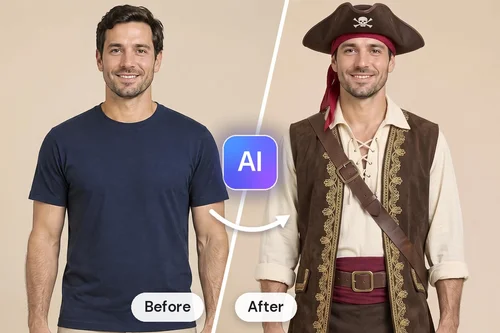
Try Halloween Costumes Before Buying
Not sure a costume will suit you? Upload one photo and try it on first. The Halloween category has ready-made costumes for women and men, from pirates and angels to gothic gowns and pumpkin suits. You see the whole look on yourself before you spend anything.
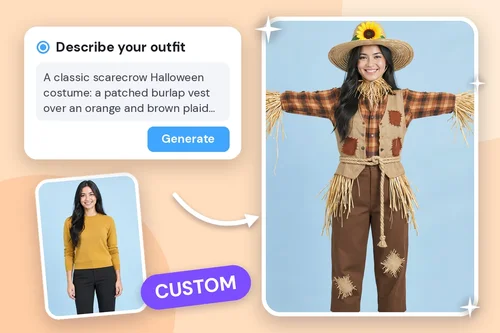
Design Your Own AI Halloween Costume
Have an idea no store sells? Open the Custom tab and describe the costume in up to 800 characters: the fabric, the colors, the hat, the props. You can also upload a photo of a full outfit, or of a top, bottom, and shoes, and the AI dresses your photo in it.
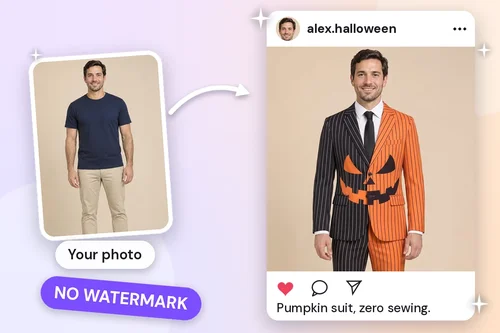
Halloween Photos Without Dressing Up
No time to dress up, or celebrating from far away? Create a costume photo for an Instagram or TikTok post, a party invitation, or a seasonal profile picture. Downloads come without a watermark, so the image is ready to share as soon as it's generated.
How to Try On a Halloween Costume With AI
 Step 1
Upload Your Photo
Upload a photo of one person facing the camera, with the full body in view. Crop out empty space first: a face that is too small in the frame may not be detected.
Step 2Pick a Costume or Describe Your Own
Open the Halloween category under Female or Male and choose a costume. For your own idea, switch to the Custom tab and describe the look or upload an outfit.
Step 3Generate and Download
Click “Generate” and the AI dresses your photo in the costume while keeping your face. Download the result with no watermark, ready to share.
Why Try On Halloween Costumes With MyEdit?

Ready-Made Costumes for Women and Men
The Halloween category sits right in the fitting room, with separate costume libraries under the Female and Male tabs. Pick one and you get a result without writing a single word of prompt.

It Still Looks Like You
The AI works from the photo you upload, so the costume changes and your face stays recognizably yours. Try several costumes on the same photo and compare them side by side before you choose.

Any Costume You Can Describe
The Custom tab accepts a description of up to 800 characters, a photo of a full outfit, or separate photos of a top, bottom, and shoes. If you can picture the costume, you can try it on.

Try Before You Buy, Rent, or Sew
Costumes cost money and time, and many are worn once. Seeing one on your own photo first tells you whether it's worth ordering, renting, or making, and helps you settle on a look sooner.

No Watermark on Your Downloads
Free users get clean images too. Post your costume photo, add it to a party invitation, or set it as your profile picture without cropping out a logo or paying to remove one.

Nothing to Install
The costume generator runs in your browser on desktop, tablet, and phone. Sign in, upload a photo, and start trying costumes on, with free credits added to your account every day.
AI Halloween Costume Generator FAQ
What is an AI Halloween costume generator?


An AI Halloween costume generator, or AI costume generator, puts a costume on a photo of you, so you can see the look without wearing it. MyEdit's version runs on AI Try On: pick a ready-made Halloween costume or describe your own, and the AI redraws your outfit while keeping your face.
How do I try on a Halloween costume with AI?
1. Upload a photo of one person facing the camera.
2. Choose a costume from the Halloween category, or describe your own in the Custom tab.
3. Click “Generate” and download the result.
Is the AI Halloween costume generator free?
Yes, you can try it for free. Sign in to receive free credits every day, and use them to generate your costumes. The credit cost is shown on the “Generate” button before you start, and free downloads come without a watermark. Need more credits? See the pricing page for paid plans.
What Halloween costumes can I try?
The Halloween category includes costumes for women and men, from pumpkin suits and pirates to angels, dark angels, grim reapers, harlequins, and gothic gowns. Have something else in mind? In the Custom tab, describe your costume, or upload a full outfit or separate pieces (top, bottom, and shoes) to build your own look.
Can I try on a costume I found online?
Yes. Save the product photo and upload it in the Custom tab, as a full outfit or as a separate top, bottom, and shoes. The AI dresses your photo in it, so you can check how the costume looks on you before you order it.
What kind of photo works best?
Use a photo of one person, facing the camera, with the full body in view and the current outfit clearly visible. Avoid group shots, face coverings, and heavy coats. If the tool can't find a face, crop the photo so the person fills more of the frame.
Will the costume photo still look like me?
Yes. The AI keeps your face, so you stay recognizable in every costume. Your pose and background usually carry over too, although some costumes arrive with their own setting or stance. If a result isn't what you wanted, generate it again.
Can I make couple or group Halloween costume photos?
AI Try On works on one person per photo. For a couple or a group, run each person's photo separately and combine the results. For a ready-made Halloween scene, try AI Photoshoot: depending on the template, upload one photo of up to four people, or up to four separate photos, so friends who aren't together can still appear in the same picture.
Can I dress up my pet for Halloween?
Yes. AI Try On is designed for people, but MyEdit's AI Pet Try On does the same for cats and dogs. Upload a clear photo of your pet and pick a ready-made look, from a lion's mane to a taco costume. For your own idea, open the Custom tab and describe it (for example, “a tiny witch hat and black cape”) or upload a photo of a pet outfit. The credit cost is shown on the “Generate” button before you start.
Can I turn my costume photo into a video?
Yes. Open your result in MyEdit's Image to Video tool, add a short prompt describing the movement, and the costume comes to life as a short clip. It's a quick way to make a Halloween post for Reels, Shorts, or TikTok.