AI Outfit Generator
Try On Clothes Online With AI
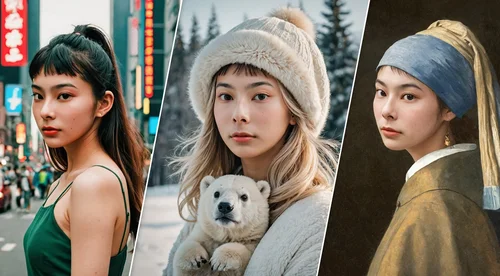
Upload one photo and see yourself in a full outfit, from casual to black tie. Pick a look, upload a garment, or describe it. Free daily credits, no watermark.
Outfits for Events, Social Posts, and Professional Profiles
Find Your Perfect Look With Our AI Virtual Fitting Room
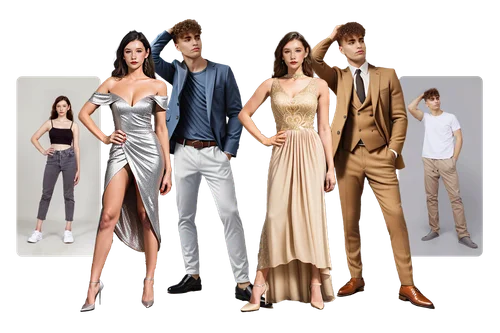
Big event coming up and nothing in the closet feels right? Upload one photo and run it through the fitting room: gala gowns, tailored suits, cocktail dresses, women's and men's. You see the whole look on yourself before you buy anything or borrow anything.
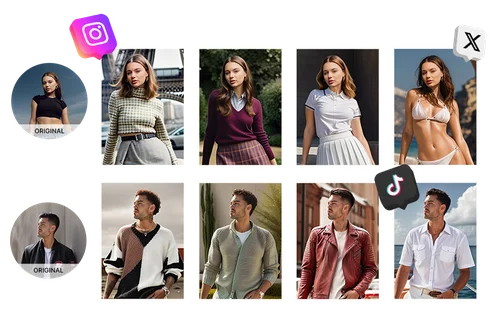
AI Trend Try-On for Social Media & Fashion Simulation
Chasing a trend gets expensive when every look means another purchase. Describe the outfit you want and the AI puts it on a photo you already have, so a week of posts comes out of one session. Send the result to Image to Video and a short prompt makes the look move.
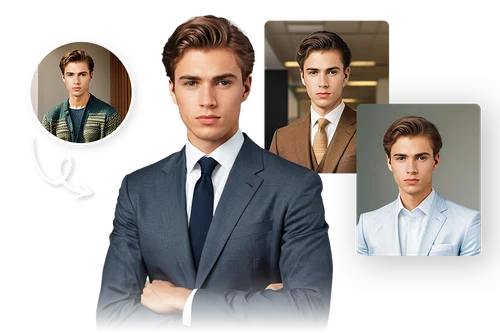
Generate a Professional AI Outfit for LinkedIn
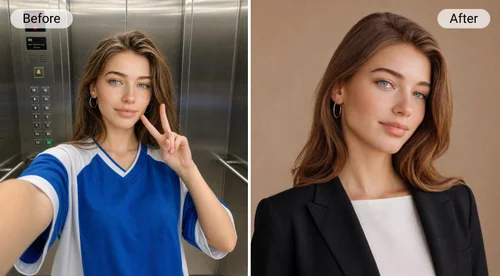
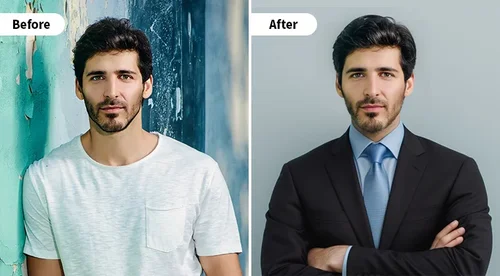
Need a headshot for LinkedIn but the only decent photo of you is in a cardigan? Upload it and the AI puts you in a navy suit, a tweed jacket, or a light blazer. Same face, same crop, ready for a profile or a company page.
How to Create Outfits With AI Outfit Generator
 Step 1
Upload Your Image
Upload a full-body photo of one person, facing the camera. The more of the current outfit the AI can see, the better it maps the new one.
Step 2Select Clothes Or Describe Your Own
Browse the fitting room by occasion, from gala and bridal to business and Japanese street style, or upload the piece you have in mind, or write the look out in up to 800 characters.
Step 3Generate and Download
Click "Generate" and Identity Lock keeps your face and pose while the outfit changes. Most runs cost 6 credits from your daily free allowance, and the 1K download carries no watermark.
AI Outfit Generator Upgrades Your Style

Hundreds of Looks, Casual to Black Tie
The fitting room is sorted by occasion: modern, gala, bridal, Japanese, themed, and business, with separate libraries for women's and men's wear. Pick one and you have a result without writing a prompt.

Identity Lock Keeps It You
The AI works from your original photo instead of generating a new person, so it redraws the outfit and carries through your face, proportions, and pose. Run five looks and it's the same you in all five.

Save on Shopping
Try a silhouette, a color, or a price bracket you wouldn't commit to yet. Seeing it on your own body beats guessing from a model who isn't your shape.

Explore Styles Freely
Not sure what suits you? Work through a whole category, then narrow down. Nothing to return, and no delivery to wait for.

No Watermark, Commercial Use Included
Free users get clean files, not a watermarked preview. What you generate is yours to post or use in your own marketing.

From Outfit to Video
Take a generated look into Image to Video, add a short prompt, and the outfit moves. Useful when a still won't carry the post.
AI Outfit Generator FAQ
What is AI Outfit Generator?


AI Outfit Generator is MyEdit's online tool that puts a different outfit on a photo you upload. Pick a look from the fitting room, upload a photo of the garment, or describe it, and the AI redraws the clothing while carrying through the face, body shape, and pose in your original photo. It runs in a browser, and downloads have no watermark.
Will it still look like me in the new outfit?
Yes. The AI regenerates the picture with the new outfit on, and Identity Lock is the part that holds your facial identity from the photo you uploaded. Without it a model would invent a face to suit the clothes. That's why you can work through ten looks and still recognize yourself in every one.
How many outfits are there?
473 right now: 369 in the women's library and 104 in the men's, grouped into Modern (161), Gala (77), Japan Style (54), Theme (37), Bridal (24), and Business (16). If none of them is the look you have in mind, upload a photo of the garment or describe it instead.
What kind of photo should I upload?
One person, full body, facing the camera, with the current outfit clearly visible. Results get worse with face coverings, a face that sits very small in the frame, heavy coats over the clothes you want replaced, or several people in one shot.
Is it free, and how do the credits work?
It's free to use, but you do need an account. Sign in and you get free credits every day. Most outfit changes cost 6 credits and the lightest option runs at 3, and the editor shows the cost before you click "Generate". Free downloads have no watermark. The pricing page covers the paid plans if the daily allowance isn't enough.
What resolution do I get, and what can I upload?
Downloads come out at 1K, which is fine for social posts, profile pictures, and planning what to buy. For a bigger file, run the result through Image Upscaler. On the way in: JPG, PNG, GIF, WebP, and BMP up to 10 MB, and written descriptions up to 800 characters.
The outfit came out wrong. What should I do?
Start with the photo. A full-body shot where the current clothes are unobstructed gives the AI the most to work with, and an unusual pose is the most common reason a result looks off. If you're describing the look, name the fabric, cut, and color rather than a brand.
Can I use the results commercially?
Yes, commercial use is permitted. You can post generated images or use them in your own marketing. You do need the rights to what you put in: your own photo or one you are licensed to use, and a garment image you own or have permission for.