AI Text Lift
Edit Text on Picture Online with AI
Change the words on any photo in seconds. MyEdit's Text Lift detects the text in your image and keeps the original font and style. Try it free.
Edit Text in Image Files for Any Project
Fix Typos and Update Details on Graphics
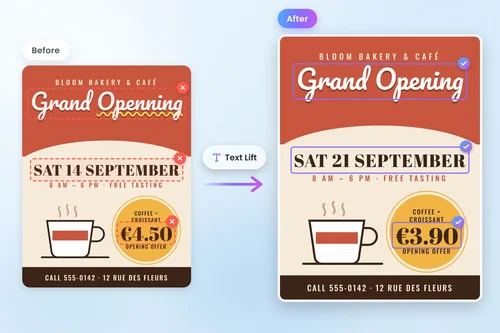
Spotted a typo on a flyer, or need to change a date, price, or phone number on an existing graphic? Edit the text in the image directly instead of rebuilding the whole design. Text Lift keeps the original font and style, so the correction blends in naturally.
Localize Ads, Banners, and Product Images
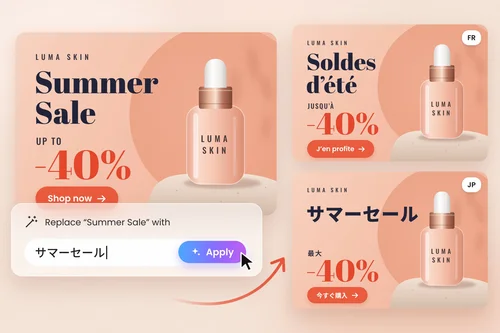
Reuse one visual across several markets by replacing the words on the picture with new copy or another language. Edit text in banners, social ads, and product photos without reopening the source file, and keep every regional version visually consistent.
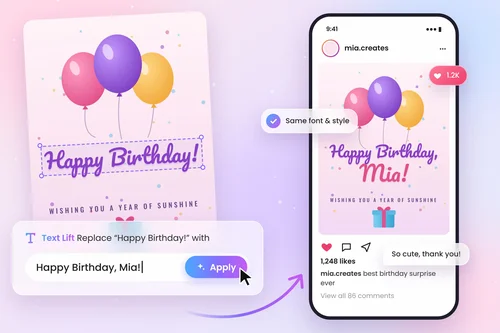
Personalize Memes, Cards, and Social Posts
Turn a reaction image into a fresh meme, add a name to a greeting card, or refresh the quote on a social graphic. Edit text on any picture in a few clicks and get a realistic result that looks like the words were always there, with no design skills needed.
How to Edit Text on a Photo
 Step 1
Upload Your Photo
Open the MyEdit Photo Editor and upload the picture you want to edit. JPG, PNG, GIF, WebP, and BMP files are supported, up to 50 MB.
Step 2Select Text Lift and Edit the Words
Click Text Lift and wait a few seconds while the AI detects the text in your image. Type your new words, then keep the original style or adjust the font, color and size.
Step 3Preview and Download
Check the result. When you're happy with your edited picture, click Export & Share in the top-right corner to download or share it.
Why Edit Text on Pictures with MyEdit

Keeps the Original Font and Style
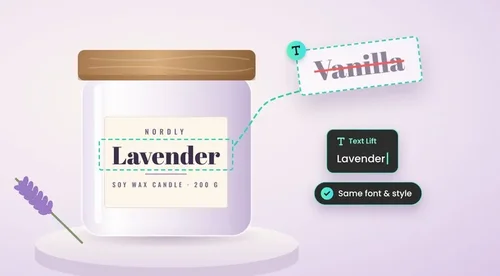
Text Lift analyzes the lettering in your image and applies the same font, size, color, and style to your new words. Your edits look natural instead of pasted on, even on detailed graphics and photos.

No Original Design File Needed
Lost the layered PSD or the template? Edit text in image files that are already flattened, such as JPGs, PNGs, and screenshots. MyEdit lifts the text out of the picture so you can rewrite it directly.

Edit Text in Seconds, No Skills Needed
Skip the manual cloning, masking, and font hunting that traditional software requires. Upload, click Text Lift, and type. Anyone can edit text on a picture in a few seconds, from beginners to busy marketers.

Restyle the Text Your Way
Text Lift turns the words in your picture into editable text. Keep the original look, or change the font, size, color, spacing and alignment, add bold, italics or effects, and move or resize the text anywhere on the image.

More Edits in One Photo Editor
Changing the words is just the start. After you edit the text in your image, keep refining it in the same MyEdit Photo Editor: remove unwanted objects, add stickers or new text, and export the finished picture.

Edit Online, Nothing to Install
MyEdit runs in your web browser, so you can edit text in an image on Windows, Mac, or Chromebook without downloading software. Open the editor, make your changes, and download the result right away.
Edit Text on Picture FAQ
How do I edit text in an image?


Upload your picture to the MyEdit Photo Editor, click Text Lift, and wait a few seconds while the AI detects the text. Type your new words, check the result, then click Export & Share to download the edited image.
Can I edit text on a picture without changing the font?
Yes. Text Lift detects the original lettering and keeps its font and style when you type new words. That way the edited text matches the rest of the image and looks like it was part of the original picture.
Can I edit text in a screenshot or a JPG file?
Yes. You don't need the original layered design file. MyEdit lets you edit text in flattened images such as screenshots, JPGs, and PNGs, as well as GIF, WebP, and BMP files up to 50 MB.
Is it free to edit text on a picture with MyEdit?
Yes. Editing text in images with MyEdit is free, so you can fix typos, update details, or translate the words on as many pictures as you need.
Can I change the text in an image into another language?
Yes. After Text Lift detects the words in your picture, you can replace them with text in another language. This is a quick way to localize ads, product images, and social posts for different markets.
Do I need Photoshop or design skills to edit text in an image?
No. Traditional software requires cloning, masking, and matching fonts by hand. With MyEdit, you click Text Lift and type your new words, so anyone can edit text in an image in just a few seconds.
What kinds of pictures can I edit text on?
You can edit text on flyers, posters, memes, greeting cards, social media graphics, banners, product photos, and screenshots. Clear, high-resolution images give the most accurate text detection and the most natural result.
Is it legal to edit text in an image?
Yes, if the images are yours or you have permission to use them. Do not edit text in images to forge IDs, receipts, or official documents, create fake screenshots to mislead people, or infringe copyrights, as this may be illegal.