Image Flipper
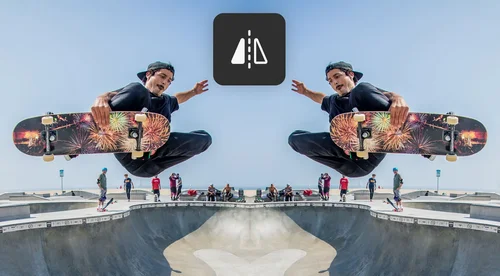
Flip Images Horizontally/Vertically
FREE! Easily flip images online with the image flipper tool.
Why Flip Images?
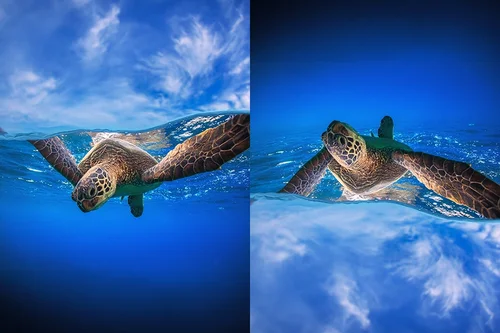
Create a Surreal or Dreamy Scene
Wow your viewers by flipping images into scenes that are not possible in real life. A quick way of doing this is by using the image flipper tool to flip images vertically and create an upside-down effect.

Tell the Intended Story
Visual theory states that our eyes look at images from left to right. So, flipping an image horizontally can help influence where the eye is drawn.

Make Photos More Compositionally Pleasing
Photographers tend to tweak images to make them more balanced and lead the viewer’s eye through the frame. So, flipping an image can create a more natural flow into the scene.
How to Flip Images With Image Flipper
 Step 1
Upload Image File
Select and import an image file from your device.
Step 2Select to Flip Image Horizontally/Vertically
On the editing dashboard, click the icon labeled Horizontal or Vertical to flip image.
Step 3Download Flipped Image
That's it! Click Download to save the edited image to your device.
Why Use Image Flipper?

Easy-to-Use
Simple three-step process. Select your file, flip picture, and export.

Online Image Flipper
Quickly flip images without downloading an app or software to your device.

All-in-One Editor
Flip, mirror, rotate, or crop pictures with just one tool.

PC and Mobile Compatibility
Simply upload image from your device and flip image.

Export in Popular Social Media Formats
Export images in ready-to-use social media formats like Facebook posts, Instagram posts, YouTube thumbnails, and more!

Support for Popular File Formats
Upload files in JPEG, PNG, GIF, WebP, or BMP.
Image Rotator FAQ
What does image flipper tool do?


Flipping an image allows you to mirror the image on its horizontal or vertical axis.
Is the image flipper tool free?
Yes, online image flipper is free.
What image formats are supported by the image flipper?
Supported image formats include JPG, PNG, GIF, WebP, and BMP.
Is it safe to use MyEdit to flip an image?
Yes, it's safe to use our tool to flip an image. MyEdit platform uses advanced security measures to safeguard users' data.
How do I flip an image?
1. Click Choose a file to upload the image 2. On the editing dashboard, click the icon labeled Horizontal or Vertical to flip image 3. Click Download to save the file to your device
How can I flip my image?
Follow these steps to flip your image with the image flipper tool: 1. Click Choose a file to upload the image 2. On the editing dashboard, click the icon labeled Horizontal or Vertical to flip image 3. Click Download to save the file to your device
How do I mirror flip an image?
You can mirror images by using our horizontal flip tool.
What is to mirror image?
To mirror an image means to flip it horizontally.
How do I flip a picture into a mirror image?
Follow these steps to mirror your image with the image flipper tool: 1. Click Choose a file to upload the image 2. On the editing dashboard, click the icon labeled Horizontal to mirror image 3. Click Download to save the file to your device
What is the free program to flip images?
We recommend our Image Flipper tool to flip images. It's free and browser-based.