

Key Takeaways
- Kling AI is good for short, realistic clips: Kling 4.0, Kling O3 and Kling 3.0 got every text and multi-shot test right.
- Best value: Kling O3 matched Kling 4.0 on text, product turns and multi-shot prompts for 25 credits per clip instead of 45.
- Kling 4.0 gave the most cinematic motion and camera moves in my tests.
- Kling 2.6 and Kling 2.5 Turbo garbled on-screen text and ignored a three-shot prompt.
- Kling 2.5 Turbo is the budget pick at 10 credits for simple B-roll without text.
Is Kling AI good? Yes, for short, realistic clips, but the Kling model you pick matters more than the brand name. MyEdit's AI Video Generator offers five Kling models, and in my tests the three newest handled text, product turns and multi-shot prompts, while the two older ones did not.
I ran the same six prompts through Kling 4.0, Kling O3, Kling 3.0, Kling 2.6 and Kling 2.5 Turbo: 30 clips, tested on November 12, 2026. Below you will find the results of each test, what each model costs, and which one to use for what.
Disclosure: MyEdit is our own product. I ran all five Kling models inside MyEdit's AI Video Generator so that every prompt, clip length, aspect ratio and audio setting was identical.
Which Kling Models Can You Use in MyEdit?
MyEdit's AI Video Generator offers five Kling models: Kling 4.0, Kling O3, Kling 3.0, Kling 2.6 and Kling 2.5 Turbo. You choose one from the model menu in the AI Video Generator, type a prompt and generate. Kling 2.5 Turbo is the cheapest at 10 credits per clip, Kling 4.0 the most expensive at 45, and only Kling O3 accepts reference images.
Kling Models in MyEdit Compared
Kling 4.0 | Kling O3 | Kling 3.0 | Kling 2.6 | Kling 2.5 Turbo | |
|---|---|---|---|---|---|
Credits per clip | 45 | 25 | 30 | 40 | 10 |
Resolution | 720p or 1080p | 720p, 1080p or 4K | 720p, 1080p or 4K | Fixed (1080p in my tests) | 720p or 1080p |
Clip length | Adjustable (I used 5 s) | 3 to 15 s | Adjustable (I used 5 s) | 5 or 10 s | 5 or 10 s |
Audio | Always on | On or off | On or off | On or off | On or off |
Reference images | No | Up to 7 | No | No | No |
Prompt limit (characters) | 11,000 | 2,400 | 2,400 | 2,400 | 2,400 |
Which Kling Model Should You Pick?
- Best value: Kling O3. It matched Kling 4.0 on text, product shots and multi-shot prompts in my tests for about half the credits.
- Most cinematic motion: Kling 4.0, for action, camera moves and dialogue when budget is not the issue.
- Middle ground with 4K: Kling 3.0, with results close to Kling O3.
- Cheap drafts and B-roll without text: Kling 2.5 Turbo at 10 credits.
- Kling 2.6: hard to recommend. It costs 40 credits and failed the text and multi-shot tests.
Free credits: MyEdit gives you 3 free credits every day you claim them, and each batch stays valid for 1 month from the claim date. Each generation spends credits depending on the model, some models also include a free try, and videos download without a watermark. See How to Get Free Credits in MyEdit below.
How to Get Free Credits in MyEdit
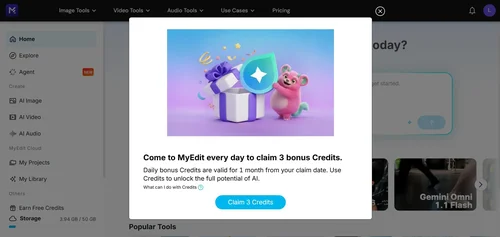
You can claim 3 free credits every day in MyEdit, and each batch stays valid for 1 month from the day you claim it, so unused credits add up.
- Sign in to MyEdit and open the AI Video Generator.
- Click your profile icon in the top-right corner and choose Earn Free Credits.
- Click Claim 3 Credits in the window that opens.
Four days of claims cover one 5-second Kling 2.5 Turbo clip at 10 credits; the other Kling models cost 25 to 45 credits per clip.
Is Kling AI Good? 5 Kling Models, 6 Same-Prompt Tests
Kling AI is good, but not every Kling model is: Kling 4.0, Kling O3 and Kling 3.0 handled all six tests, while Kling 2.6 and Kling 2.5 Turbo failed the text and multi-shot tests. Each test used one prompt for all five models, and I kept the first result from each.
How I Tested
- Date: November 12, 2026.
- Device: Windows desktop PC.
- Browser and app: Google Chrome 157, MyEdit web app, English interface.
- Tasks: 6 text-to-video prompts in AI Video Generator, each run once on Kling 4.0, Kling O3, Kling 3.0, Kling 2.6 and Kling 2.5 Turbo (30 clips). Settings: 5 seconds, 16:9, 720p (Kling 2.6 has no resolution choice and rendered at 1080p), audio on.
- Criteria: did the clip follow the prompt (action, camera move, number of shots), was required text spelled exactly, and did people, hands and products stay consistent. I reviewed frames across each clip and detected shot cuts with video tools.
Test 1: Fast Motion (Dog Catching a Frisbee)
What it checks: fast action and physics: a run, a leap, a catch and a splash in 5 seconds.
Prompt: “A golden retriever sprints across a sunny Southern California beach, leaps high to catch a red frisbee in midair, then lands in the shallow surf with a big splash. The camera tracks alongside the dog in a smooth side-on shot with slight slow motion. Realistic, natural daylight. Sound of waves, paws on wet sand and the splash.”
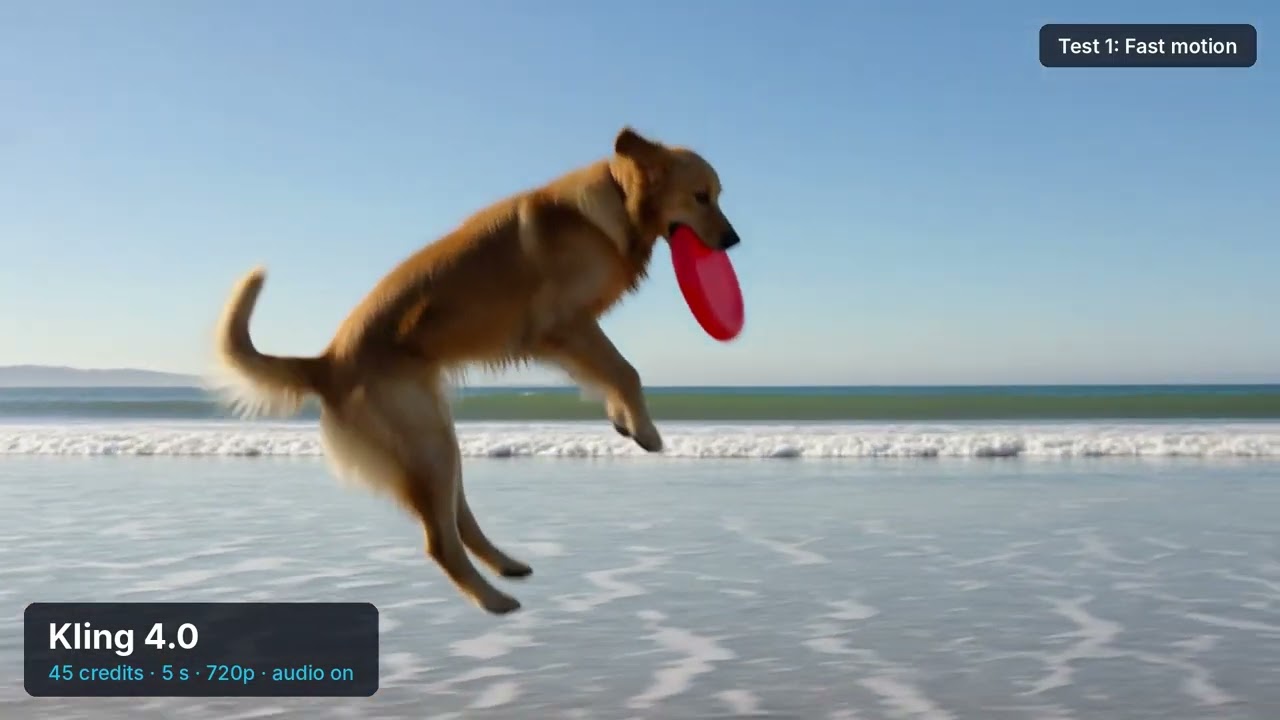
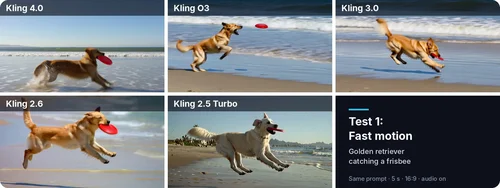
- Kling 4.0: the most dynamic clip, with a high leap, a clean catch and a landing in the surf.
- Kling O3 and Kling 3.0: the full sequence in a smooth side-on tracking shot, with soft motion blur on the fastest moments.
- Kling 2.6: a close, energetic catch, but the dog almost disappears into the splash at the end.
- Kling 2.5 Turbo: completes the action, but the dog is a pale cream color rather than golden.
Verdict: All five handle fast action; Kling 4.0 looks the most cinematic.
Test 2: Camera Movement (Drone Over Fall Foliage)
What it checks: one continuous camera move that ends on a reveal.
Prompt: “Drone shot: the camera glides low over a Vermont forest in peak fall colors at sunrise, then rises and turns slowly to the right to reveal a red covered bridge over a river in the valley below. One continuous, smooth camera move with no cuts. Cinematic and realistic. Soft wind and birdsong.”
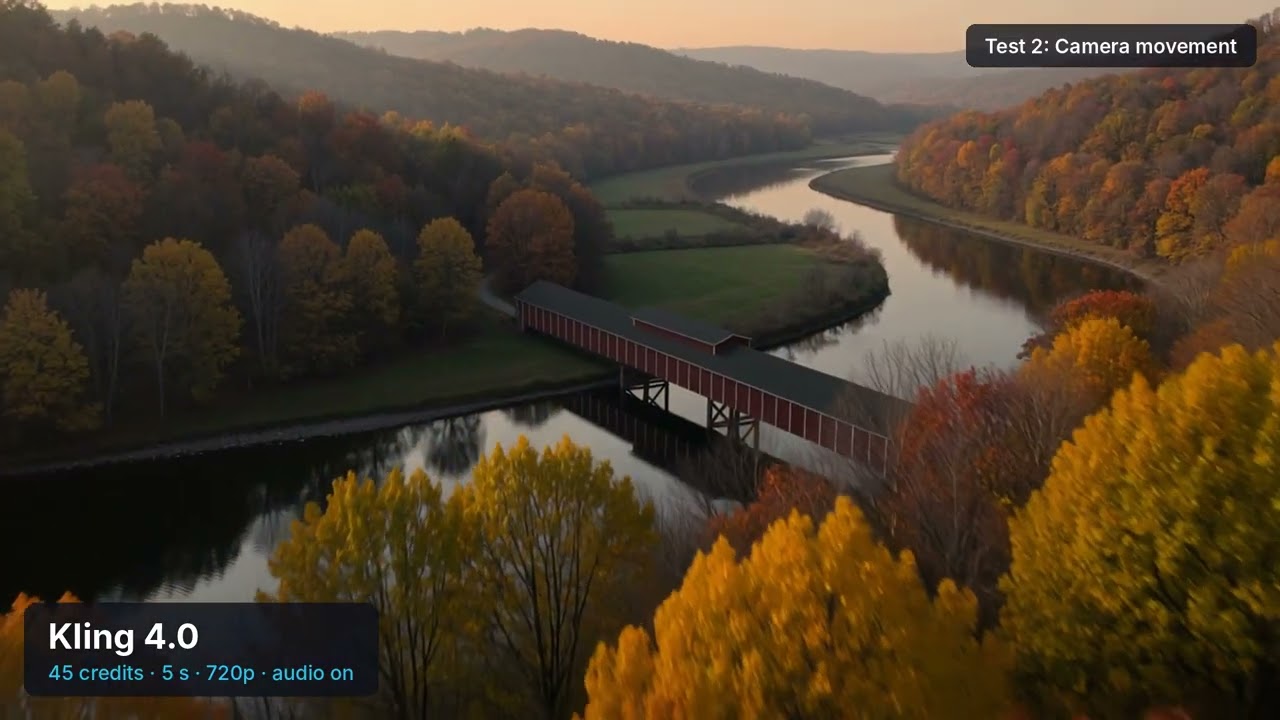
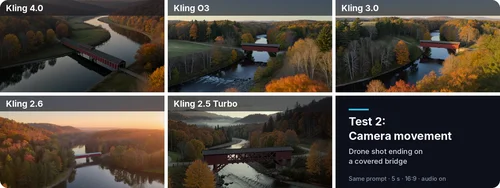
- Kling 4.0: the best move. The camera rises over the trees and reveals a large red covered bridge over a winding river.
- Kling O3 and Kling 3.0: smooth, continuous moves that reveal a smaller bridge in the valley.
- Kling 2.6: a smooth move, but the bridge stays small and far away.
- Kling 2.5 Turbo: the bridge is in view from the first frames, so there is no real reveal.
Verdict: No model cut the shot; Kling 4.0 followed the rise-and-reveal instruction best.
Test 3: Dialogue and On-Screen Text (Talking Food-Truck Owner)
What it checks: a spoken English line and a sign that must read exactly “ROSA’S TACOS.”
Prompt: “Realistic evening street scene in Austin, Texas. A smiling food-truck owner in her forties, wearing a black cap and a white apron, leans out of the truck window, looks at the camera and says in a friendly American accent: "Fresh off the grill, best tacos in town!" Her lips match the words. Above her, the truck's sign reads exactly "ROSA'S TACOS" in large white letters on a red background, sharp and readable. Medium shot with a slow push-in. Sizzling grill and light street chatter. No subtitles and no other text.”
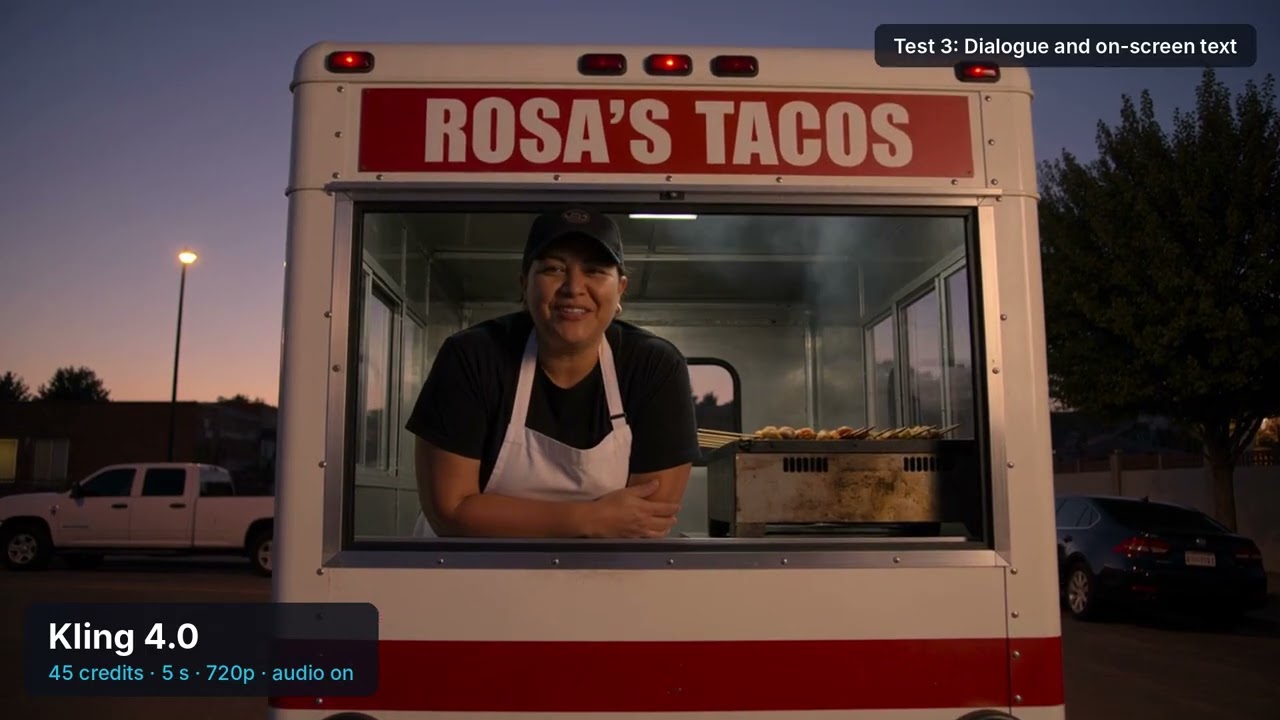
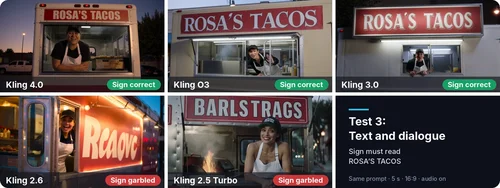
- Kling 4.0, Kling O3 and Kling 3.0: the sign reads “ROSA’S TACOS,” exactly as written.
- Kling 2.6: the sign reads “Reaovc.”
- Kling 2.5 Turbo: the sign reads “BARLSTRAGS.”
- Spoken line: in the Kling 4.0 clip, the owner delivers the line clearly.
Verdict: If your clip needs readable text, use Kling 3.0, Kling O3 or Kling 4.0.
Test 4: Full 360° Product Turn (Perfume Bottle)
What it checks: whether the product keeps its look through a full turn and whether the label “NORTHFIELD” is correct when it faces the camera again.
Prompt: “A frosted glass perfume bottle with a gold cap stands on a white marble pedestal and makes one full 360-degree turn: we see its sides and back, then the front label returns to face the camera, reading exactly "NORTHFIELD" in black serif letters, clear and undistorted. Fixed camera, soft studio light gliding across the glass, plain beige background, premium ad look. Soft ambient music.”
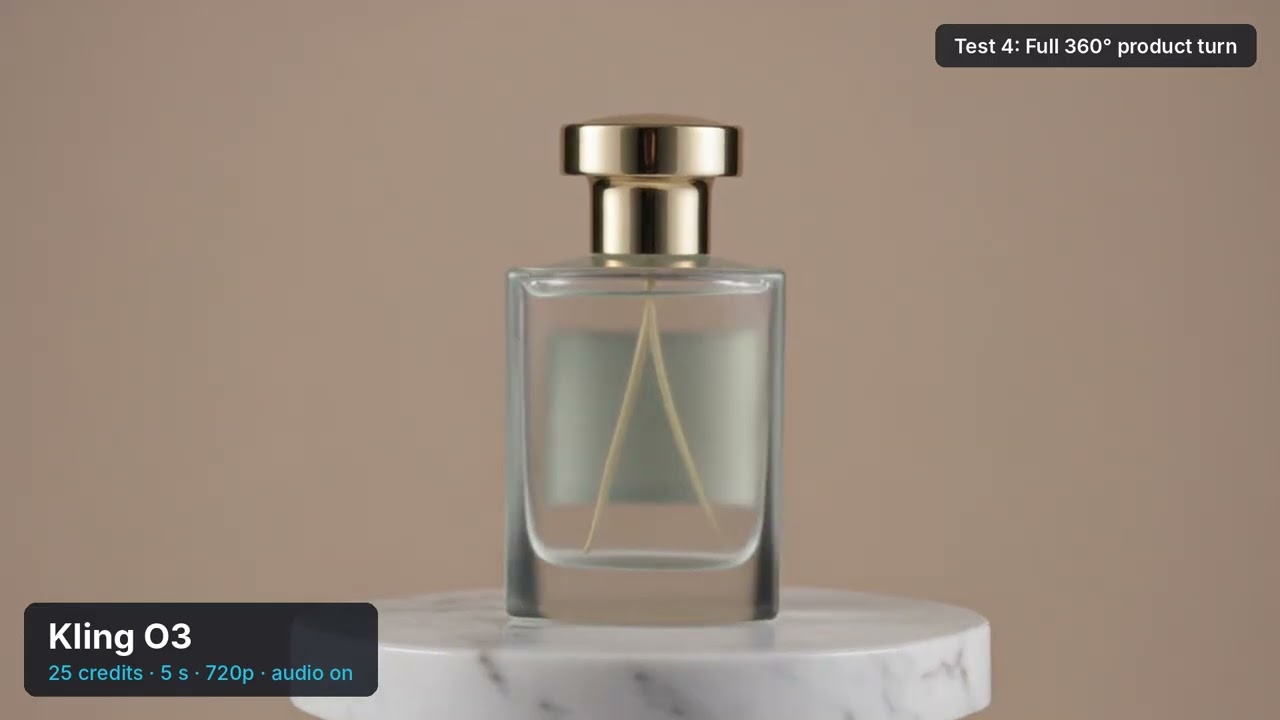
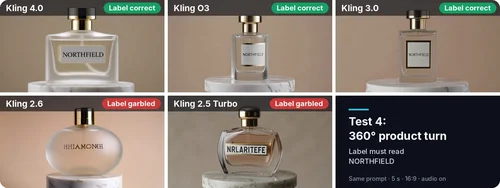
- Kling 4.0, Kling O3 and Kling 3.0: the bottle turns and ends on a clean, correctly spelled label.
- Kling 2.6: a round frosted bottle with a garbled label (“HHIAMONRH”).
- Kling 2.5 Turbo: the bottle turns, but the label reads “NRLARITEFE.”
Verdict: For product shots with branding, the same three models win.
Test 5: Multi-Shot Consistency (Coffee Ad)
What it checks: three different shots (wide, close-up, medium) in one 5-second clip, with the same barista in every shot.
Prompt: “A three-shot coffee commercial with the same barista in every shot. Shot 1, wide: a young barista with curly red hair and a green apron works behind the counter of a sunny Brooklyn cafe. Shot 2, close-up: she pours heart-shaped latte art into a white cup. Shot 3, medium: she slides the cup across the counter to a customer and smiles. Same person, same green apron and same white cup in all three shots. Warm natural light. Sound of an espresso machine and soft cafe chatter.”
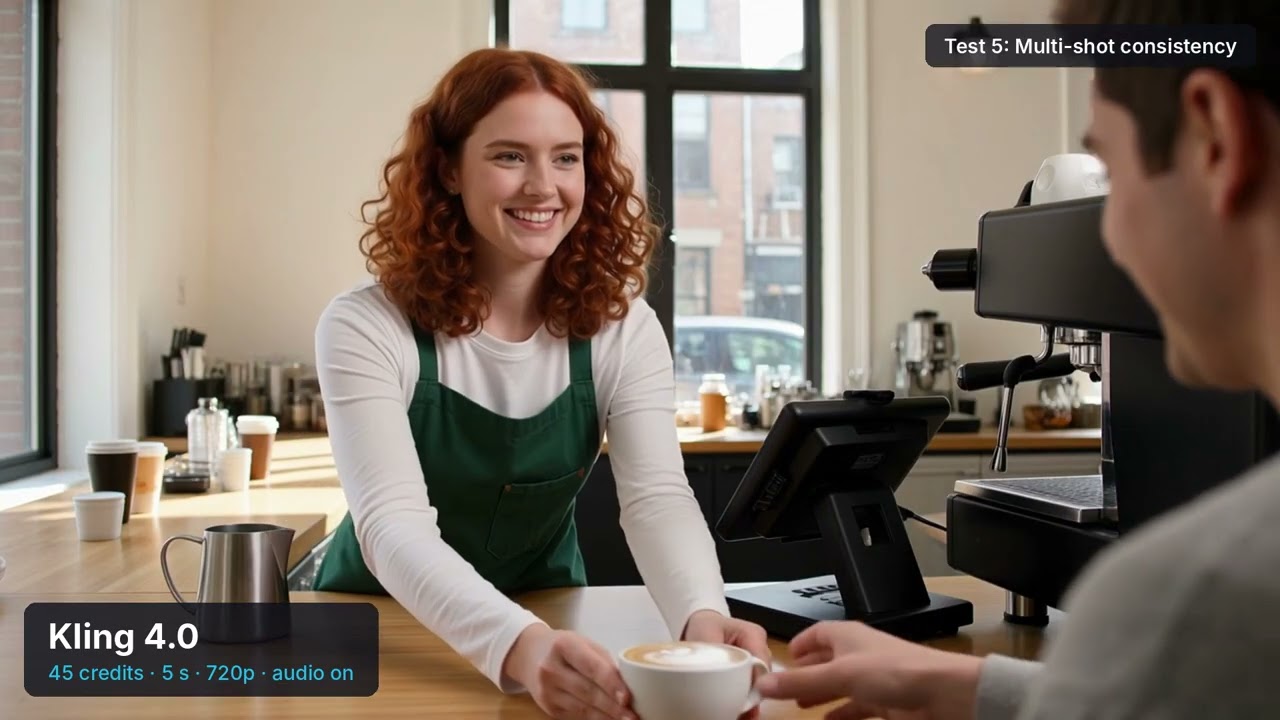
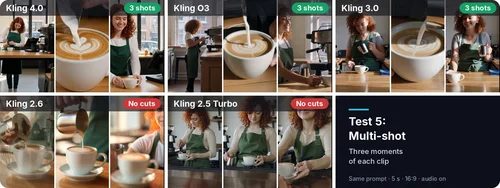
- Kling 4.0, Kling O3 and Kling 3.0: three distinct shots (wide, close-up, medium) with the same red-haired barista and green apron.
- Kling 2.6: no cuts. One continuous move from the pour to the barista, opening on a blurry double-exposed frame.
- Kling 2.5 Turbo: no cuts. A single medium shot of the barista.
Verdict: Only the three newer models follow shot-by-shot prompts.
Test 6: Hands and Fingers (Pianist Close-Up)
What it checks: realistic hands and fingers in fast motion, a classic weak spot for AI video.
Prompt: “Close-up of a pianist's hands playing a fast, lively jazz passage on a grand piano in a dim New Orleans club. All ten fingers move naturally and press the keys, with realistic knuckles and nails and no extra or merged fingers. The camera slowly slides along the keyboard. Warm stage light. The piano sound matches the finger movements.”
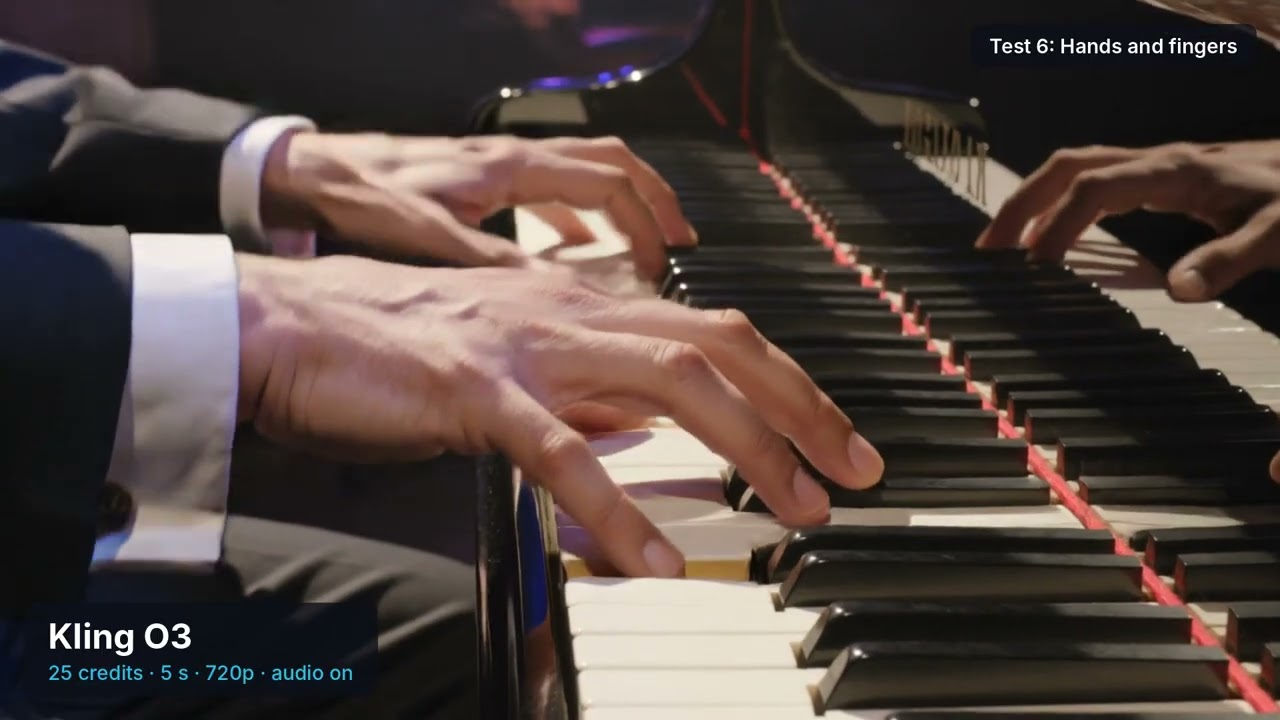
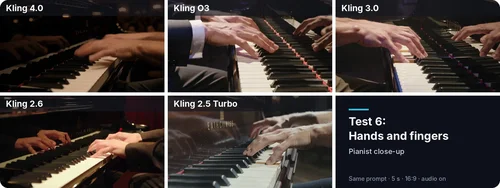
- Kling O3 and Kling 3.0: the clearest hands, with natural knuckles, nails and finger spacing in a well-lit close-up.
- Kling 4.0: natural hands, but a dark, soft-focus scene makes the fingers harder to read.
- Kling 2.6: a wider shot, so the hands are small in the frame.
- Kling 2.5 Turbo: softer, less defined fingers, and the brand name on the piano is gibberish.
Verdict: For hand close-ups, start with Kling O3 or Kling 3.0. I judged frames across each clip; small glitches can still appear in motion.
Kling Pros and Cons in MyEdit: My Verdict on Each Model
Of the five Kling models in MyEdit, Kling O3 is the one I would start with, Kling 4.0 is the one to use when motion matters most, and Kling 2.6 is the one to skip. Here is each model’s balance of strengths and limits from my six tests.
Kling 4.0
Pros

 Correct sign and label text, and three clean shots on the multi-shot prompt
- The most cinematic motion and camera moves in my tests
- The spoken line came through clearly
Cons

 Highest price: 45 credits for a 5-second 720p clip
- Dark, soft image on the piano close-up
- Audio cannot be turned off
Kling O3
Pros
- Matched Kling 4.0 on text, product turns and multi-shot prompts
- Cheapest of the three reliable models at 25 credits
- Natural hands, plus a 4K option and up to 7 reference images
Cons
- Some motion blur on fast action
- A smaller, less dramatic reveal on the drone shot
Kling 3.0
Pros
- Correct text and a clean 360° product turn
- Three consistent shots and natural hands
- 4K option at 30 credits per clip
Cons
- Some motion blur on fast action
- Costs 5 credits more than Kling O3 for similar results
Kling 2.6
Pros
- Energetic close-up action
- Renders at 1080p by default
- Offers 5- or 10-second clips
Cons
- Garbled the sign and the product label
- Ignored the three-shot structure
- 40 credits, the second-highest price
- Several clips had much quieter audio
Kling 2.5 Turbo
Pros
- Cheapest Kling model at 10 credits per clip
- Sharp, attractive single shots
- Fine for simple B-roll without text
Cons
- Garbled the sign and the label
- Ignored the three-shot prompt
- No real reveal on the drone shot
- Less defined fingers on the piano close-up
Is Kling AI Safe to Use?
You can use Kling in MyEdit right in your browser: there’s nothing to install, and you don’t need a Kling account. Kling is made by Kuaishou, a Chinese technology company.
MyEdit’s terms ban deepfakes and NSFW content, as our Responsible AI Statement explains. Kling is a third-party model, so what you send to it also follows its provider’s terms.
Before you publish a clip, check the model’s terms for commercial use, and keep personal details out of your prompts. Downloads have no watermark.
How to Use Kling Models in MyEdit
You can try any Kling model in three steps in MyEdit's AI Video Generator, right in your browser.
Step 1
Select a Model and Describe Your Video
Open the AI Video Generator and choose a Kling model from the model menu: Kling 4.0, Kling O3 and Kling 3.0 are under Featured, Kling 2.6 and Kling 2.5 Turbo under More models. Then type your prompt.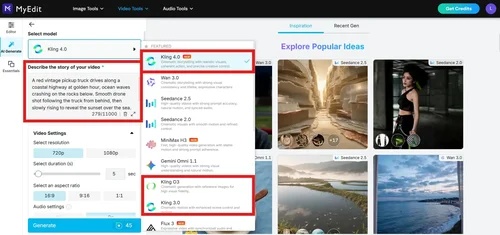
Step 2
Add Reference Media and Settings (Optional)
Set the resolution, duration, aspect ratio and audio. Kling O3 also accepts up to 7 reference images. The Generate button shows the credit cost before you click.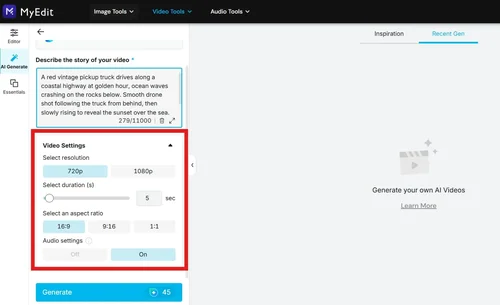
Step 3
Generate and Download
Click Generate. You can start another clip while the first one renders; finished videos are saved to My Library, where you can download them without a watermark.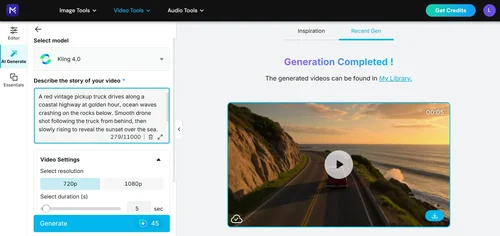
Prefer to start from a photo? Image to Video animates an existing image instead of a text prompt.
Conclusion: Which Kling Model Should You Use?
Start with Kling O3: in my tests it matched Kling 4.0 on readable text, product turns and multi-shot prompts for 25 credits instead of 45. Switch to Kling 4.0 for action and camera-led shots, use Kling 2.5 Turbo for cheap drafts without text, and skip Kling 2.6.
Comparing image models too? See the GPT image model comparison on this blog, tested the same way in MyEdit.
About This Test
- Tested on November 12, 2026, in the English web app (AI Video Generator, text to video).
- Credits and settings were read from the online tool on the test date and may change.
- The brands in the prompts (Rosa’s Tacos, NORTHFIELD) are fictional, and all people shown are AI-generated.
- Background on Kling and its developer: Kling AI on Wikipedia.

