
Key Takeaways
- Why use GPT models in MyEdit? You can pick the exact model for each image and switch between all six GPT models in the same panel.
- Which GPT image models does MyEdit offer? GPT Image 2.6 Sunburst and Flare, GPT Image 2.5 Sunburst and Flare, GPT Image 2 and GPT Image 1.5. I tested all six.
- Sunburst or Flare? In my tests, GPT Image 2.6 Flare averaged 11.5 seconds per run and 2.6 Sunburst 32.3 seconds. Use Flare for drafts and batches, and Sunburst when detail and variety matter.
- 2.6 or 2.5? Both generations got every line of text right, but the 2.5 models added objects I did not ask for more often. Start new work on 2.6.
- What does it cost? 3 credits per 1K image on all six models, and 6 credits per 2K image on every model except GPT Image 1.5. Every account can claim 3 free credits per day.
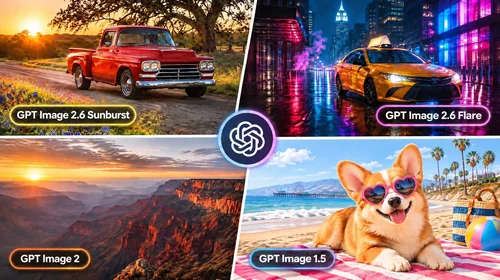
MyEdit's AI Image Generator lets you choose from six GPT image models, including GPT Image 2.6 Flare and GPT Image 2.6 Sunburst, which OpenAI released on November 4, 2026. I ran the same four prompts, from a garage sale flyer to a three-panel comic, through all six models and timed every run. Here is how they compare on speed, text accuracy, instruction following and cost, and which one to use for each job.
Disclosure: MyEdit is our own product. I ran all six GPT image models inside MyEdit's AI Image Generator so that every prompt, resolution and credit cost was identical. The only difference was the aspect ratio for GPT Image 1.5, which used the closest ratio it supports.
Which GPT Image Models Does MyEdit Offer?
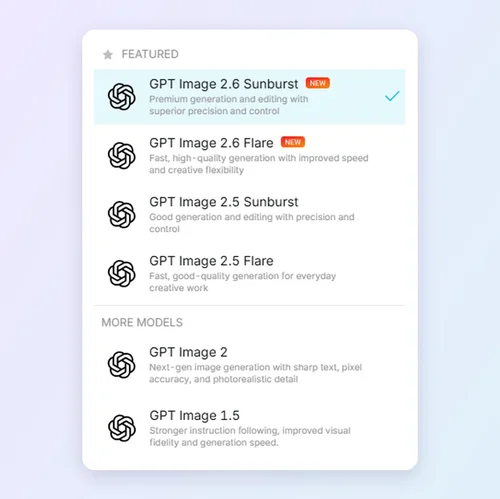
MyEdit offers six GPT image models in its AI Image Generator: the new GPT Image 2.6 Sunburst and Flare, the previous-generation GPT Image 2.5 Sunburst and Flare, GPT Image 2 and GPT Image 1.5. All six cost the same 3 credits for a 1K image, so the real differences are speed, prompt length, aspect ratios and how well each model follows instructions.
GPT Image Models in MyEdit Compared
GPT Image 2.6 Sunburst | GPT Image 2.5 Sunburst | GPT Image 2 | GPT Image 1.5 | |
|---|---|---|---|---|
Released | Nov 2026 | Sep 2026 | Apr 2026 | Dec 2025 |
OpenAI positioning | Detail and precise edits (Flare version: speed) | Quality, previous gen (Flare version: speed) | Move to 2.6 | Older model |
My average time | 32.3 s (Flare: 11.5 s) | 21.8 s (Flare: 20.6 s) | 32.8 s | 16.9 s |
Prompt limit (characters) | 32,000 | 32,000 | 8,000 | 2,500 |
Aspect ratios | 6 | 6 | 6 | 3 |
Resolution | 1K or 2K | 1K or 2K | 1K or 2K | No setting |
Reference images | 16 | 16 | 16 | 16 |
Credits (1K / 2K) | 3 / 6 | 3 / 6 | 3 / 6 | 3 |
4 Same-Prompt Tests: Which GPT Image Model Did Best?
No model won every test. All six got every line of text right and every count right, so the real differences were speed, extra objects nobody asked for, variety between images and how reliably a character stayed the same. Each grid below shows the first image from each model's run, with no retries or cherry-picking.
How I Tested
- Tested on: November 9, 2026 in MyEdit's US English interface (GPT Image 2.6, GPT Image 2 and GPT Image 1.5), and November 10, 2026 (GPT Image 2.5 Sunburst and Flare)
- Device and OS: Windows desktop PC, Chrome 157
- Tasks: 4 prompts (garage sale flyer, three-panel comic, home office desk, picture book character) on 6 models, 1K resolution, 2 images per run, 24 runs in total. GPT Image 1.5 used 2:3 and 3:2 where it has no 3:4, 16:9 or 4:3 option.
- Timing: From clicking Generate until both images appeared. Because GPT Image 2.5 ran on a different day, compare its times with caution.
- Criteria: Text accuracy, instruction following, consistency, variety between images and generation time. Model positioning from OpenAI's announcement and image prompting guide.
Test 1: Garage Sale Flyer With Exact Text
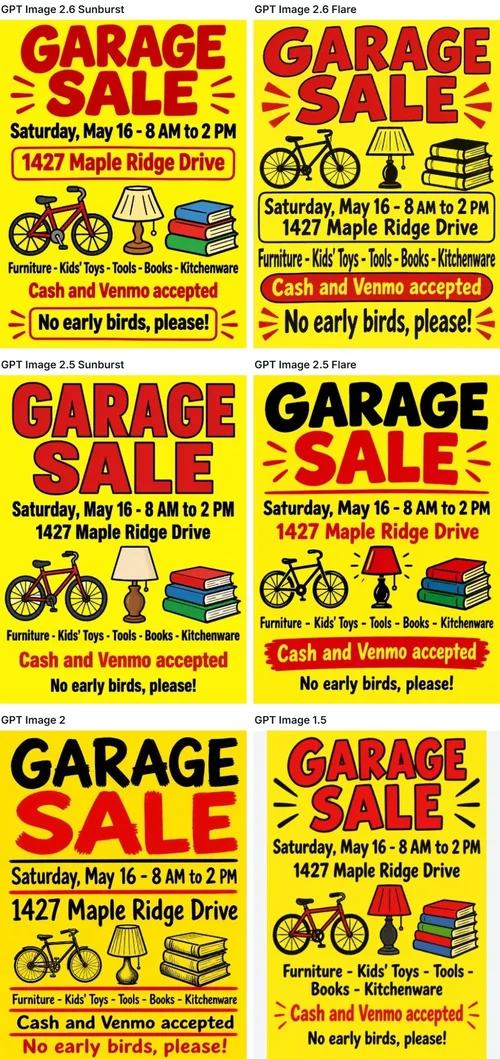
Prompt: Printable garage sale flyer to post on a neighborhood bulletin board, portrait layout, bold and easy to read from across the street, bright yellow background with black and red lettering, and simple hand-drawn icons of a bicycle, a lamp and a stack of books. All text must be spelled exactly as follows and no other text may appear: headline "GARAGE SALE"; "Saturday, May 16 - 8 AM to 2 PM"; "1427 Maple Ridge Drive"; "Furniture - Kids' Toys - Tools - Books - Kitchenware"; "Cash and Venmo accepted"; "No early birds, please!"
Result: All six models spelled every line correctly in all twelve images, including the address and the apostrophe in "Kids' Toys." The differences were in layout. GPT Image 2.6 Sunburst and 2.5 Flare varied their design the most between their two images, 2.6 Flare placed the icons above the date, GPT Image 2 squeezed the last two lines into small print in one image, and GPT Image 2.5 Sunburst and GPT Image 1.5 each produced two nearly identical posters.
Test 2: Three-Panel Comic With Dialogue
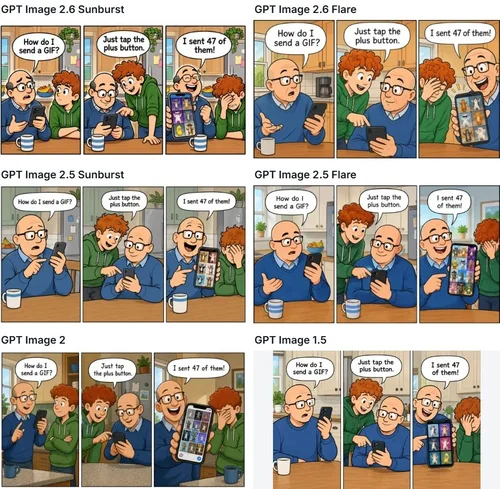
Prompt: Three-panel newspaper comic strip in a clean, colorful cartoon style, with the panels arranged left to right. Characters: Max, a teenage boy with curly red hair and a green hoodie, and his dad, a bald man with glasses and a blue sweater. Panel 1: in a kitchen, Dad holds up a smartphone and says "How do I send a GIF?" Panel 2: Max leans over to show him and says "Just tap the plus button." Panel 3: Dad proudly shows a phone screen full of dancing cat GIFs and says "I sent 47 of them!" while Max facepalms. Each line of dialogue is in a speech bubble, spelled exactly as written. No other text, no title, no signature.
Result: All six models put every line of dialogue in the right bubble, spelled exactly, in both of their images. The differences were in the storytelling. GPT Image 2.6 Sunburst and GPT Image 2 kept both characters in all three panels, which reads more naturally, while 2.6 Flare, both 2.5 models and GPT Image 1.5 showed only the dad in the first panel. Every model got the punchline right, with the dad proudly holding up a screen of cat GIFs while Max facepalms.
Test 3: Counting and Placement on a Home Office Desk
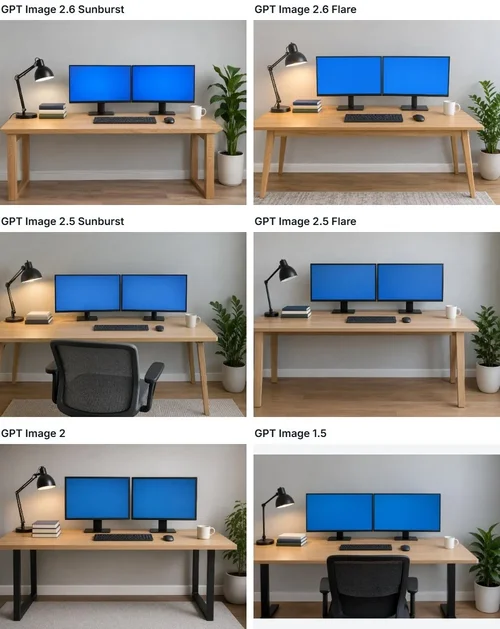
Prompt: Photorealistic photo of a home office desk against a light gray wall, with no people anywhere in the image. On a light oak desk, from left to right: a black desk lamp on the far left, then a stack of exactly three books, then exactly two computer monitors side by side, and a white coffee mug on the far right. A wireless keyboard and mouse sit in front of the monitors. Exactly one potted plant sits on the floor to the right of the desk. The monitors show a plain blue background with no readable text. No other objects on the desk.
Result: Every model got the counts and positions right in all twelve images: the lamp on the far left, exactly three books, exactly two monitors, the mug on the far right and one plant on the floor. The slips were extra objects. GPT Image 2.5 Sunburst added an office chair I did not ask for in both of its images and hung a framed picture on the wall in one, while 2.5 Flare and GPT Image 1.5 each added a chair once. Neither 2.6 model added a chair.
Test 4: Same Character in Four Scenes
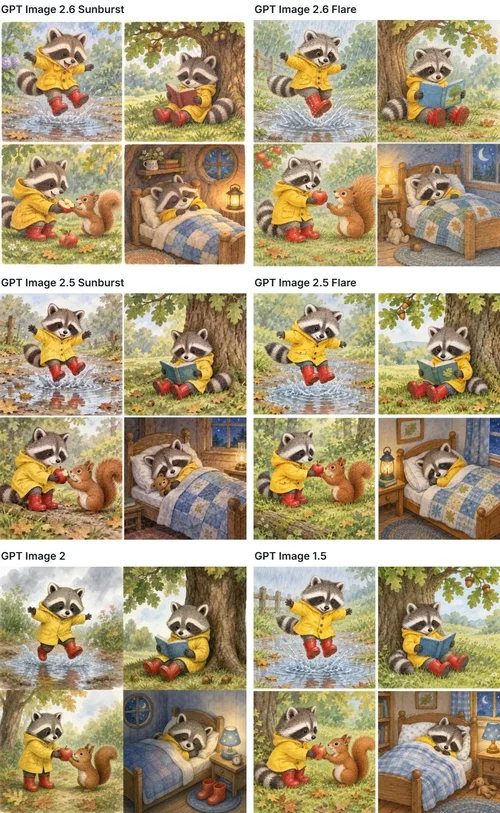
Prompt: Children's picture book illustration in soft watercolor style: a 2x2 grid of four scenes starring the same small raccoon who wears a yellow raincoat and red rubber boots. Top left: the raccoon jumping into a puddle. Top right: the raccoon reading a book under an oak tree. Bottom left: the raccoon sharing an apple with a squirrel. Bottom right: the raccoon asleep in a tiny bed. The raccoon must look identical in all four scenes, with the same face markings, raincoat, boots and size. No text.
Result: All six kept the yellow raincoat, red boots and face markings across the panels. GPT Image 2 was the least reliable: in one of its two images, the raccoon's striped tail is missing in three of the four scenes. Both 2.6 models and both 2.5 models stayed consistent, although 2.6 Flare repeated almost the same four compositions in both of its images, which gives you fewer options to choose from.
What the Tests Showed
- Text: All six models spelled every line of the flyer and every comic speech bubble correctly.
- Instructions: All six counted and placed every object on the desk, but the 2.5 models and GPT Image 1.5 added an unrequested chair; the 2.6 models did not.
- Speed: GPT Image 2.6 Flare averaged 11.5 seconds, GPT Image 1.5 16.9, 2.6 Sunburst 32.3 and GPT Image 2 32.8. The 2.5 models averaged about 21 seconds.
- Consistency: The 2.6 and 2.5 models kept the character steady; GPT Image 2 dropped the raccoon's tail in one image.
- Variety: GPT Image 2.6 Sunburst changed its layout the most between images, and it and GPT Image 2 told the comic most naturally.
Which GPT Image Model Fits Which Job?
Choose by workflow and format first, since every model costs the same at 1K.
- A fast batch of ideas, flyers or social posts: GPT Image 2.6 Flare.
- A final poster, comic or illustration where you want layout options: GPT Image 2.6 Sunburst.
- A recurring character or mascot: either 2.6 model.
- A project you started on GPT Image 2.5: the matching 2.5 model to keep the same look, or its 2.6 version for cleaner instruction following.
- Instagram feed posts (4:5), or TikTok, Reels and Stories covers (9:16): any model except GPT Image 1.5, which has neither ratio.
- Matching images from an older workflow: GPT Image 2 or GPT Image 1.5.
GPT Image 2.6 Sunburst: Best for Detail and Variety
Sunburst is the base GPT Image 2.6 model, and OpenAI positions it for higher-quality images and greater consistency across edits. In my tests it changed its layout the most between images, kept both characters in every comic panel and held the raccoon steady across all four scenes. It accepts prompts of up to 32,000 characters and 16 reference images. The trade-off is time: it averaged 32.3 seconds per run, about 2.8 times slower than 2.6 Flare.
Pros

 Most layout variety in my tests
- Kept the character consistent in every scene
- 32,000-character prompts and up to 16 reference images
Cons

 Averaged 32.3 seconds per run in my tests
- About 2.8 times slower than 2.6 Flare
- 2K images cost 6 credits each
GPT Image 2.6 Flare: Best for Speed
Flare is the smaller, faster 2.6 model, and it was the clear speed winner in my tests at 11.5 seconds per run. OpenAI says it can return an image in as little as six seconds at low quality, but MyEdit has no quality setting, so expect times closer to mine. Speed did not cost accuracy: Flare spelled every flyer line and speech bubble correctly, added nothing extra to the desk and kept the raccoon consistent. It tends to repeat the same composition from image to image.
Pros
- Fastest in my tests at 11.5 seconds per run
- Perfect text and a consistent character
- Same limits and price as 2.6 Sunburst
Cons
- Repeated similar compositions between images
- Left Max out of the first comic panel
GPT Image 2.5 Sunburst: Accurate, but Adds Extras
GPT Image 2.5 Sunburst is the base model of the previous generation, released in September 2026. In my tests it got every line of text right and kept the raccoon consistent in all four scenes. Its weak spot was the instruction to add nothing else: it put an office chair in both desk images and hung a framed picture on the wall in one. It averaged 21.8 seconds per run.
Pros
- Correct text in every flyer and comic
- Kept the character consistent in every scene
- Same 32,000-character prompts and 16 references as 2.6
Cons
- Added unrequested objects in both desk images
- Two nearly identical flyer layouts
- OpenAI suggests trying 2.6 Sunburst first
GPT Image 2.5 Flare: Solid, but Outpaced by 2.6 Flare
GPT Image 2.5 Flare is the speed model of the previous generation. In my tests it spelled everything correctly, kept the raccoon consistent and varied its flyer design more than any other older model. Three of its four runs took 13 to 18 seconds, but one raccoon run took 38.4 seconds, which pushed its average to 20.6 seconds. Like 2.5 Sunburst, it added an office chair I did not ask for in one desk image.
Pros
- Correct text in every flyer and comic
- Varied its flyer layout between images
- Kept the character consistent in every scene
Cons
- One unusually slow run at 38.4 seconds
- Added an unrequested chair in one desk image
- Left Max out of the first comic panel
GPT Image 2: Slowest and Least Consistent
GPT Image 2 launched in April 2026 as ChatGPT Images 2.0 and still got every line of my flyer and comic text right. But it was the slowest model in my tests at 32.8 seconds per run, just behind 2.6 Sunburst, and it dropped the raccoon's striped tail in three of four scenes in one image. Its prompt limit is also 8,000 characters, a quarter of the 2.6 and 2.5 cap. OpenAI's own guide suggests moving GPT Image 2 work to 2.6 Flare or 2.6 Sunburst.
Pros
- Correct text in every flyer and comic
- Six aspect ratios, 1K or 2K, up to 16 references
Cons
- Slowest in my tests at 32.8 seconds per run
- Dropped the raccoon's tail in one image
- Prompts capped at 8,000 characters
GPT Image 1.5: Fast, but Limited
GPT Image 1.5 was OpenAI's image model before GPT Image 2. It was surprisingly quick in my tests at 16.9 seconds per run, second only to 2.6 Flare, and it got every line of text right. However, it produced nearly identical images within each run, added an office chair I did not ask for in one desk image and offers only 1:1, 3:2 and 2:3 ratios with no resolution setting. That rules it out for 9:16 Stories and Reels covers or 4:5 Instagram posts.
Pros
- Second fastest in my tests at 16.9 seconds per run
- Correct text at the same 3-credit price
Cons
- Nearly identical images within each run
- No 9:16, 4:5 or 16:9 aspect ratio
- 2,500-character prompts and no resolution choice
How to Use GPT Image Models in MyEdit
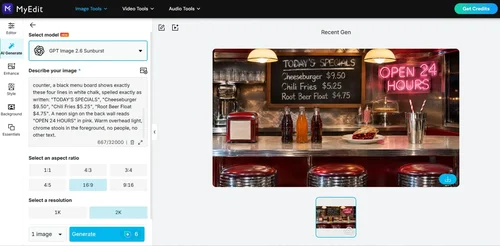
You can switch between all six GPT image models in one panel, and the Generate button shows the credit cost before you spend anything.
Step 1
Write Your Text Prompt
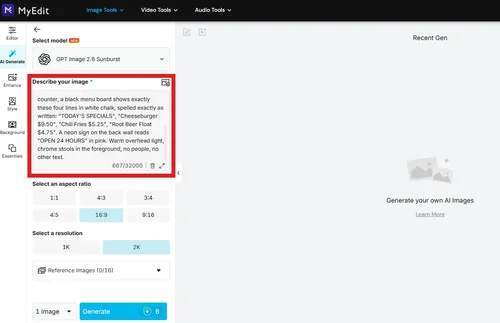
Open the AI Image Generator and describe the image you want, including the subject, setting and mood. The counter under the prompt box shows the character limit for the selected model.
Step 2
Pick a Model and Add Your Reference Image (Optional)
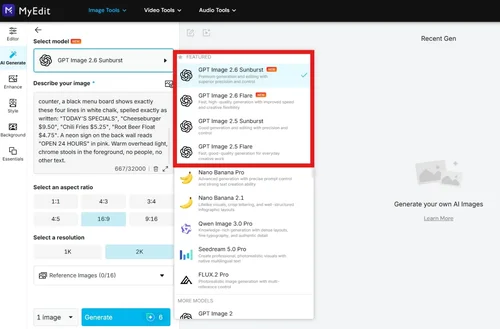
Open Select model and pick one of the six GPT image models. Choose an aspect ratio and resolution, and upload up to 16 reference images to guide the result.
Step 3
Generate and Download
Choose how many images to create, check the credit cost on the Generate button and click Generate. Download the images you like, with no watermark.
Verdict: Which GPT Image Model Should You Use?
Use GPT Image 2.6 Flare as your everyday default: it was the fastest model in my tests and just as accurate on text and instructions as the slower ones. Switch to GPT Image 2.6 Sunburst for final images where detail and layout options matter. Because all six models cost the same at 1K, and the 2.6 models followed instructions more cleanly, there is little reason to start new work on GPT Image 2.5, GPT Image 2 or GPT Image 1.5.
If you need 4K images, which none of the GPT models offer, try another model in the same menu: Nano Banana Pro in MyEdit generates at 1K, 2K or 4K. To see how it stacks up against GPT Image on the same prompts, read GPT Image vs Nano Banana: 5 Same-Prompt Tests in MyEdit.
About This Article
- Tests were run and model settings and credit costs verified on November 9, 2026 in MyEdit's US interface, and on November 10, 2026 for GPT Image 2.5. OpenAI details come from OpenAI's official announcement and documentation.
FAQs
1. Can I choose which image model ChatGPT uses?


No, not inside ChatGPT. OpenAI ships Images 2.6 in ChatGPT on every plan, but it offers the choice between GPT-Image-2.6 Flare and Sunburst to developers in its API. If you want to pick the exact model for each image, MyEdit's AI Image Generator lets you choose from six GPT image models in one menu.
2. Which GPT image models are available in MyEdit?
Six: GPT Image 2.6 Sunburst, GPT Image 2.6 Flare, GPT Image 2.5 Sunburst, GPT Image 2.5 Flare, GPT Image 2 and GPT Image 1.5. The 2.6 models are the newest, released by OpenAI on November 4, 2026.
3. Which GPT image model should I choose in MyEdit?
Start with GPT Image 2.6 Flare. It averaged 11.5 seconds per run in my tests, against 32.3 seconds for 2.6 Sunburst, with equally accurate text. Switch to GPT Image 2.6 Sunburst for final images where detail and layout variety matter, and use the older models only to match images from an earlier project.
4. How many credits does each GPT model cost in MyEdit?
Every GPT model costs 3 credits for a 1K image. A 2K image costs 6 credits on the 2.6 and 2.5 models and GPT Image 2, and GPT Image 1.5 has no resolution setting, so it is always 3. The Generate button shows the exact cost before you spend anything.
5. Can I use GPT image models in MyEdit for free?
Yes, with daily credits. Every account can claim 3 free credits per day, which covers one 1K image from any GPT model, and you can download your images with no watermark.
6. What is the difference between GPT Image 2.6 and 2.5?
GPT Image 2.6 is the newer generation, and OpenAI says it generates images 50% faster. In my tests, both generations got every line of text right, but the 2.5 models added objects I did not ask for, while the 2.6 models did not. MyEdit offers both, so you can compare them on the same prompt.