
Key Takeaway
- Nano Banana 2.1 is the best default in MyEdit: it rendered every word correctly in my tests and costs 4 credits per image at 2K.
- Nano Banana Pro is best for final, detailed layouts, but it is the most expensive and slowest model.
- Nano Banana 2 Lite is the cheapest and fastest model, but one of my four drafts misprinted a number.
- Four Nano Banana 2 Lite drafts plus one fix in Nano Banana 2.1 cost the same as one Nano Banana Pro image at 4K.
- MyEdit’s 3 free daily credits cover one Nano Banana 2.1 image at 1K or one Nano Banana 2 Lite image.
Google has released five Nano Banana image models since August 2025, and MyEdit lets you use all five in its AI Image Generator and Chat Photo Editor. I spent two days and about 70 credits running them side by side, and the results surprised me: the newest model is not the most expensive, and the most expensive one is not always the best. The right pick depends on the job, whether that is rough drafts, text-heavy graphics, a fix to one part of an image or a final high-resolution picture.
Below, I start with a quick summary of my results, then explain where each model came from and which job each one suits, with an example I made for every model. At the end, I walk through one recipe-card prompt I ran through three of the models.
Disclosure: MyEdit is our own product. I ran all five Nano Banana models inside MyEdit's AI Image Generator and Chat Photo Editor, so every credit cost and timing comes from the same tool, and the recipe-card test used an identical prompt and settings for each model I compared.
Nano Banana Models at a Glance
Here is a quick summary of how the five models compared in my tests in MyEdit. I made one example image with every model and ran a recipe-card test on three of them. Keep scrolling to see each example image, the full test and how every result came out.
Model | Best for (based on my tests) | AI Image Generator (credits per image) | Chat Photo Editor (credits per edit) |
|---|---|---|---|
Nano Banana 2.1 | Anything with text: flyers, menus, labels | 3–8 | 4 |
Nano Banana Pro | Final, print-ready images with rich detail | 6–12 | 6 |
Nano Banana 2 Lite | Fast, cheap drafts (proofread the numbers) | 2 | 2 |
Nano Banana 2 | Prompts already tuned for its look | 3–7 | 5 |
Nano Banana | Quick, casual images on a tight budget | 2 | 2 |
In the AI Image Generator, the credit range depends on the resolution you choose, from 1K to 4K. I checked these prices on November 17, 2026.
The Nano Banana Family: Five Models in 14 Months
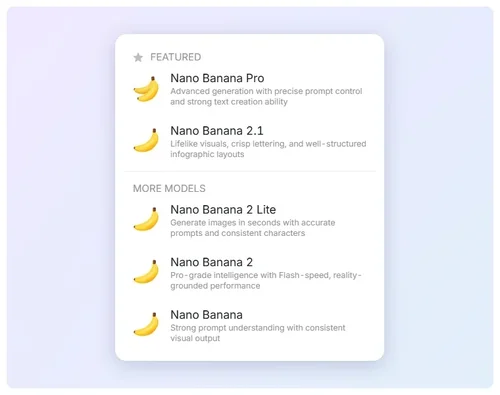
Nano Banana is Google's name for its Gemini image models, and each version runs on a different Gemini model.
- Nano Banana (Gemini 2.5 Flash Image), August 2025: the original model behind 2025's viral figurine trend.
- Nano Banana Pro (Gemini 3 Pro Image), November 20, 2025: the high-end model built on Gemini 3 Pro.
- Nano Banana 2 (Gemini 3.1 Flash Image), February 26, 2026: a faster, cheaper all-rounder.
- Nano Banana 2 Lite (Gemini 3.1 Flash-Lite Image), June 30, 2026: the fastest and lowest-cost model in the family.
- Nano Banana 2.1, October 6, 2026: an update to Nano Banana 2 with better image quality, text and editing.
Google now points new projects to 2.1 instead of Nano Banana 2, and to 2 Lite as the successor to the original. Pro remains the high-end option.
Which Nano Banana Model to Use in MyEdit, by Job
For most everyday images, I start with Nano Banana 2.1 and switch only when the job calls for another model. Each pick below includes an example I made and the main limit I ran into.
Lots of rough ideas, fast: Nano Banana 2 Lite
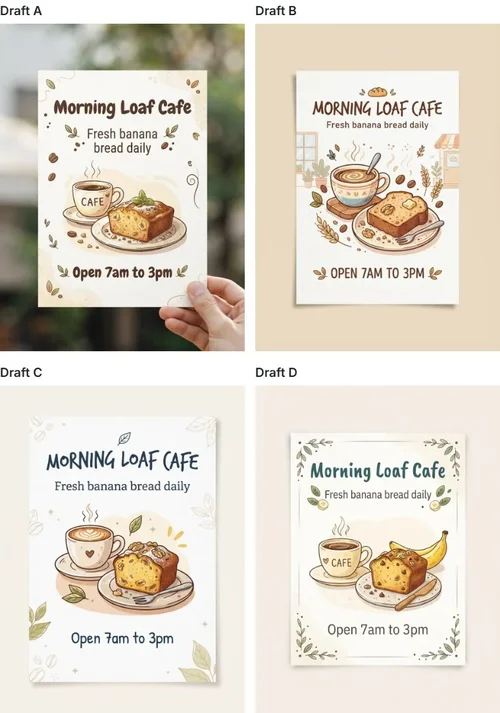
Nano Banana 2 Lite is the cheapest and fastest way I found to explore layouts. When I asked it for a café flyer, it returned four different layouts in about 12 seconds, which is exactly the high-volume drafting Google built it for. It still accepts up to 14 reference images.
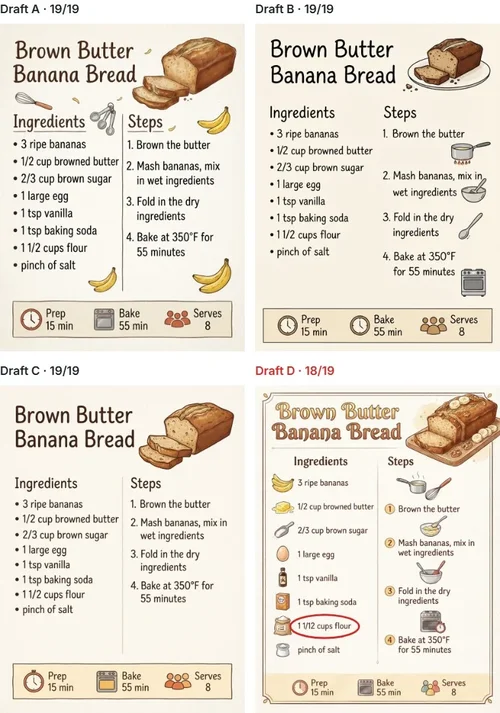
Limit: there is no resolution setting, so its images come out smaller than the 2K and 4K options of the other models. In my recipe-card test, one of four drafts printed “1 1/12 cups flour” instead of “1 1/2”, so I proofread every number before using a Lite image.
Posters, infographics and text: Nano Banana 2.1
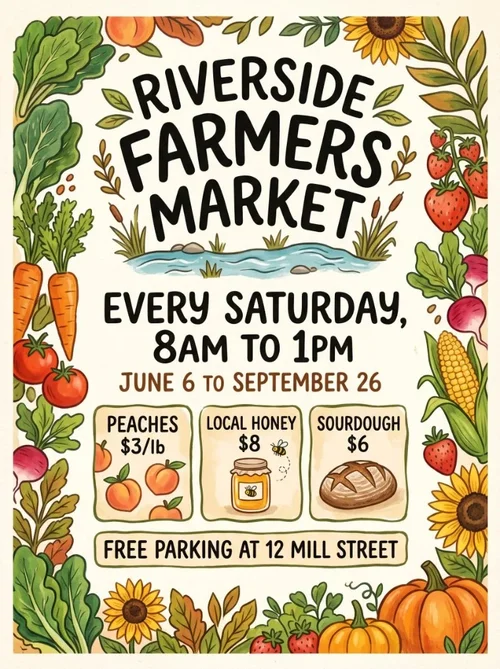
Nano Banana 2.1 is my default for anything with words on it, such as menus, flyers, labels or recipe cards. My farmers market flyer came back in about 26 seconds with every date, price and the address spelled exactly as I typed them. Google says 2.1 renders text better than Nano Banana 2, and in MyEdit it also costs less at 2K.
Limit: Google’s model card says small text can still look blurry at 1K and that the model sometimes mixes up left and right, so I use 2K or higher for text-heavy images. My 4K recipe card from 2.1 also left a large empty gap under one column.
Changing one part of an image: Nano Banana 2.1 with Select Area
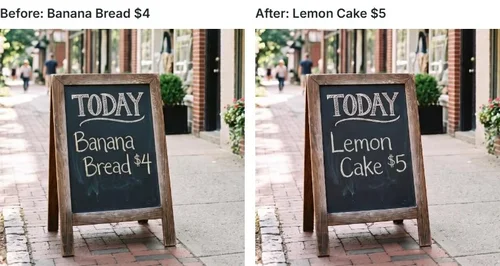
To fix one detail without regenerating the whole image, I open it in the Chat Photo Editor, choose Nano Banana 2.1 and use Select Area to paint over the part I want changed. On a bakery photo, I masked the chalkboard and asked for “Lemon Cake $5” instead of “Banana Bread $4”, and 2.1 rewrote it in the same chalk handwriting.
Limit: you brush the area by hand, and a large mask can change nearby text too. Even with a tight mask, small details elsewhere can change: in my bakery edit, a flower box and a patch of curb were slightly redrawn, so I always compare before and after. A small brush helps when lines sit close together.
A final, detailed image: Nano Banana Pro
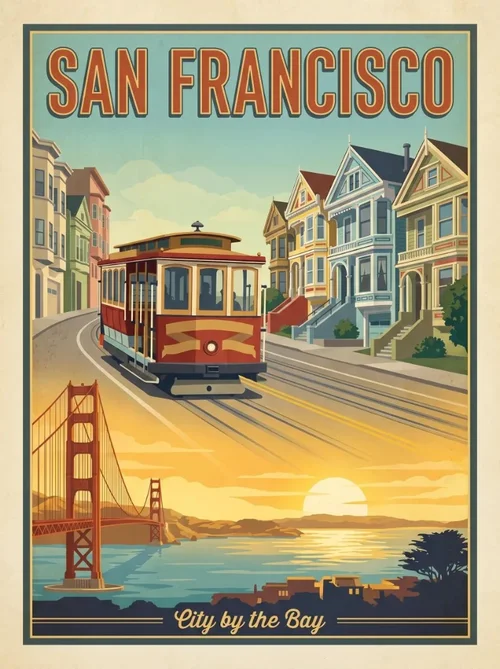
Nano Banana Pro is the model I reach for when layout and detail matter, such as a poster meant for print. My San Francisco travel poster took about 24 seconds, and in my recipe-card test Pro gave every step its own illustration while 2.1 left empty space. At 4K, though, Pro was my slowest run.
Limit: it is the most expensive model in MyEdit, up to six times the price of Nano Banana 2 Lite per image. In Google’s own preference tests, Pro now scores below 2.1, so on simple prompts the extra credits may buy little.
When Nano Banana 2 still makes sense
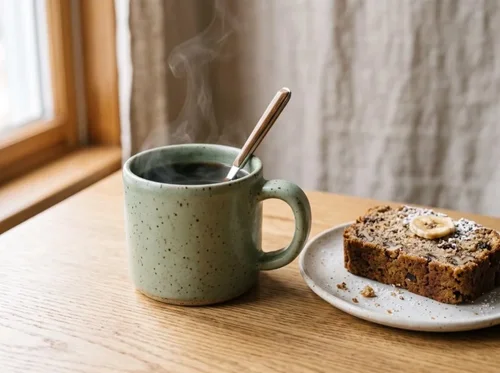
Nano Banana 2 is still in MyEdit’s model menu, and at 4K it is slightly cheaper than 2.1. My product shot of a ceramic mug came out clean in about 20 seconds. If you already have prompts tuned for its look, there is no need to switch right away.
Limit: Google has moved new projects to 2.1, which beats Nano Banana 2 in Google’s quality tests and costs less at 2K. I made only this one example with Nano Banana 2 and left it out of my recipe-card test.
When the original Nano Banana still makes sense
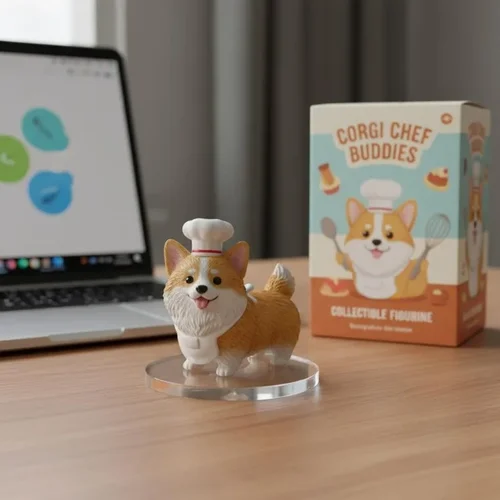
The original Nano Banana is as cheap as Nano Banana 2 Lite. My figurine-style corgi took about 11 seconds and even gave the toy box a readable name, which is the kind of quick, casual image this model still handles well.
Limit: it accepts only 3 reference images, against 14 for the newer models, and it has no 2K or 4K option. Google recommends 2 Lite as its replacement, and I left the original out of my recipe-card test.
Quick Drafts or One Pro Image: Which Is Worth Your Credits?
When every word on an image has to be right, is it better to make cheap drafts and fix the mistakes, or pay once for a premium model? Nano Banana 2 Lite costs a sixth of what Nano Banana Pro charges at 4K, but one of its four drafts in my test misprinted a number.
So I spent 12 credits each way on the same recipe-card prompt: four Nano Banana 2 Lite drafts plus one fix in Nano Banana 2.1, or a single Nano Banana Pro image at 4K. Drafting gave me a corrected card and three spare layouts; Pro gave me one larger, more detailed card, which is the better pick for print.
How I Tested
- Device: Windows 64-bit PC, Chrome 157, MyEdit web app on a Creator Pro plan
- Date: November 17, 2026 (recipe-card test) and November 18, 2026 (one example image per model)
- Prompt: 714 characters, for a 3:4 recipe card for brown butter banana bread, with 8 ingredients, 4 steps and 3 footer labels
- Scoring: 19 checklist items (title, 2 column headings, 8 ingredients, 4 steps, 3 footer labels and a loaf in the top-right corner)
- Timing: from clicking Generate to the finished result, one run per setting
Draft with Nano Banana 2 Lite, Fix with 2.1 (12 Credits)
Four Nano Banana 2 Lite drafts arrived together in about 10 seconds. Three got every word right; the fourth had the most decorated layout but printed “1 1/12 cups flour” instead of “1 1/2”. Two drafts looked typeset rather than hand-drawn, and one reused a clock icon for the baking time.
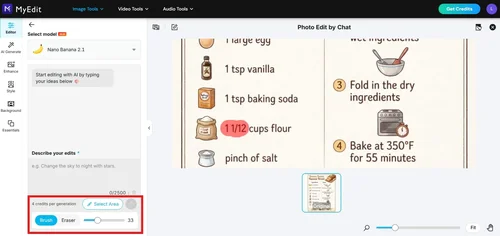
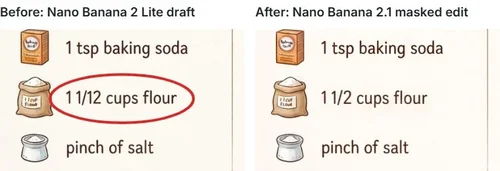
I kept the best-looking draft and fixed only its flour line in the Chat Photo Editor, using Select Area with Nano Banana 2.1. The line now reads “1 1/2 cups flour” and every other word stayed the same, though the labels on the nearby flour and baking soda icons were slightly redrawn. The corrected card also came back at twice the draft’s size.
Go Straight to Nano Banana Pro at 4K (12 Credits)
I sent the same prompt to Nano Banana Pro at 4K, and to Nano Banana 2.1 at 4K for comparison. Both got every checklist item right, so text accuracy did not separate them. Pro produced the richer layout, with an illustration for every step, but it was the slowest run; 2.1 was quicker and cheaper but left a gap under the steps.
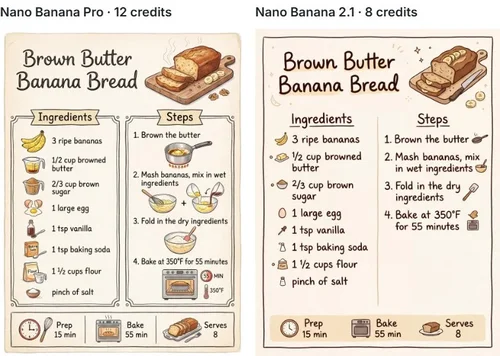
My verdict: if you want options, or you don’t mind fixing a line, drafting gets you more for the same 12 credits. If you need one large, detailed image for print, going straight to Pro is simpler. This was one prompt with one run per setting, so treat these results as an example rather than a benchmark.
What Google's Benchmarks Say, and What They Miss
Google’s own tests rank Nano Banana 2.1 above Nano Banana Pro, even though Pro costs more. In Google’s human-preference tests for text-to-image, 2.1 scored 1,050 Elo in its Thinking setting, against 990 for Nano Banana 2 and 935 for Pro. On a separate test of how often labels and numbers in infographics come out right, 2.1 also beat both.
Benchmarks average many prompts, so a single prompt can go the other way. In MyEdit’s earlier GPT Image vs Nano Banana test, Pro handled exact text and counts better than 2.1 on a harder prompt, while in my recipe-card test both were flawless. When one image really matters, I run it on both and compare.
How to Use Nano Banana for Free in MyEdit
You can try any Nano Banana model in MyEdit with the free credits every account gets each day. MyEdit gives 3 free credits a day on every plan, enough for one Nano Banana 2.1 image at 1K or one Nano Banana 2 Lite or original Nano Banana image. Higher resolutions, Pro and multi-image runs need more than one day’s allowance.
Step 1
Write Your Text Prompt
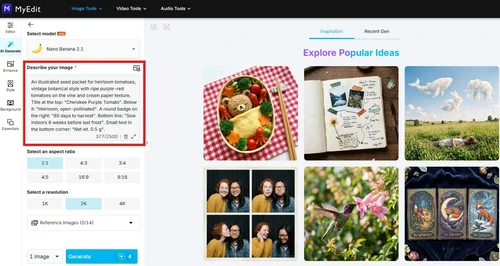
Open the AI Image Generator and describe the image you want, in up to 2,500 characters. Put any exact text in quotation marks, such as a title or a price, so the model copies it word for word.
Step 2
Pick a Model and Add Your Reference Image (Optional)
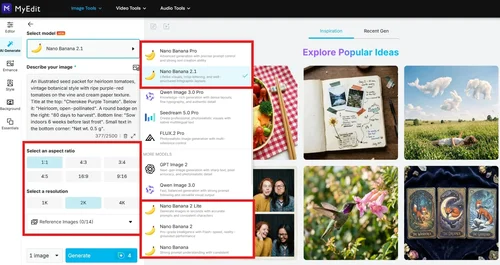
Open the model menu, choose a Nano Banana model and set the aspect ratio, resolution and number of images. The credit cost on the Generate button updates as you change settings. Add up to 14 reference images (3 for the original Nano Banana) to keep a face, product or style.
Step 3
Generate and Download
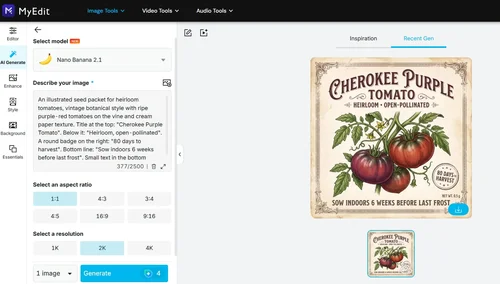
Click Generate, check the result and download it. To fix one part, open the image in the Chat Photo Editor, choose Nano Banana 2.1 and use Select Area to mark what should change.
Sources and Verification
- Verified: November 17, 2026. MyEdit credits, limits and model lists were checked live in the AI Image Generator and Chat Photo Editor.
- Google Cloud: Announcing Nano Banana Pro
- Bloomberg: Google unveils a faster version of Nano Banana (Nano Banana 2)
- Google Cloud: Gemini Omni Flash and Nano Banana 2 Lite
- Google DeepMind: Nano Banana 2.1 model card
FAQs
1. Which Nano Banana models can I use in MyEdit?


All five: Nano Banana, Nano Banana 2, Nano Banana 2 Lite, Nano Banana 2.1 and Nano Banana Pro. You pick them from the model menu in MyEdit's AI Image Generator, and the same five are available for edits in the Chat Photo Editor.
2. How many credits does each Nano Banana model cost in MyEdit?
Per image, Nano Banana and Nano Banana 2 Lite cost 2 credits, Nano Banana 2 costs 3 to 7, Nano Banana 2.1 costs 3 to 8 and Nano Banana Pro costs 6 to 12, depending on resolution. Edits in MyEdit's Chat Photo Editor cost 2 to 6 credits. I checked these prices on November 17, 2026, and they can change.
3. Which Nano Banana model in MyEdit is best for text in images?
Nano Banana 2.1 at 2K. In my tests it got every word, date and price right on a recipe card and a market flyer. Nano Banana Pro was just as accurate on the recipe card but costs more, and Nano Banana 2 Lite misprinted one number across four drafts.
4. Can I change just one part of an image with Nano Banana in MyEdit?
Yes. Open the image in MyEdit's Chat Photo Editor, choose a Nano Banana model such as Nano Banana 2.1, use Select Area to paint over the part you want changed and describe the change. Small details outside the mask can be redrawn, so compare before and after.
5. How much Nano Banana can I use with MyEdit's free credits?
MyEdit gives every account 3 free credits a day. That covers one Nano Banana 2.1 image at 1K, or one Nano Banana 2 Lite or original Nano Banana image. Higher resolutions, Pro and multi-image runs need paid credits.
6. Is Nano Banana 2.1 better than Nano Banana Pro?
For most images, yes: Nano Banana 2.1 scores higher than Pro in Google's preference tests and costs less in MyEdit. In my recipe-card test both got every word right, but Pro produced the richer layout, so I use Pro for final images where layout and detail matter most.