
Key Takeaway
- I ran this test in MyEdit: GPT Image 2.5 Sunburst scored 42/42 and Nano Banana Pro 41/42 across five identical prompts.
- Nano Banana Pro’s only miss was an exact count: six books on a shelf instead of five.
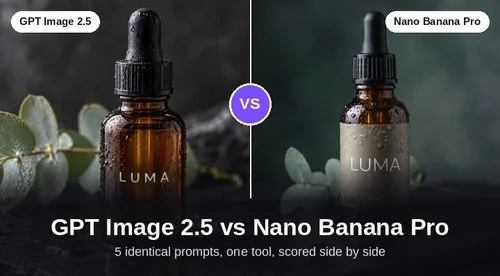
- Both spelled every poster and label line correctly and kept my real cat’s markings from one photo.
- GPT Image 2.5 averaged 25.7 seconds per image against 29.4, and costs 3 credits at 1K versus 6.
- Nano Banana Pro is the only one of the two with a 4K option in MyEdit, and its photos look more candid.
GPT Image 2.5 won my same-prompt test by a single point: 42 of 42 checklist items against 41 of 42 for Nano Banana Pro. Both models spelled every poster line correctly, rendered a product label cleanly and kept the markings of my real cat Meo from a reference photo. Nano Banana Pro’s only miss was an exact object count, while GPT Image 2.5 was about four seconds faster per image.
Tested on November 3, 2026, with the same five prompts and the same settings for both models.
Disclosure: MyEdit is our own product. I ran both models inside MyEdit's AI Image Generator so that every prompt, setting and credit count was identical.
GPT Image 2.5 vs Nano Banana Pro at a Glance
GPT Image 2.5 is OpenAI’s newest image model, released on September 8, 2026, while Nano Banana Pro is Google’s Gemini 3 Pro Image model, released on November 20, 2025. All the models tested in this comparison are available in MyEdit’s AI Image Generator, so you can run the same prompts and compare the results yourself.
GPT Image 2.5 | Nano Banana Pro | |
|---|---|---|
Developer | OpenAI | Google DeepMind |
Release date | September 8, 2026 | November 20, 2025 |
Versions | Flare (faster) and Sunburst (precision) | One Pro model |
Reference images in MyEdit | Up to 16 | Up to 14 |
Prompt length in MyEdit | Up to 32,000 characters | Up to 2,500 characters |
Resolutions in MyEdit | 1K and 2K (Sunburst) | 1K, 2K and 4K |
Score, 5 tests | 42/42 | 41/42 |
What Each Model Is Built For
GPT Image 2.5 is built for long, precise briefs and repeated edits, while Nano Banana Pro is built for high-resolution, reference-heavy compositions.
GPT Image 2.5
OpenAI released GPT Image 2.5 on September 8, 2026, as two models. Flare is the default for everyday work, and OpenAI says it beats GPT Image 2 on quality with up to 50% lower latency. Sunburst trades speed for tighter control in detailed creative work and edits (OpenAI announcement).
In MyEdit, GPT Image 2.5 accepts up to 16 reference images and prompts of up to 32,000 characters, but Sunburst only offers 1K and 2K output. I tested Sunburst because, like Nano Banana Pro, it is the premium tier of its family.
Nano Banana Pro
Nano Banana Pro is Google DeepMind’s Gemini 3 Pro Image model, launched on November 20, 2025. Google positions it around sharper text rendering, Google Search grounding for factual visuals, and blending up to 14 images while keeping up to five people consistent. It outputs 2K and 4K, and every image carries Google’s invisible SynthID watermark (Google announcement).
In MyEdit, Nano Banana Pro accepts up to 14 reference images and prompts of up to 2,500 characters. It is the only one of the two models with a 4K option.
How I Ran the Same-Prompt Test
I gave both models the same five prompts and settings, kept the first image each time and scored it against a checklist I wrote before generating.
How I tested
- Tester: Luigi Esposito, MyEdit. Tested on November 3, 2026.
- Device: Windows PC (64-bit), Chrome 156, MyEdit Creator Pro account.
- Models: GPT Image 2.5 Sunburst vs Nano Banana Pro in the MyEdit AI Image Generator.
- Settings: 1:1, 2K, one image per run, first result kept, no rerolls or edits.
- Tasks: text poster, 10-detail scene, product photo, portrait, reference photo of a real cat.
- Criteria: checklist items met, generation time, credits charged and downloaded file size.
Each prompt lists 8 or 10 things the image must contain, and a model earns one point per item it gets right. That keeps the totals checkable rather than a matter of taste. Generation time runs from clicking Generate to the image appearing, and pixel sizes come from the downloaded JPG files.
Test 1: Exact Text on a Poster
Both models spelled all three lines of poster text correctly, scoring 8/8 each.
Prompt: “A vintage travel poster for a fictional town called Brightwater Bay. Bold serif headline at the top: BRIGHTWATER BAY. Smaller line below: Summer Ferry Festival, July 12–14. Small line at the bottom: Tickets at the harbor office. Illustrated lighthouse, sailboats, warm sunset palette.”
Checklist: the three text lines spelled exactly, the en dash in 12–14, a lighthouse, sailboats, a sunset palette and no stray text.
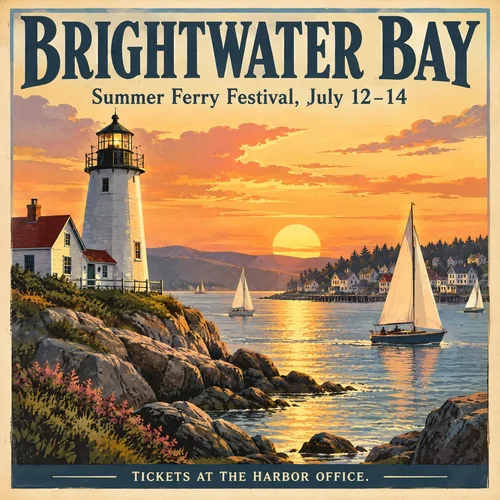
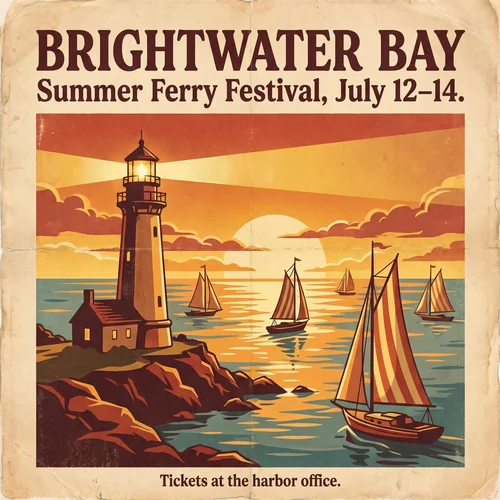
GPT Image 2.5 painted a detailed coastal scene and set the bottom line in capitals, which the prompt allowed. Nano Banana Pro chose a flatter screen-print look that reads more like a real vintage poster, and it copied the prompt’s sentence periods onto the design. For exact copy both are safe, so pick on style.
Test 2: A Prompt With 10 Specific Details
GPT Image 2.5 got all 10 details right, while Nano Banana Pro got 9 of 10.
Prompt: “A cozy home office at 7 a.m., seen from the doorway. A wooden desk by a window on the left, light rain on the glass. On the desk: an open laptop with a blank white screen, a green ceramic mug with steam, exactly three yellow sticky notes, a small succulent in a white pot. A gray cat sleeps on a blue chair. A bookshelf on the right wall holds exactly five books. Soft cool morning light, photorealistic, 35mm lens.”
Checklist: doorway view, desk by a window on the left, rain on the glass, blank laptop screen, green mug with steam, exactly three yellow notes, succulent in a white pot, gray cat on a blue chair, exactly five books, cool morning light.
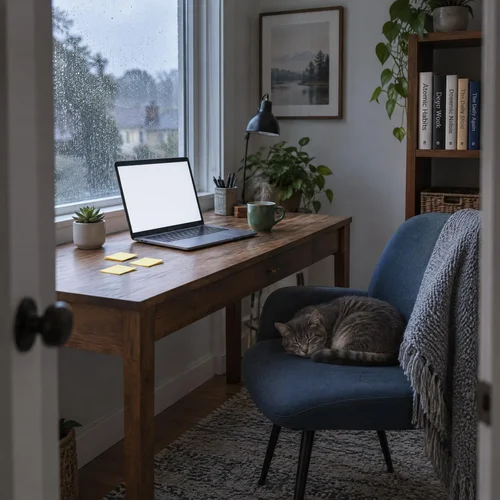
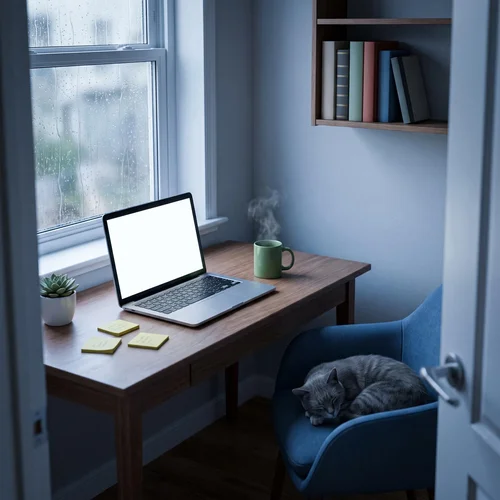
Nano Banana Pro missed only the count: its wall shelf holds at least six books instead of five. GPT Image 2.5 hit every item, but it also printed real-looking book titles on the spines without being asked, so check generated props before using an image commercially.
Test 3: Studio Product Photo With a Label
Both models produced an ad-ready serum shot and rendered “LUMA” and “30 ml” correctly, scoring 8/8 each. LUMA is a brand name I made up for this test, not a real product.
Prompt: “Studio product photo of an amber glass serum bottle with a black dropper cap on wet slate. The label reads LUMA in white sans-serif capitals and, below it, 30 ml. Water droplets on the bottle, soft reflection on the slate, one eucalyptus sprig behind, dark moody background, 100mm macro, shallow depth of field.”
Checklist: amber glass bottle, black dropper cap, wet slate, LUMA in white sans-serif capitals, 30 ml below it, droplets on the bottle, a reflection on the slate and one eucalyptus sprig behind.
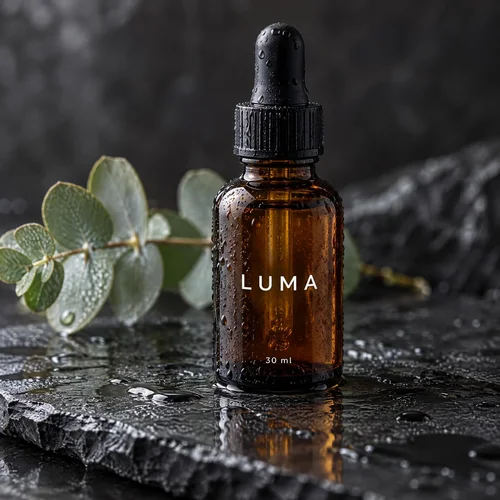
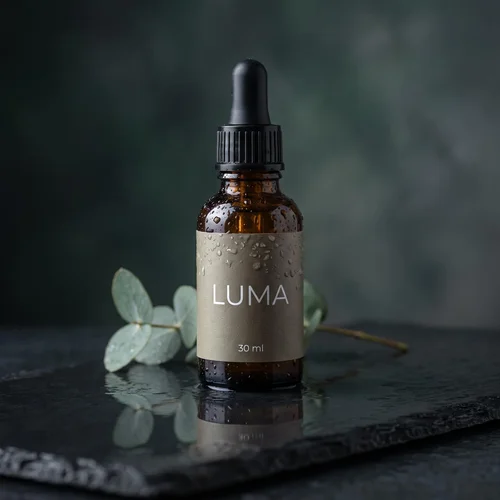
GPT Image 2.5 printed the text straight onto the glass and pushed the droplets and contrast for a glossy look. Nano Banana Pro added a taupe paper label the prompt never mentioned, which looks polished but changes the packaging. For a mockup of a real product, describe the label material explicitly.
Test 4: Photoreal Portrait
Both portraits passed all eight checks, including natural hands holding the bowl, so each model scored 8/8.
Prompt: “Candid photo of a woman in her late 60s with short silver hair, laughing while holding a pottery bowl she just made, clay on her hands, denim apron, natural window light in a small ceramics studio, 85mm, f/2.”
Checklist: a woman in her late 60s, short silver hair, laughing, a pottery bowl, clay on her hands, a denim apron, a window-lit ceramics studio and anatomically correct hands.
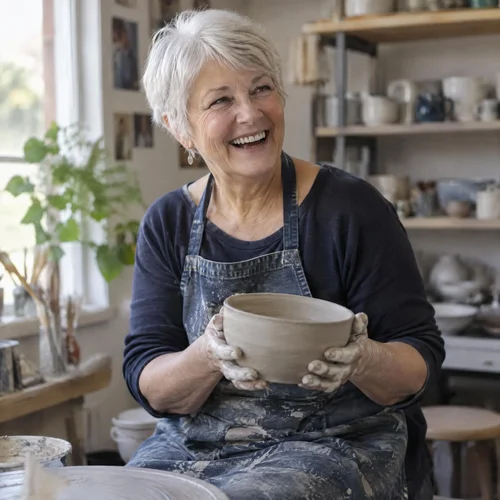
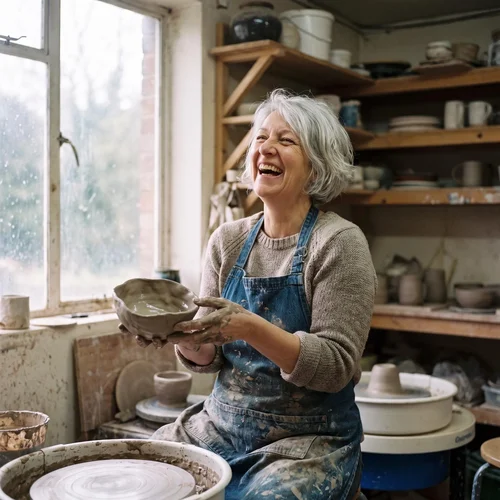
GPT Image 2.5 delivered a clean, evenly lit portrait with a cropped haircut, closer to a stock photo. Nano Banana Pro went documentary, with wet clay, a lopsided handmade bowl and rain on the window. Its hair is chin-length rather than clearly short, which I counted as a pass but is the closest call in the test.
Test 5: Generating From a Reference Photo of a Real Cat
Both models kept every marking of Meo, my tuxedo cat, and scored 8/8 from a single close-up photo.
I uploaded this photo, which shows only Meo’s face, and asked for a full-body scene: “Use the cat in the reference photo. Show this exact cat sitting on a sunny windowsill next to a small potted plant, full body visible, soft morning light, photorealistic. Keep the cat’s face markings, nose color and eye color exactly the same as in the reference.”
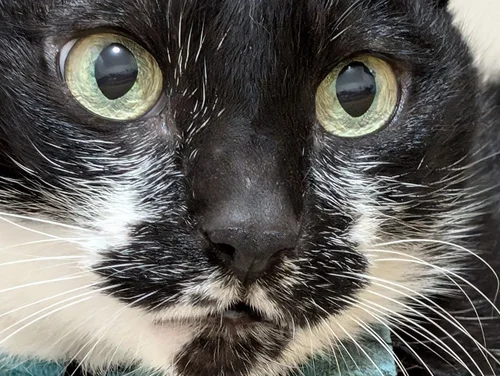
Checklist: tuxedo coat, fully black forehead, yellow-green eyes, black nose, white muzzle with a black chin patch, white whiskers, a sunny windowsill and a potted plant.
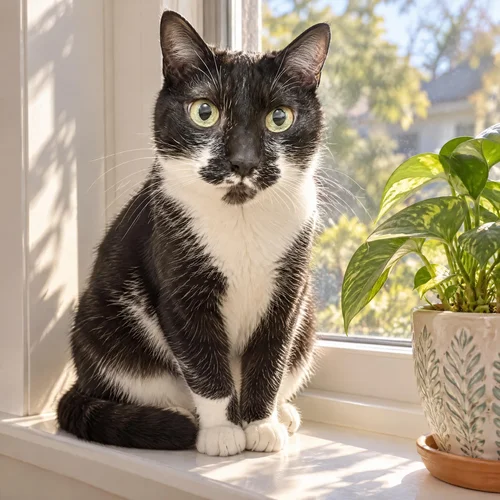
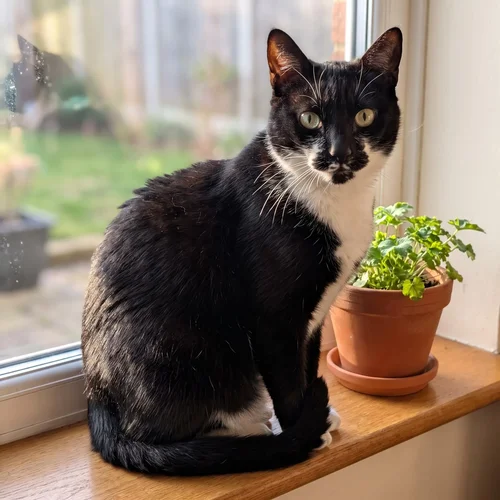
GPT Image 2.5 copied the speckled black patches beside the nose and Meo’s wide-eyed look most closely. Nano Banana Pro gave a slimmer face but a more natural sitting pose. Both had to invent the body because the photo shows only the face, so upload a full-body shot when that matters.
Speed, Credits and Output Size
GPT Image 2.5 was faster on average, at 25.7 seconds against 29.4, and both models cost 6 credits per image at 2K in MyEdit.
GPT Image 2.5 Sunburst | Nano Banana Pro | |
|---|---|---|
Average time, 5 tests | 25.7 seconds | 29.4 seconds |
Fastest and slowest run | 22 and 33 seconds | 24 and 33 seconds |
Credits per image, 1K | 3 | 6 |
Credits per image, 2K | 6 | 6 |
Credits per image, 4K | Not offered | 12 |
Downloaded file at 2K | 2048 × 2048 px | 2048 × 2048 px |
Both models took a few seconds longer when working from a reference photo. Nano Banana Pro’s 4K setting took 41 seconds, and the file I downloaded measured 2576 × 2576 px, about 1.6 times the pixels of the 2K file. If you need a larger GPT Image 2.5 result, run it through the AI Image Upscaler instead.
Final Scorecard
GPT Image 2.5 Sunburst won the scorecard 42 to 41, with the only gap coming from a single object count.
Test | GPT Image 2.5 Sunburst | Nano Banana Pro |
|---|---|---|
1. Exact text on a poster | 8/8 | 8/8 |
2. 10 specific details | 10/10 | 9/10 |
3. Product photo with a label | 8/8 | 8/8 |
4. Photoreal portrait | 8/8 | 8/8 |
5. Reference photo of a real cat | 8/8 | 8/8 |
Total | 42/42 | 41/42 |
What About Nano Banana 2.1?
Nano Banana 2.1, Google’s newer and cheaper model, did not beat Pro in two extra runs: it scored 7/8 on the poster and 8/10 on the 10-detail prompt.
I ran the Test 1 and Test 2 prompts again with identical settings. Nano Banana 2.1 costs 4 credits per image at 2K in MyEdit, a third less than Pro, and took 29 to 30 seconds.
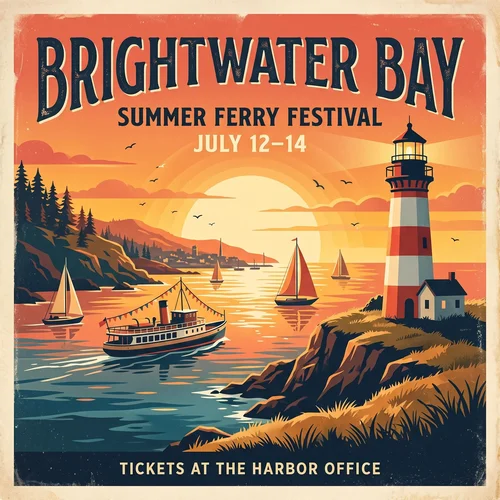
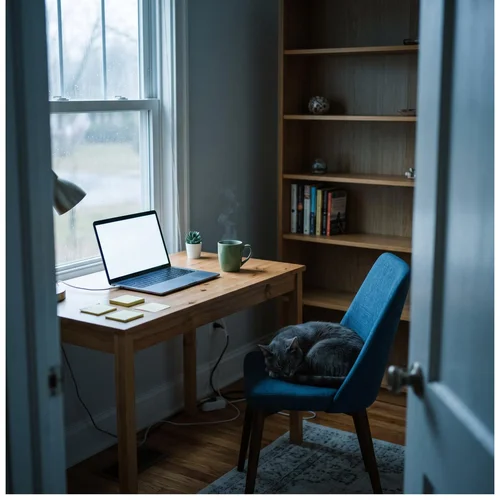
Its poster had the most designed layout of the three models and even added a festival ferry, but it dropped the comma in the date line. In the office scene it placed four sticky notes and about eight books, missing both counts. For quick drafts it is good value; for prompts with exact numbers, use GPT Image 2.5.
Which One Should You Use in MyEdit?
Use GPT Image 2.5 for long briefs, exact counts and fast iteration, and use Nano Banana Pro when you want a candid photographic look or a 4K file. For my own work, GPT Image 2.5 is my default, and I switch to Nano Banana Pro for hero photos.
GPT Image 2.5 Strengths and Trade-offs
Pros

 Met every checklist item in all five tests (42/42)
- Fastest on average at 25.7 seconds per image
- Takes prompts up to 32,000 characters and 16 reference images
- Half the credits of Nano Banana Pro at 1K (3 vs 6)
Cons

 No 4K option for Sunburst in MyEdit
- Added real book titles nobody asked for in Test 2
- Portraits lean toward a polished stock-photo look
Nano Banana Pro Strengths and Trade-offs
Pros
- The only one of the two with 4K output in MyEdit
- Most candid, documentary-style photo in the portrait test
- Kept a real cat’s markings from one close-up photo
Cons
- Missed an exact count: six books instead of five
- Prompts capped at 2,500 characters in MyEdit
- Added a paper label to the product shot unprompted
How to Run This Test Yourself
You can repeat any of these prompts in the MyEdit AI Image Generator by generating once, switching models and generating again with the same settings.
Step 1
Write Your Text Prompt
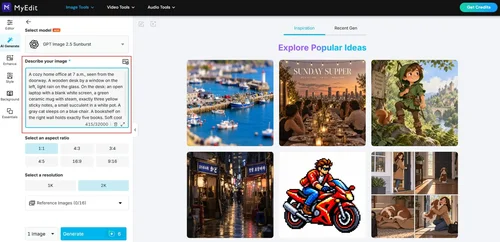
Paste one of the prompts above into the Describe your image box, or write your own with details you can count.
Step 2
Pick a Model and Add Your Reference Image (Optional)
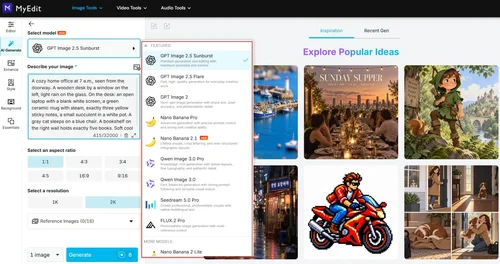
Choose GPT Image 2.5 Sunburst, set the aspect ratio and resolution, and upload a reference photo if your prompt uses one.
Step 3
Generate and Download
Click Generate, then switch to Nano Banana Pro without changing anything else and generate again. Download both and compare them against your checklist.
Limitations of This Test
Five prompts with one image each is a snapshot, not a benchmark, and a second run of the same prompt can land differently. I tested only the Sunburst version of GPT Image 2.5 and only at 2K. Generation times also depend on server load, and a checklist cannot capture taste, which is why every result is shown above.
Both models add details nobody asked for, so review every image before publishing. Small fixes such as a stray prop are quicker with AI Replace than with a full regeneration.
FAQs
1. Is Nano Banana Pro or GPT Image 2.5 better?


In my five same-prompt tests, GPT Image 2.5 Sunburst scored 42/42 and Nano Banana Pro 41/42, so GPT Image 2.5 is slightly more reliable at following exact instructions. Nano Banana Pro is the better pick when you want a candid photographic style or 4K output.
2. Is Nano Banana better than GPT Image 2?
GPT Image 2 has been succeeded by GPT Image 2.5, which OpenAI released on September 8, 2026, with faster generation and higher quality. I tested GPT Image 2.5 rather than GPT Image 2, and it edged out Nano Banana Pro by one checklist point.
3. Which model is better for text inside images?
Both spelled every requested line correctly in the poster and label tests. GPT Image 2.5 stayed closest to the prompt’s punctuation, while Nano Banana Pro copied sentence periods into the design and Nano Banana 2.1 dropped a comma.
4. Is there an image model better than Nano Banana Pro?
On my checklists, GPT Image 2.5 Sunburst scored one point higher. Google’s newer Nano Banana 2.1 costs less per image but scored lower than Pro on both prompts I ran.
5. Can I try GPT Image 2.5 and Nano Banana Pro for free?
Every MyEdit account can claim 3 free credits per day, and image generation is paid with credits. In my run, GPT Image 2.5 Sunburst cost 3 credits per image at 1K and Nano Banana Pro cost 6, while the Creator Pro plan adds 500 credits a month.