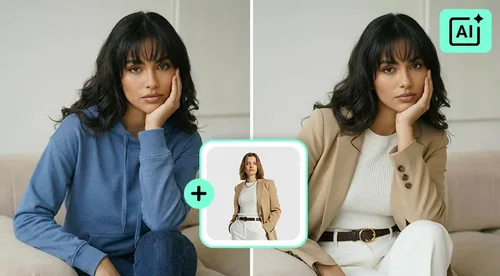
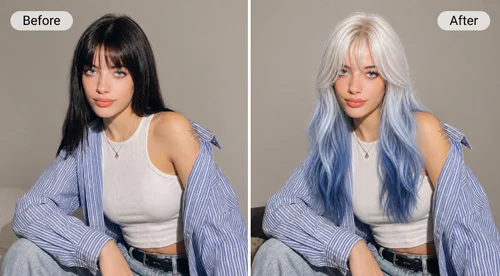
AI Hair Color Changer
Change Your Hair Color, Keep Your Haircut
Type a shade and see it on your own hair, with your cut and length left as they are. Try new colors with your free daily credits.
Hair Color Try On for Every Kind of Change
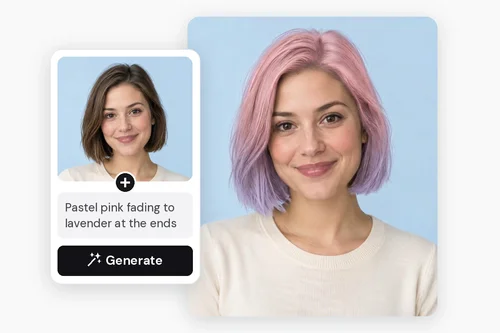
Describe Colors No Palette Has
A swatch picker stops at the colors someone else chose. Here you write the color instead, so pink roots that melt into lavender ends, copper with a darker root, or a soft champagne blonde are all fair game. If you can say it in a sentence, you can see it on your own hair.
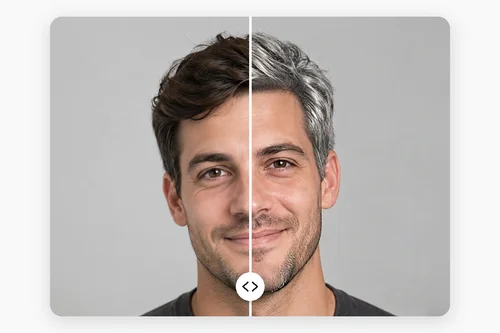
Test a Shade Before You Commit
Going from dark brown to silver is a big step, and a box dye or a salon visit is hard to undo. See the shade on your own photo first, then bring the result to your colorist or barber, so the conversation starts from a picture instead of a guess at what “ash” or “icy” means.
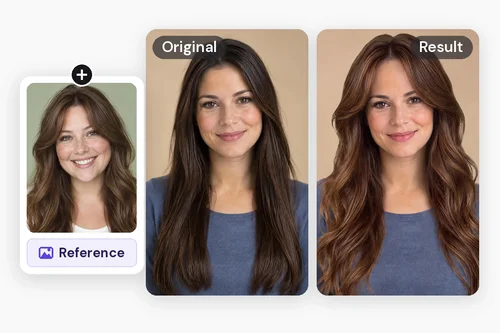
Try Trending Styles From a Photo
Spotted a cut and color you love on social media or in a salon lookbook? Upload that photo as a reference in the Custom tab, and the AI restyles your hair after it, changing the cut as well as the color. Try a few different photos to compare looks before your next salon visit.
Change Your Hair Color Online in Three Steps
 Step 1
Add a Clear Photo of Your Hair
Open the Hair Color Changer and add a front-facing photo taken in good light. Bring your hair forward over your shoulders, and keep hats and hands out of the frame.
Step 2Write the Color You Want
In the Custom tab, type “keep my hairstyle, change color to cinnamon auburn,” or any shade you like. Prefer a photo? Upload one as a reference instead.
Step 3Compare, Adjust, and Save
Click “Generate.” Too warm or too bright? Change a word or two in your description and run it again, then save the version you like best to show your stylist.
What Makes This Hair Color Changer Different?

Your Cut Stays, Only the Color Moves
Start your description with “keep my hairstyle” and the AI leaves your length, layers, and texture alone. You judge the new color on the haircut you'll actually walk out of the salon with.

Shades Written in Your Own Words
There's no color wheel to scroll. Name a shade the way you'd say it to a friend, like warm chestnut, smoky lavender, or icy platinum, and refine the wording until the result matches the picture in your head.

Start From a Photo You Love
Found a style you love on social media or in a salon lookbook? Upload it as a reference and the AI restyles your hair after it, cut and color included, so you can see how that look would work on you before you commit to it.

Realistic Shine and Texture
The new color follows the light and shadows already in your photo, so waves keep their depth and straight hair keeps its shine. The result reads like a real dye job, not a flat tint laid over the top.

Short Cuts and Long Hair Alike
Whether you wear a short textured cut, a chin-length bob, or hair well past your shoulders, your cut stays in place while the color changes. It works on men's and women's photos alike, so the preview always looks like your own hair.

Ready to Send to Your Stylist
Your daily free credits cover generating and downloading, and the saved image has no watermark. Send it to your colorist before the appointment, or share it and let your friends vote on the shade.
AI Hair Color Changer FAQ
How does an AI hair color changer work?


You describe a hair color, and the AI finds the hair in your photo and repaints it, following its waves, shine, and shadows. Your face, background, and clothes stay as they were, so the preview looks like you after a salon visit.
Can I change my hair color online for free?
Yes. Signing in gives you free credits every day, and they cover both generating a new color and downloading it without a watermark. Each run shows its credit cost on the “Generate” button, so you know what a try costs before you click.
Will my haircut stay the same?
Yes, when you ask for it. Begin your description with “keep my hairstyle” or “keep my haircut and length the same,” then name the color. If a result ever changes the style, simply run it again. Want a new cut as well? Try the AI Hairstyle Changer.
How do I find a hair color that suits my skin tone?
Run two or three shades on the same photo and compare them side by side. As a rule of thumb, honey, copper, and auburn flatter warm undertones, while ash, platinum, and cool brown suit cool ones, but seeing them on your own face is the surest test.
Can I use the hair color changer on my phone?
Yes. The hair color changer runs entirely online, so it works in the web browser on your phone or tablet, with nothing to install. Upload a selfie, type the color you want in the Custom tab, and compare the result with your original photo.
Can I try trendy hairstyles and colors from a photo?
Yes. Save a photo of a trending look you like, then in the Custom tab choose “Upload a hairstyle photo” and add it as a reference. The AI restyles your hair after it, changing both the cut and the color, so you can see a trend on yourself before you book.
Does the hair color changer work for men?
Yes. Short cuts, fades, and textured styles all work. Upload a front-facing photo and describe the color, for example “keep my hairstyle, change color to silver gray,” which is a handy way to see how going gray would look before it happens.
Can I try highlights, balayage, or ombré?
Yes. Describe where each shade goes, such as “dark brown roots fading to caramel ends” or “soft honey highlights around the face.” Fine highlights can come out subtle, so say how bright and how wide you want them, and run it again to fine-tune.