AI Multi-Angle
Turn One Video Into Multiple Camera Angles
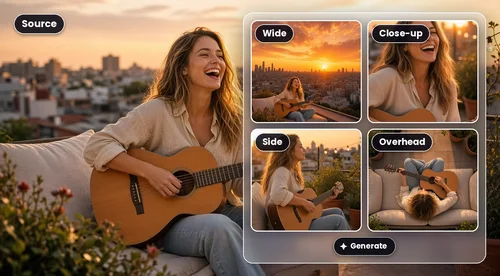
Filmed it on one phone? Upload the clip and AI re-shoots it from new angles, cutting between close-ups, wide shots, and camera moves. You don't write a prompt, and your timing stays the same.
How to Get Multiple Camera Angles From One Video
 Step 1
Open AI Multi-Angle
Open MyEdit AI Agent and pick AI Multi-Angle from the Skills menu.
Step 2Upload Your Clip
Add one video between 4 and 30 seconds long and up to 100 MB. Phone or camera footage works, in vertical, horizontal, or square format.
Step 3Generate and Download
Send your clip, and AI plans the shots and renders your new video in a few minutes, ready to download.
Get Multi-Cam Coverage From Videos You Already Shot
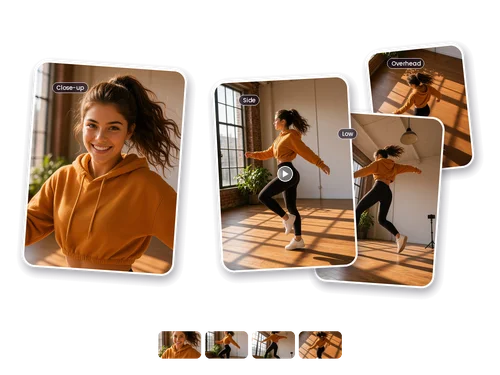
Give Your Dance Video the Music-Video Treatment
You finally nailed the routine in one take, but a phone propped against the wall makes every move look flat. Upload that clip and AI Multi-Angle cuts it into angles like front, side, low, and overhead, so the jumps look bigger and the footwork is easy to follow.
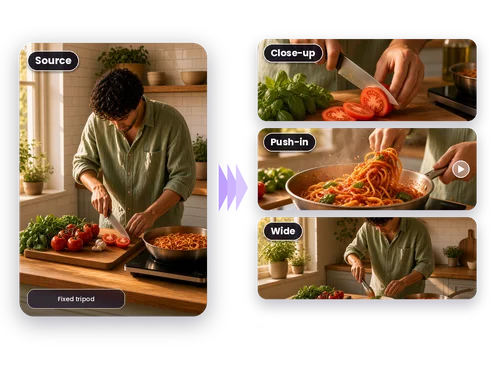
Turn a Fixed-Angle Cooking Demo Into a Show
Most home cooking videos are shot from one tripod at one height. That works, but viewers miss the details they came for. AI Multi-Angle cuts to a close-up on the knife work, a slow push-in on the sizzle, and a wider shot for plating, so a simple recipe clip looks like it was filmed in a studio kitchen.
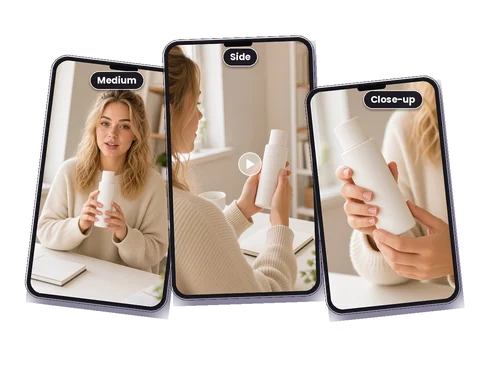
Keep Viewers Watching Your Product Demo or Talk-to-Camera Video
A single static shot is the fastest way to lose viewers halfway through a product walkthrough. Let AI switch between a medium shot of you talking, a side angle, and a close-up of the product in your hands, and the same 30 seconds is much easier to watch to the end.
Why Choose MyEdit's AI Multi-Angle

Multi-Cam Coverage Without Extra Cameras
Multi-camera shoots usually mean more gear, more people, and a lot of syncing in the edit. With AI Multi-Angle, one clip from one device gets you wide shots, close-ups, and camera movement in a single video.

Your Performance Stays the Same
AI only changes where the camera is. Every move, gesture, and expression follows your original take, and it won't add people or props that weren't in your footage.

No Prompts or Shot Lists
You don't have to describe a single angle. AI watches your clip, decides which moments need a close-up and which need a wide, and builds the whole edit in one pass.

Same Length, Same Format
Your new video matches the original's length and aspect ratio, so a vertical Reel stays vertical and a horizontal clip stays ready for YouTube. Captions you already added stay in place.

Works With More Than Solo Shots
Duets and bands work too, as long as the main action is clear. Keep everyone well inside the frame and AI has more to work with.

Pay Only for the Finished Video
Checking your clip and planning the shots cost nothing. Credits are used only when the final video renders, and the amount depends on how long it is.
More Ways to Create with MyEdit
AI Multi-Angle FAQ
What is AI Multi-Angle?


AI Multi-Angle is MyEdit's AI tool that turns a video shot from one camera position into an edit that looks like it was filmed with several cameras. AI studies the clip, plans a sequence of shots such as wide, medium, close-up, and moving angles, then generates a new version that cuts between them. The action and timing come from your original footage, and only the camera perspective changes.
How do I change the camera angle of a video with AI?
Upload the clip to AI Multi-Angle in MyEdit AI Agent and it generates new views of the same moment, from close-ups to wide shots and moving angles. You don't write a prompt or pick the angles yourself. AI decides where each shot goes based on what's happening in your video, so the whole process takes one upload.
What kind of videos work best?
A single continuous take with one clear subject doing something easy to follow: dancing, singing, playing an instrument, a cooking demo, a product walkthrough, or someone talking to the camera. Clips that are already cut together, videos where the subject is tiny or keeps leaving the frame, and footage covered in text overlays give weaker results.
How long can my video be?
Between 4 and 30 seconds, and no larger than 100 MB. MyEdit checks this before anything starts, so you'll know right away if a clip doesn't fit. If your video runs longer, trim it to your best 30 seconds with Video Trimmer and upload it again.
Will the length, aspect ratio, or audio change?
Length and aspect ratio match your original, and the video is exported in 720p. AI uses your original audio as the reference and recreates the sound for the new video, so it may differ slightly from what you recorded. Captions or text already on screen stay put, and no new text is added.
How much does AI Multi-Angle cost?
It runs on MyEdit credits. Checking your clip and planning the shots are free. Credits are deducted only when the final video is generated, based on its length. If you don't have enough credits, the Agent lets you know so you can buy more or upgrade your plan.
Where do I find my finished video?
Most videos are ready in a few minutes. The Agent lets you know in the chat, and the video is saved automatically to the AI Multi-Angle folder in My Library, where you can preview it, download it, or start a new one.
What if the video fails or doesn't look right?
Now and then a generation doesn't finish. When that happens, the Agent tells you the video wasn't made and asks you to try again later. You can also retry it from My Library. Results depend on the source, too: a clear subject in one continuous take gives AI the most to work with.
Can I keep editing after the video is made?
Yes. Once your video is ready, AI Agent suggests a few next steps based on the result, such as an animated style, a night scene, or added sound effects. Click one and it continues in the same chat, so you don't have to upload anything again.