AI Video Effects
Add Effects That Follow Every Move
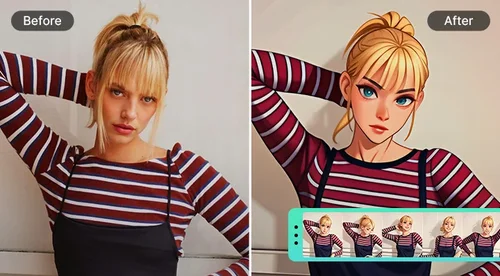
Upload a short clip and pick a style. AI looks at what's in your clip and adds effects that move with your subject, from sketch-style line art to stickers and comic-book bursts.
Add AI Video Effects to Every Kind of Clip
Turn Travel Clips Into Living Illustrations
You filmed the Eiffel Tower from the Trocadéro like everyone else on the plaza. With Blue Sketch, the tower and the people in front of it turn into blue-and-white line art while the sky and fountains stay real. It looks like an illustrator drew over your footage, and it started as a 4-second clip.

Turn Group Selfies Into a Moving Scrapbook
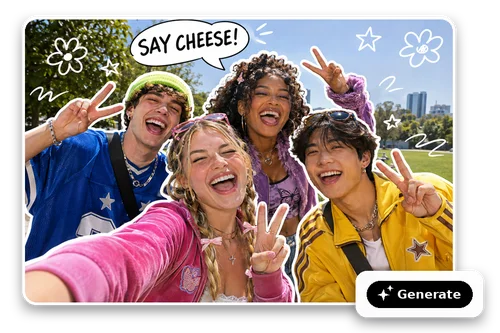
Everyone squeezed into the frame and threw up a peace sign. White Outline traces each person in a bold white border, then adds doodled flowers and a pop-up caption that fits the moment, like "SAY CHEESE!" The clip keeps playing, so the scrapbook page moves with your friends.
Make Every Dunk and Kickflip Pop Like a Comic
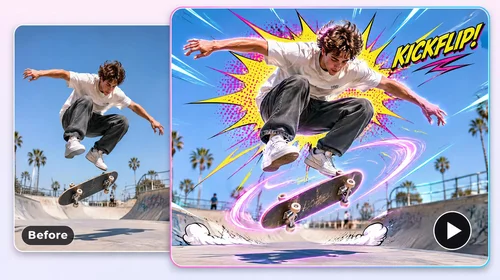
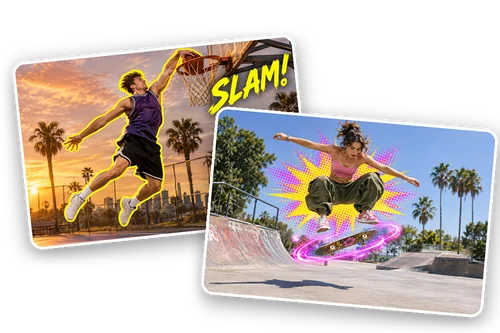
A dunk or a kickflip is over in a second, and these styles make sure nobody misses it. Yellow Pop outlines the player in bright yellow and stamps a hand-lettered word like "SLAM!" at the rim. Comic FX surrounds a skater with a comic-book burst and glowing light trails that follow the board.
How to Add AI Effects to a Video Online With MyEdit
 Step 1
Upload Your Video
Pick AI Effect from the Skills menu in MyEdit Agent and add an MP4 or MOV clip, 4 to 30 seconds long and up to 100 MB.
Step 2Choose an Effect
Click a preview card to pick a style. Not sure which one? Describe the look you want and AI suggests a match.
Step 3Get Your Video
AI applies the effect and saves the finished clip to the AI Effect folder in My Library, ready to download.
Why Choose MyEdit's AI Video Effects
Effects Designed for Your Clip
AI watches your video first, then picks the words, stickers, and bursts that fit it. A dunk might get a "SLAM!" and a group selfie a "SAY CHEESE!" The same style plays out differently from clip to clip.
Effects That Move With the Action
AI picks out the main people and objects and keeps outlines, stickers, and bursts attached as they jump, dance, or turn. The rest of the scene stays as you filmed it.
Styles for Calm Clips and Fast Ones
Some styles keep things clean and illustrated. Others bring comic-book energy to sports and dance clips.
Describe the Vibe, Get a Match
Tell AI what your clip is about, like "a cute look for my cat video," and it recommends an effect that fits and says why.
Same Length, Same Frame, With Sound
Your result keeps the clip's length and aspect ratio. AI rebuilds the audio from your original sound.
Keep Editing in the Same Chat
When the video is ready, AI suggests a next step. Try another effect on the same clip, or use the new video as the start of your next edit.
More Ways to Create with MyEdit
AI Video Effects FAQ
What are AI video effects?


AI video effects are visual effects that AI adds to footage you already have by recognizing the people and objects in each frame. In MyEdit, AI Effect is a skill in MyEdit Agent that applies a ready-made style to your clip, such as redrawing a landmark as line art or adding a comic-book burst to a basketball dunk. It keeps the effect on the subject as it moves.
What effects can I choose from?
Blue Sketch redraws people and landmarks as blue-and-white line art. White Outline traces each person in a white border and adds doodled stickers and a pop-up caption. Yellow Pop outlines your subject in bright yellow and adds hand-lettered words and bursts. Comic FX surrounds fast moves with comic-book bursts and glowing light trails. Effects can't be recolored, rewritten, or combined. New styles are added over time. The preview cards always show the current lineup.
Will the same effect look the same on every video?
No. Each style sets the overall look, like white borders or comic-book bursts. AI reads what's happening in your clip and chooses the words, stickers, and placement to match. A basketball dunk and a skate trick can get completely different captions from the same style.
What videos can I upload?
One MP4 or MOV clip at a time, 4 to 30 seconds long and up to 100 MB. MyEdit checks the length and file size before anything is generated, so a clip that doesn't fit is stopped before it uses credits on the video. For a longer video, cut the part you want with Video Trimmer first.
Is MyEdit AI Video Effects free?
You can start with free daily credits when you sign in. Each finished video uses credits based on the length of your clip. Chatting with MyEdit Agent uses a small number of credits per message.
Will my video keep its length, aspect ratio, and sound?
Yes. The result matches your clip's length and aspect ratio and exports at 720p. AI rebuilds the audio from your original sound, so it can differ slightly from the source. You can't add your own music in this step.
Can I use a photo instead of a video?
AI Effect needs a video clip. To start from a still, turn it into a clip with Image to Video first, or ask MyEdit Agent to use AI Transition.
Can I try a different effect on the same clip?
Yes. Ask for another effect and AI applies it to your original clip, not the result. If you pick an effect you've already used on that clip, MyEdit checks with you before making it again.