
Key Takeaway
- A podcast intro is a short opener, ideally under 30 seconds: a hook, the show's name and promise, and a handoff to the episode.
- Write the script first: a preset AI voice in MyEdit's Text to Speech read our 35 words in 11.5 seconds, about 3 words per second.
- MyEdit's AI Music Generator made a 58-second instrumental theme (60 seconds is the shortest length you can ask for), so plan to trim it.
- Straight out of the tools, the music was about 9 LU louder than the voice: set each clip's volume before you export.
- MyEdit's Podcast Studio joins clips end to end, so music plays before and after the voice, not under it.
To make a podcast intro with AI, write a script of about 35 words, turn it into a voice, generate a short instrumental theme, then join the pieces, balance their volumes and export. That's the whole job, and you can do every step in the browser.
I built a 26-second intro for a made-up gardening show this way, using MyEdit's AI tools and measuring the loudness of each layer, so you can see what each tool gives you and where you'll still have to make a call. Tested on November 2, 2026.
What goes into a podcast intro?
A podcast intro tells new listeners what show they're in and why they should stay, in as few seconds as possible. Most intros mix the same few parts, in different orders:
- A hook: a question or promise that makes someone keep listening.
- The show's name and promise: what it is and what listeners get every episode.
- A theme: a short piece of music that people learn to recognize.
- A handoff: a line or a musical ending that moves into the episode.
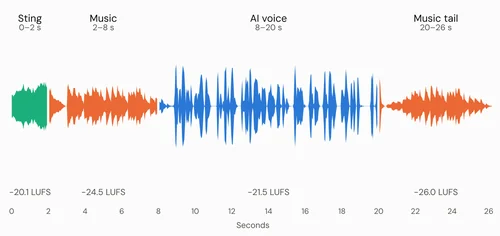
Here's how those parts sat in the intro I made. The music-first order is the one MyEdit's Podcast Studio supports, because it places clips one after another. I measured each part's timing and loudness on the exported MP3:
Part | What it does | How loud it ended up |
|---|---|---|
Sting (0–2 s) | A short guitar strum to open | −20.1 LUFS, at 51% clip volume |
Theme (2–8 s) | The show's music on its own, fading out | −24.5 LUFS, at 33% clip volume |
Voice (8–20 s) | Hook, show name and promise, handoff line | −21.5 LUFS, at 100% clip volume |
Theme tail (20–26 s) | The music returns and fades into the episode | −26.0 LUFS, at 33% clip volume |
How to write a podcast intro script that fits in 12 seconds
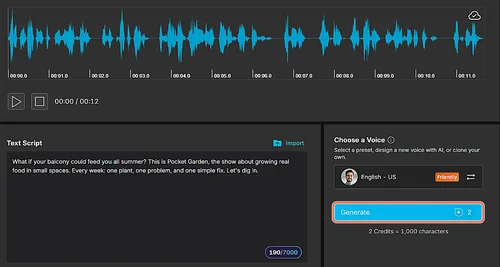
Write your intro script before you touch any audio, because its length decides how long everything else runs. In my test, a preset AI voice read about 3 words per second, so 35 words filled 11.5 seconds. That's a useful budget: about 30 to 40 words if you want the voice part to stay near 12 seconds.
A simple formula that fits that budget:
- Hook (one sentence): ask the question your listener already has.
- Name and promise (one sentence): say the show's name and what it covers.
- Format (one short sentence): what every episode gives them.
- Handoff (two or three words): a line that starts the episode.
This is the script I used for the made-up show Pocket Garden:
“What if your balcony could feed you all summer? This is Pocket Garden, the show about growing real food in small spaces. Every week: one plant, one problem, and one simple fix. Let's dig in.”
Read your draft out loud with a timer before you generate anything. If it runs past 15 seconds, cut the format sentence first: the hook and the show's name matter most.
How to make a podcast intro with AI in MyEdit
You can make every layer of the intro with MyEdit's AI tools and put them together in its Podcast Studio, all in a browser. MyEdit is our own product, and the same workflow works with any AI voice, music generator and audio editor you already use. Each step below uses a different tool, so each one comes with its own screenshot.
1. Turn your script into a voice in Text to Speech
Open Text to Speech, paste your script and pick a preset voice by language, gender and style. Click Generate, listen, then download the audio. On November 2, 2026, the editor showed a cost of 2 credits per 1,000 characters, so a 190-character script used 2 credits.
Use a preset voice or your own: the tool can also clone a voice from a short recording, but never clone someone else's. Our download was a mono MP3 at −21.2 LUFS, quieter than the music you'll add next.
2. Generate an instrumental theme in AI Music Generator
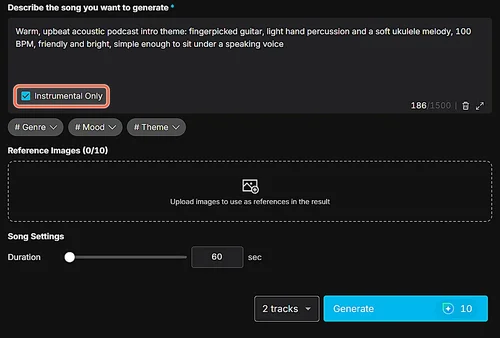
In AI Music Generator, describe the mood, tempo and instruments, then turn on Instrumental Only so no singing competes with your voice. Ask for two tracks so you can choose: each track cost 5 credits in my test, and the tool can make up to six at once.
The shortest length you can set is 60 seconds, and my tracks came back at 58 and 59 seconds. That's far longer than an intro needs, so you'll trim it in step 5. Music generated with MyEdit can be used in personal and commercial projects, including your podcast.
3. Make a short sting in AI Sound Effect Generator
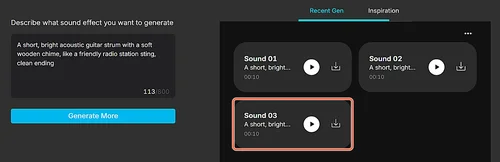
A sting is a one- or two-second sound that opens the intro. In AI Sound Effect Generator, describe it in a sentence (up to 800 characters) and generate. My prompt returned three 10-second variations, so pick one and plan to keep only its first second or two.
This layer is optional. When I played the finished intro back, the sting was the part that felt out of place, so try your intro with and without it before you keep it.
4. Bring the files into Podcast Studio
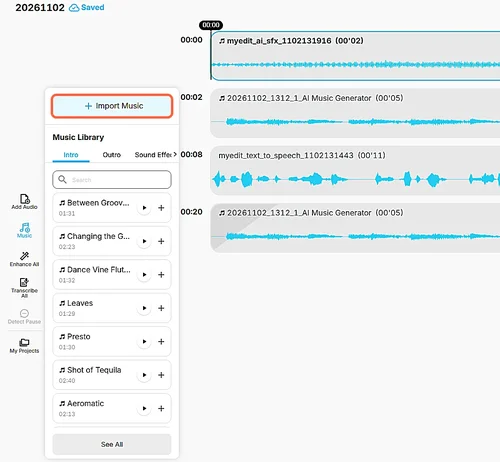
Open Podcast Studio and click Add Audio, then Import From Local to bring in your voice file. For the theme and the sting, open the Music panel and click Import Music. Tracks you made in other MyEdit tools didn't appear in Podcast Studio's library during my test, so download them first and import them as files.
Each time you add a clip, Podcast Studio asks whether to place it in front of or behind the selected clip. Put the music in front of the voice, then the sting in front of the music.
5. Trim the clips, set their volumes and add fades
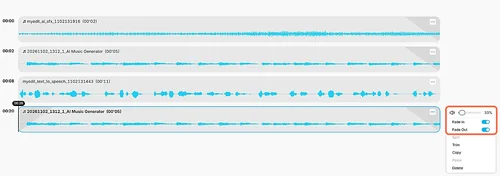
Open each clip's menu (the three dots) to reach Trim, the volume slider and the Fade In and Fade Out switches. Here's what I set:
- Sting: trimmed to 2 seconds, volume 51%, fade out.
- Theme: trimmed to about 6 seconds, volume 33%, fade out.
- Voice: left at 100%.
- Theme tail: the theme copied and pasted after the voice, volume 33%, fade in and fade out.
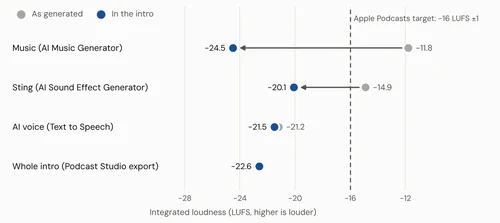
The volume matters more than it looks. The theme came out of AI Music Generator at −11.8 LUFS and the voice at −21.2 LUFS, so at equal settings the music would have been about 9 LU louder than your host.
6. Export the intro as MP3 or WAV
Click Export & Share, choose MP3 or WAV and download. My MP3 came out as a 26-second mono file at 48 kHz and 192 kbps. Keep the intro as its own file, so you can place it at the start of every episode.
How loud should podcast intro music be?
Podcast intro music should sit clearly below the voice wherever the two are close together, and the whole intro should match the loudness of your episode. In my export, the theme played at −24.5 LUFS before the voice and the voice at −21.5 LUFS, so the music stayed about 3 LU quieter.
The whole intro, though, measured −22.6 LUFS, about 6.6 LU quieter than the level Apple recommends for podcasts. Podcast Studio's export has no loudness target to pick, so the level you hear is the level you set with the clip sliders.
Here's what Apple recommends, as listed on its Audio requirements page on November 2, 2026, and what each point means for your intro:
Requirement | Apple's recommendation | What it means for you |
|---|---|---|
Loudness | About −16 LKFS (the same scale as LUFS), within ±1 dB | Our intro (−22.6 LUFS) would need about 6 dB more |
True peak | No higher than −1 dBFS | Raise volumes in small steps: our voice already peaked at −4.4 dBFS |
Why it matters | Audio far from the target may get its volume adjusted | Match the intro to your episode so the jump into it sounds natural |
Each clip's volume slider in Podcast Studio goes up to 200%, so you can raise a quiet intro. Do it in small steps and check the result, because louder clips also mean higher peaks. I didn't re-export at higher settings, so treat the target as something to check, not a number Podcast Studio sets for you. Apple's full recommendations are on its Audio requirements page.
What this AI workflow can't do yet
The workflow gets you a usable intro quickly, but it has limits you should know before you start:
- No music under the voice. Podcast Studio places clips one after another, and MyEdit's Audio Editor opens the same editor. My own preference, after listening, was a theme that fades in and out under the voice at a very low level, and that needs an editor with separate tracks.
- Levels don't match out of the box. The music was 9 LU louder than the voice, and the export didn't bring the intro up to podcast loudness.
- Themes come long. AI Music Generator's 60-second minimum means trimming every time, and a hard trim can cut a phrase mid-note, so keep the fade on.
- Files don't move between tools on their own. I had to download each layer and import it into Podcast Studio.
I rated the result 3.5 out of 5 by ear. What held it back was the sting, which sounded out of place, and the music-first order: I'd have liked the theme to fade in and out under the voice instead.
MyEdit for Podcast Intros at a Glance
Pros

 Voice, theme and sting all made in the browser, with no recording gear
- Instrumental Only gives a theme with no vocals to fight your host
- Clip volume, trims and fades are one menu away in Podcast Studio
Cons

 Podcast Studio can't play music under the voice
- The exported intro was 6.6 LU below Apple's loudness target
- Themes start at 60 seconds, so every one needs trimming
Want to use your own voice instead?
You can record your lines straight into Podcast Studio with Start Recording, then add the theme around them the same way. A recorded voice changes two things: you'll want a quiet room and a mic close to your mouth, and its loudness will differ from the AI voice's, so check the clip volumes again.
If your recording sounds dull, as if you spoke through a pillow, that's a separate problem with its own fixes. The guide on how to fix muffled audio covers the usual causes and what an AI speech enhancer can rescue.
Test details and sources
- Test audio: a voice from MyEdit's Text to Speech (preset English (US) voice), an instrumental theme from AI Music Generator and a sting from AI Sound Effect Generator. All of it is AI-generated for a made-up show; no real person's voice was used or cloned, and real recordings can behave differently.
- Tools: MyEdit Web on a Windows PC in the browser; Text to Speech, AI Music Generator, AI Sound Effect Generator and Podcast Studio at their default settings, apart from Instrumental Only and two tracks in AI Music Generator and the clip volumes, trims and fades listed above.
- Criteria: the length of each part, integrated loudness (LUFS, ITU-R BS.1770) of each file and of the exported intro, and a listening score from 1 to 5.
- Tested on November 2, 2026. Tool pages and credit costs verified the same day.
- Loudness recommendations: Apple Podcasts Audio requirements, verified on November 2, 2026.
- MyEdit is our own product.
FAQs
1. How long should a podcast intro be?


Keep it as short as it can be while still saying what the show is. Under 30 seconds is a common target; ours ran 26 seconds, with 11.5 seconds of voice. If listeners hear it every episode, shorter music-only parts help, because they'll want to get to the content quickly.
2. Can I use AI-generated music in my podcast intro?
Yes. Music generated with MyEdit's AI Music Generator can be used in personal and commercial projects, including podcasts. If you add reference images to guide the music, use only images you own or have permission to use.
3. What should I say in a podcast intro?
Start with a hook, a question or promise your listener cares about. Then say the show's name, what it covers and what each episode gives them, and end with a short handoff line. About 30 to 40 words keeps the voice part near 12 seconds.
4. Can I use an AI voice for my podcast intro?
Yes. A preset AI voice is a quick way to get a consistent intro without recording. Use a preset or your own cloned voice, never a copy of someone else's, and think about telling listeners the intro voice is AI-generated.
5. Should podcast intro music play under the voice?
Both orders work. Music first, then voice, is easy to build in an editor that joins clips one after another, like Podcast Studio. Music under the voice usually sounds smoother, but it needs separate tracks and the music kept well below the voice so every word stays clear.
6. How do I make a podcast intro for free?
You can write the script yourself and build the audio with tools that offer free credits. MyEdit gives you free credits every day, and its AI Music Generator's first single-track generation is free. Text to Speech and extra music tracks use credits, so check the cost shown before you generate.